GB
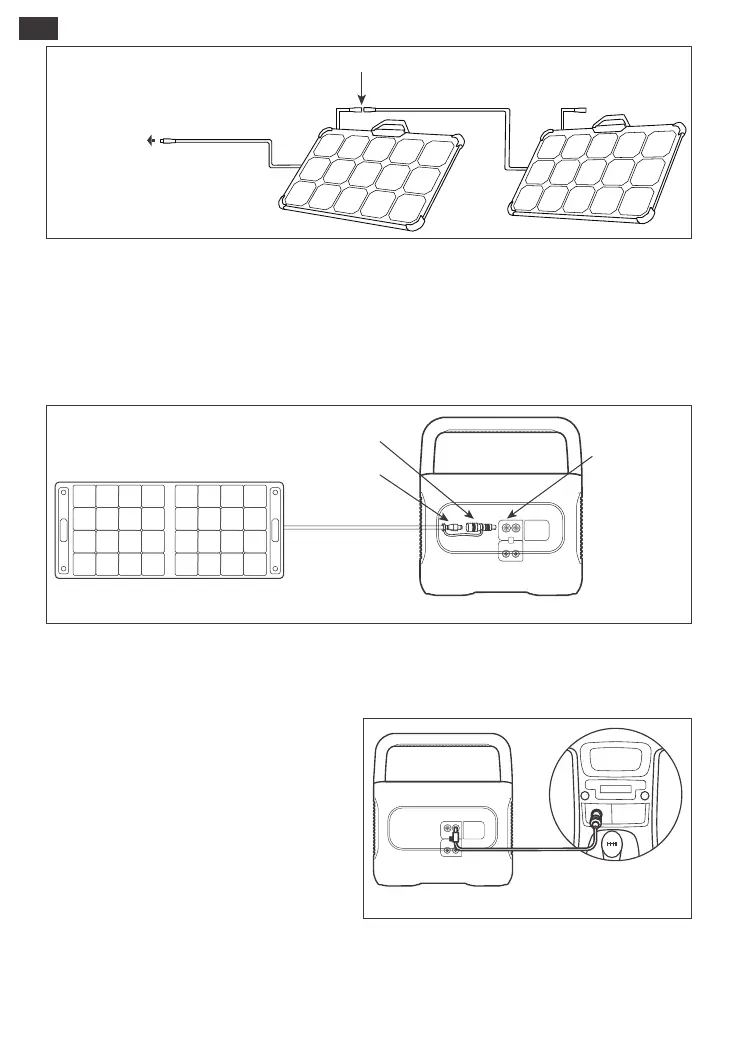
Warm Tip: Users can enter the number of solar panels in their own combination according to the
number of solar panels they purchased. Currently, the product supports charging with 1, 2, 3, 4, 5, 6, 8,
and 12 80W solar panels in combination.
CHARGING IN THE CAR
1) Vehicle charging is only applicable in 12V vehicles, not in 24V ones. Please do not charge this
product in 24V vehicle to avoid personal injury and property loss.
2) It is recommended to use Jackery accessories - solar panels for solar charging. We will not be
responsible for the losses caused by using other brands’ solar panels.
Safety Precautions When Charging
Meanwhile, please ensure that the car charger
and the car cigarette lighter provide a good
connection, and ensure that the car charger is
fully inserted. In addition, if the vehicle is running
on bumpy roads, it is forbidden to use the car
charger in case it burns due to a poor
connection. The Company will not be
responsible for any loss caused by non-stan-
dard operation.
This product can be charged with a 12V car charger. Please start the vehicle before charging to
prevent draining the car battery and prevent your vehicle from being unable to start.
Vehicle
Explorer 1500 Pro
13 5
24 6
R
A/C
AUTO
DC7909 to DC8020 Adaptor Operation Guide
All of our solar panels on sale have been upgraded to include a DC7909 to DC8020 adapter. If you
have purchased a Jackery solar panel without a DC7909 to DC8020 adapter, you can charge your
Jackery Explorer 1500 Pro by following the connection instructions below.
DC7909 male
DC7909 to DC8020 Adaptor
DC8020 female
Explorer 1500 Pro
The solar panel charging output port
(DC8020 male, with DC8020 to DC7909 Adaptor)
Parallel port(DC 8020 female)
07









 To Next Page