6
5
7
6
DE
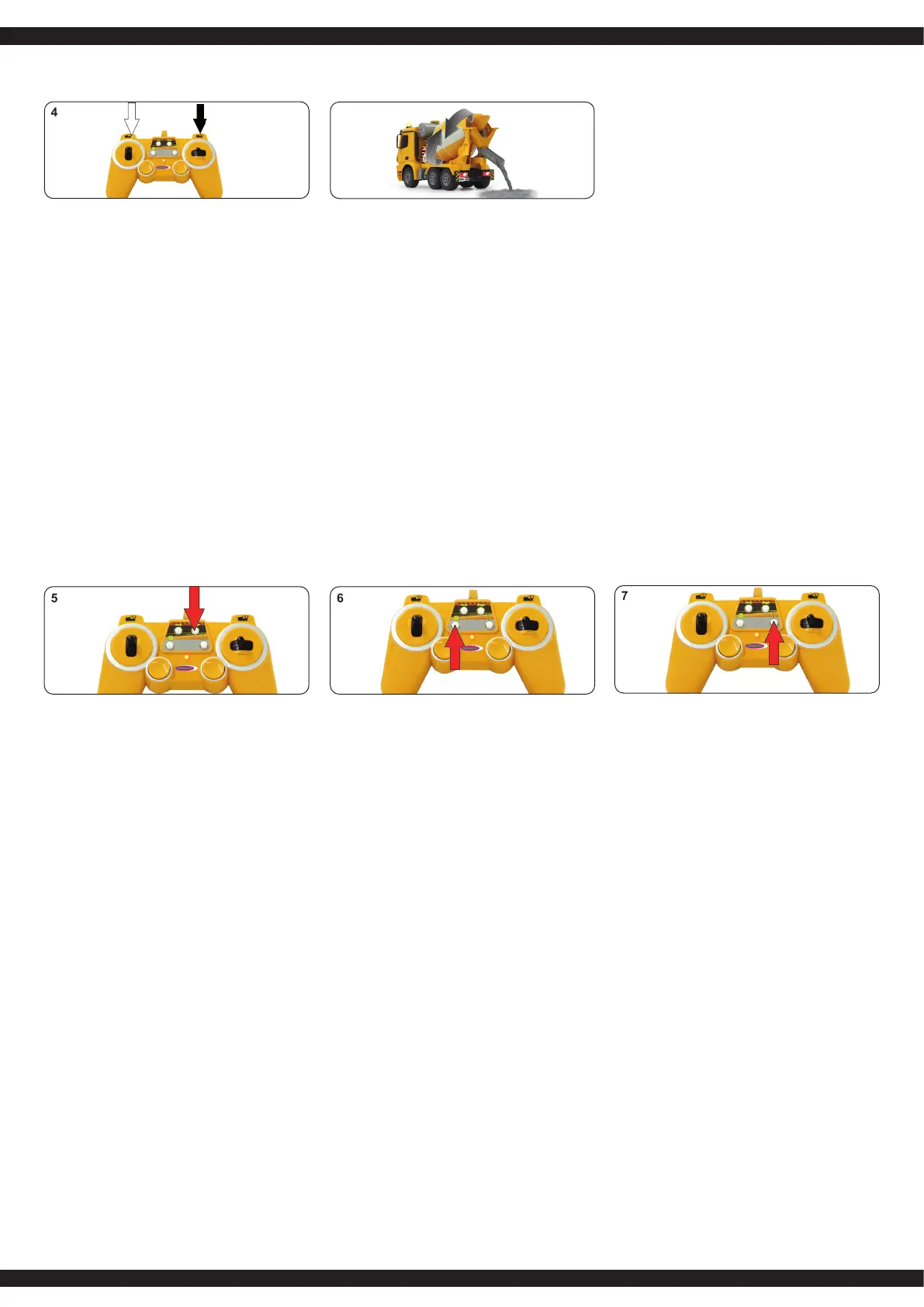
4. Mischtrommel
Starten Sie den Betonmischer.
Drücken Sie die linke Taste
beginnt die Mischtrommel sich
nach links zu drehen. Drücken
Sie die rechte Taste beginnt die
Mischtrommel sich nach rechts
zu drehen und die Ladung
wird ausgeworfen. Während die
Mischtrommel sich dreht,
leuchten die Scheinwerfer und
die Signalleuchten oben blinken.
Achtung!
Kein feuchtes Mischgut etc. in die
Mischtrommel geben.
GB
4. Mixing drum
Start the Concrete Mixer. Press
the left button, the mixing drum
will rotate to the left. Press the
right button and the mixing drum
will turn right and the load will
be ejected. The headlights and
signallightswillashwhilethe
drum is turning.
Warning!
No damp mixture etc. should be
lled into the mixing drum.
FR
4. Tambour mélangeur
Démarrez la bétonneuse. Si
vous appuyez le bouton gauche,
le tambour mélangeur va tour
ner vers la gauche. Si vous
appuyez le bouton droit, le
tambour va tourner vers la droite
et le chargement va être éjecté.
Pendant que le tambour
mélangeur tourne, les phares
s’allument et les feux de
signalisation se mettent en
marche.
Attention!
Ne pas mettre du matériel mouil-
leux ou humide dans le tambour
mélangeur.
IT
4. Tamburo di miscelazione
Avviare la betoniera. Premendo
il tasto sinistro, il tamburo di
miscelazione inizia a ruotare a
sinistra. Premendo a destra,
il tamburo di miscelazione inizia
a ruotare verso destra, e la
carica viene espulso. Durante
che il tamburo di miscelazione
gira, i fari e le luci sopra
lampeggiano.
Attenzione!
Non mettere alcun mix umido ecc.
nella vasca di mescolamento.
ES
4. Tambor de mezclado
Inicie la mezclador de cemento.
Pulsar el botón izquierdo (a) y el
tambor de mezcla se inicia a
girar hacia izquierda. Pulsar el
botón derecho (b), el tambor de
mezcla se inicia a girar hacia
derecha y el cargo se descarga.
Mietras se gira el tambor de
mezcla, brilla el faro y las luces
de señal arriba parpadean.
Atención!
No poner mezcla húmenda en el
tambor.
CZ
4. Míchací buben
Nastartujte mixér betonu.
Tlačenímtlačítka
dolevasemíchacíbubenzačne
otáčetdoleva.Tlačenímtlačítka
doprava se míchací buben
začneotáčetdopravaanáklad
sezačnevysypávat.Během
otáčenímíchacíhobubnu,svítí
světlometyasignálkanahoře
bliká.
Pozor!
Nedávejte do míchacího bubnu
žádnou vlhkou směs apod.
PL
4. Mieszalnik bębnowy
Włączyćbetoniarkę.
Powciśnięciulewegoprzycisku
mieszalnikbębnowyzacznie
obracaćsięwlewo.Po
wciśnięciuprawegoprzycisku
mieszalnikbębnowyzacznie
obracaćsięwprawo,a
zawartośćbębnazostanie
wyładowana.Podczasobrotu
bębnaświecąsięświatłaoraz
migajągórnelampki
sygnalizacyjne.
Uwaga!
Do mieszalnika bębnowego nie
wkładać mokrego ładunku itp.
NL
4. Mengtrommel
Start de betonmixer. Druk op de
linker knop, de mengtrommel zal
naar links draaien. Druk op de
rechter knop en de mengtrom-
mel zal naar rechts draaien en
de lading zal worden
uitgeworpen. De koplampen en
signaallampen zullen knipperen
terwijl de trommel draait.
Waarschuwing!
Er mag geen vochtig mengsel
e.d. in de mengtrommel worden
gedaan.
SK
4. Miešací bubon
Spustitemiešačkubetónu.
Stlačtetlačidlo.ľavétlačidlo,
miešacíbubonsazačneotáčať
doľava.Stlačtetlačidlopravé
tlačidloamiešacíbubonsasa
otočídopravaanáplňsabude
vysunutý.Svetlometyasignálne
svetlábudúblikať,zatiaľčo
bubonsaotáča.
Pozor!
Do miešacieho bubna sa nesmie
plniť vlhká zmes a pod.
4
DE - Bedienung
GB - Operation
FR - Fonctionnement
IT - Funzionamento
ES - Funcionamiento
CZ - Obsluha
PL - Obsługa
NL - Bewerking
SK - Operácie
DE
5. Hupe/Sound abschalten
Durch drücken der Hupe ertönt ein Hup-
Ton. Durch längeres drücken der Hupe wird
der Ton abgeschaltet.
6. Demo-Taste
Die Demo-Taste lässt das Modell automa-
tisch Manöver durchfüren.
7. Memory-Funktion
Drücken Sie länger die Memory-Funktions-
Taste, die LED der Fernsteuerung wechselt
die Farbe und das Modell zeichnet die
Bewegungen auf. Erneutes, kurzes
drücken der Taste spielt die Bewegungen
wieder ab.
8. Motor aus
Wenn dem Modell länger als 50 Sek. keine
Befehle gesendet werden, schaltet sich das
Modell automatisch aus und muss neu
gestartet werden.
GB
5. Horn/Sound off
By holding down the horn-button the sound
will be switched off. By pressing the button
a horn sound will be heard.
6. Demo button
The demo button allows the model to
automatically perform manoeuvres.
7. Memory-funktion
Hold down the memory-function button,
the LED on the remote control will change
colour and the model will record
movements. Press the button afterwards
for the Concrete Mixer to automatically
execute the stored movements.
8. Engine off
If the model does not get any input within
50 sec., the model turns off automatically
and must be restarted.
FR
5. Klaxon/Éteindre le klaxon
Si vous appuyez longtemps sur le klaxon, le
son en est coupé. En appuyant sur le
klaxon, vous entendrez le son d’un klaxon.
6. Touche démo
Le bouton de démonstration permet au
modèle d‘effectuer des manoeuvres
automatiquement.
7. Fonction de mémoire
Appuyez aassez longtems sur le bouton de
fonction de mémoire. La couleur de la
limiére LED de la radiocommande change
et tous les mouvements du modèle seront
enregistrés. Si encore une fois vous
appuyez brièvement sur ce bouton les
mouvements se reproduiront.
8. Moteur coupé
Si vous n’envoyez plus d’ordre pendant
plus de 50 secondes, le véhicule s’éteint
automatiquement et il faudra le redémarrer.
IT
5. Clacson/Spegnim. suono
Premendo per un tempo prolungato il
clacson si spegne il suono. Premendo il
clacson, si sente un suono di clacson.
6. Funzione Demo
Il pulsante demo permette al modello di
eseguire automaticamente delle manovre.
7. Funzione di memoria
Premendo per un tempo prolungato il
pulsante di funzione memoria, il LED sul
telecomando cambia il colore e il
modello registra i movimenti. Premendo di
nuovo il tasto brevemente, si possano
riprodurre nuovamente i movimenti svolti.
8. Spegnimento motore
Seilmotorenonricevecomandiperpiùdi
50 secondi, si spegne automaticamente e
deve essere riavviato.
ES
5. Claxon/Apagar el sonido
Atravésdeprimermáselclaxonseapaga
el tono. Al pulsar el claxon suena un
sonido.
6. Botón-Demo
El botón permite que el modelo realliza
automáticamentelasmaniobras.
7. Función-Memory
PrimirmáselbotónMEMORY,elLEDde
la emisora va a cambiar el color y el
modelo registra los moviementos. Si ahora
vas a primir brevemente el botón, el
modelo va hacer los moviementos.
8. Motor apagado
Si no le vas a dar mas de 50 segundos
nigun comandos, el modelo se apaga en
automáticamenteysedebereiniciar.
CZ
5. Houkačka | Vypnutí zvuku
Stlačenímhoukačkyzaznírealistickýzvuk
houkačky.Delšímpodrženímhoukačkyse
zvuk vypne.
6. Demo-tlačítko
Demo-tlačítkoumožňujemodeluprovést
automatickýmanévr.
7. Paměťová funkce
Delšímpodrženímtlačítkapaměťové
funkcesezměníbarvaLEDnadálkovém
ovládáníamodelsizapisujepohyby.Nové
krátkéstisknutítlačítkapřehrajeuložené
pohyby.
8. Vypnutí motoru
Pokud se modelu déle jak 50 sekund
nevyšležádnýpříkaz,modelse
automaticky vypne a musí se znovu
nastartovat.
PL
5. Klakson | Wyłączanie dźwięków
Powciśnięciuklaksonuzabrzmirealistczny
dźwiękklaksonuciężarówki.Dłuższe
wciśnięcieklaksonuspowodujewyłączenie
dźwięku.
6. Przycisk funkcji demo
Powciśnięciuprzyciskufunkcjidemomodel
automatycznie wykona zapisany manewr.
7. Funkcja pamięci
Dłuższewciśnięcieprzyciskufunkcji
pamięcispowoduje,żediodaLEDna
pilocie zmieni kolor, a model zacznie
zapamiętywaćsekwencjęruchów.Po
ponownym,krótkimwciśnięciuprzycisku
modelwykonazapamiętaneruchy.
8. Wyłączanie silnika
Jeżeliprzezokresdłuższyniż50sek.
modelnieotrzymażadnychpoleceń,wtedy
wyłączysięautomatycznieimusizostać
uruchomiony ponownie.
NL
5. Geluidssignaal/geluid uitzetten
Door het indrukken van geluidssignaal
weerklinkt een realistisch geluid. Door op
het geluidssignaal lang te drukken, wordt
het geluid uitgeschakeld.
6. Demo-toets
Met de demo-knop voert hetmodel automa
tisch manoeuvres uit.
7. Geheugenfunctie
Druk geheugenfunctie in en houd
deze ingedrukt, LED van de
afstandsbediening verandert
van kleur en het model registreert
een beweging. Door deze
opnieuw in te drukken, worden de
bewegingen herhaald.
8 De motor uitzetten
Als het model opdrachten gedurende
50 sec. niet ontvangt, zal dan automatisch
uitgeschakeld worden en moet opnieuw
worden gestart.
SK
5. Vypínanie klaksónu/zvuku
Postlačeníklaksónuzaznierealistickýzvuk
klaksónuauta.Dlhšiestlačenieklaksónu
spôsobívypnutiezvuku.
6. Demo tlačidlo
Postlačenídemotlačidlavozidlo
automatickyvykonániekoľkomanévrov.
7. Pamäťová funkcia
Akdlhostlačtefunkčnépamäť,
LEDucerienManažérstratiť
farbu a model bude zapamätal
pohyb.Poopätovnomkrátky
Tlačidloťah,pohybsaodohráva
sámraz.
8. Vypnutie motora
Akmodelpodobudlhšiuako50sekúnd
nedávažiadnaobjednávka,modelbude
automaticky vypne a je teda nutné
reštartuje.



 To Next Page
 Loading...