10
1) Check the specication table for the correct operating requirements
(located on the rear of the unit).
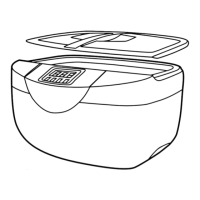
2) Before connecting power, put the unit on a stable and at working surface. Add water to
tank, suicient to completely immerse the items being cleaned. Using the stainless steel
basket is highly recommended. Never operate the unit without water in the cleaning tank.
Always ll the unit above 2/3 marker line indicated on the inside of the tank. Failing to do
so, may cause damage to the unit.
3) Connect the power cable to the rear of the unit and ensure the wall supply is switched on.
Touch the button on the front panel to turn on the machine. You are now ready to set the
timer and temperature.
4) To freely set the required heating temperature. When the set temperature is higher than
the actual temperature, the built-in heater will initiate the heating function immediately.
The working status (OFF and ON) is visible through the LCD display window. When the
heater has reached the required temperature, the heater will stop automatically. When the
temperature is lower than the set one, heating will also start automatically. In this case, the
uid will be maintained at the current set temperature.
5) Setting the timer. When the power is on, rotate the timing knob to set the cleaning
duration. Adjustments will be visible on the LCD display. At this time, the ultrasonic
cleaning function will start promptly once the
button is pressed.
6) Start/stop button (
) Pressing this will start the unit, press again to pause/stop
cleaning, this is useful to stop the unit mid cycle and inspect cleaning progress.
OPERATION INSTRUCTIONS



 To Next Page