EasyManua.ls Logo

Jamestown 103843 - User Manual

Jamestown 103843
80 pages
Go to English
Print Icon
To Next Page IconTo Next Page
Loading...
103843
DE Digitales Grillthermometer
IT Termometro da barbecue digitale
FR Thermomètre numérique pour gril
GB Digital grill thermometer
CZ Digitální teplomer na grilování
SK Digitálny teplomer na grilovanie
PL Cyfrowy termometr do grilla
SI Digitalni termometer za žar
HU Digitális grillhoméro
BA/HR
Digitalni termometar za roštilj
GR Ψηφιακό θερμόμετρο ψησταριάς
NL Digitale barbecuethermometer
SE Digital grilltermometer
FI Digitaalinen grillilämpömittari

Table of Contents

Question and Answer IconNeed help?

Do you have a question about the Jamestown 103843 and is the answer not in the manual?

Overview

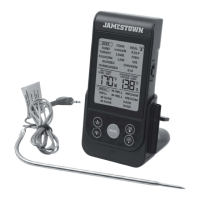
The Jamestown Grill wireless thermometer is designed for precise measurement and monitoring of the internal temperature of grilled food. It is intended for private use and not for commercial applications. The device consists of a wireless thermometer and a transmitter base, both powered by AAA batteries (4x R03, 1.5 V).

Function Description:

The device allows users to select various meat types and desired doneness levels, with corresponding target temperatures displayed on an LCD screen. It features a count-up/count-down timer function and a backlight for improved visibility. The thermometer uses a stainless steel meat probe connected to the transmitter base via a heat-resistant cable. The transmitter base sends temperature data wirelessly to the handheld thermometer.

Important Technical Specifications:

  • Item Number: 103843
  • Measuring Range: -50°C to +220°C (-58°F to 428°F)
  • Resolution: 1°C (1°F)
  • Accuracy: ±2% (±2°C)
  • Sender Frequency: 433.92 MHz
  • Max. Transmitter Range (free-field): 25 m
  • Max. Transmission Power: 1.84 dBm
  • Batteries: 4x R03, AAA, 1.5 V
  • Dimensions (Wireless Thermometer): 117 x 61 x 20 mm
  • Dimensions (Transmitter Base): 74 x 58 x 63 mm

Usage Features:

  1. Connecting the Probe: The stainless steel meat probe (14) is connected to the transmitter base (2) by inserting its plug (15) into the probe socket (13).
  2. Inserting the Probe: The probe tip should be inserted into the thickest part of the meat, avoiding bones, cartilage, or fat, and ensuring no part of the probe is exposed to open flames.
  3. Powering On: Both the transmitter base and the wireless thermometer are powered on by sliding their respective ON/OFF switches (18 for base, 7 for thermometer) to the "ON" position. A blue LED on the transmitter base (11) will flash, indicating signal transmission. The connection between the two units is established automatically.
  4. Language Selection: Press and hold the [MODE] button (4) for 5 seconds to switch between English and Dutch.
  5. Meat Type Selection: Press the [MEAT ■] button (5) to cycle through various meat types: Fish, Beef, Lamb, Veal, Pork, Turkey, Hamburger, Chicken.
  6. Doneness Level Selection: Press the [TASTE ►] button (6) to select the desired doneness: Rare, Medium Rare, Medium, Medium Well, or Well Done. The target temperature for the selected doneness will appear on the LCD screen (1). For Hamburger, Turkey, and Fish, only "Well Done" is available.
  7. Manual Temperature Setting: In cooking status, use the [MIN ▲] (2) or [SEC ▼] (3) buttons to increase or decrease the target temperature. Holding these buttons for 5 seconds enables faster adjustment. Pressing [MEAT ■] or [TASTE ►] briefly returns to the default "BEEF" interface.
  8. Temperature Unit Selection: A [°C/°F] switch (10) on the back of the wireless thermometer allows switching between Fahrenheit and Celsius.
  9. Backlight: Pressing any button on the wireless thermometer while it's powered on will activate the backlight.
  10. Count-up/Count-down Timer:
    • Press the [MODE] button (4) briefly to select the timer function.
    • To set a count-down time, use the [MIN ▲] (2) and/or [SEC ▼] (3) buttons.
    • Press [TASTE ►] (6) to start the timer (count-up or count-down).
    • Press [MEAT ■] (5) to pause the timer.
    • To reset the timer to zero when paused, press [MIN ▲] (2) and [SEC ▼] (3) simultaneously.
    • An alarm will sound when the count-down timer finishes; press any button to silence it.
    • Holding [MIN ▲] (2) or [SEC ▼] (3) for 5 seconds allows for faster timer adjustment.
    • Press [MODE] (4) to return to the grilling interface.
  11. Cooking Alerts: The device will emit audible alerts when the meat reaches the target temperature.

Maintenance Features:

  1. Basic Cleaning: Before first use, remove all packaging materials and protective films. Clean all parts of the grill thermometer.
  2. Probe Cleaning: The stainless steel meat probe and its cable become extremely hot during use. Always remove the probe from the heat source using oven mitts or a pot holder and allow it to cool. Hand wash the stainless steel meat probe with mild soap and hot water, rinse thoroughly, and dry completely with a soft cloth. The device parts are not dishwasher safe.
  3. Battery Replacement: When the device is not in use, remove the batteries. Open the battery compartment (8 for thermometer, 17 for base), insert new AAA batteries, ensuring correct polarity, and close the compartment.
  4. Storage: Store the device and all accessories in a dry, well-ventilated place. Protect the device and its accessories from dirt and corrosion during long periods of non-use.
  5. Transport: When shipping, use the original packaging if possible.

Safety Precautions:

  • Operate the device indoors only.
  • Do not expose the device to water or other liquids.
  • Avoid using the device in rooms with bathtubs, showers, swimming pools, or near sinks/water connections.
  • Do not operate the device immediately after moving it from a cold to a warm room, as condensation could damage it. Allow it to reach room temperature and for condensation to evaporate.
  • Never use the grill thermometer in a microwave or oven.
  • Keep the thermometer and its accessories away from open flames and hot surfaces.
  • Avoid direct sunlight on the base unit and receiver.
  • Do not bend the probe cable or route it over sharp edges.
  • Always switch off the thermometer when not in use, cleaning, or in case of malfunction.
  • Do not use force when operating or cleaning the device.
  • Do not remove or cover symbols on the device. Replace illegible labels immediately.
  • This product transmits on the ISM band. Interference from other devices (e.g., WLAN, Bluetooth, remote controls, microwaves) may occur. If interference (e.g., lines on the display) occurs, switch off the source of interference or switch the device to another channel.
  • Maintain a minimum distance of 50 cm from individuals with pacemakers.
  • Use only manufacturer-approved batteries. Never recharge batteries. Keep batteries away from metal objects to prevent short circuits.
  • Battery fluid can cause skin irritation and burns; avoid contact. In case of contact, rinse thoroughly with water and seek medical attention if eyes are affected.

Jamestown 103843 Specifications

General IconGeneral
BrandJamestown
Model103843
CategoryThermometer
LanguageEnglish