EasyManua.ls Logo

Jandy AquaPalm - User Manual

Jandy AquaPalm
20 pages
Print Icon
To Next Page IconTo Next Page
Loading...
Installation and Operation Data
Installation and
Operation Manual
AquaPalm
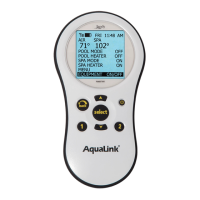
Wireless Handheld Remote
(For use with AquaLink
®
RS
OneTouch and All Button Systems)
WARNING
FOR YOUR SAFETY - This product must be installed and serviced by a professional pool/spa service
technician. The procedures in this manual must be followed exactly. Failure to follow warning notices
and instructions may result in property damage, serious injury, or death.
H0574200 Rev -
ATTENTION
This device complies with part 15 of the FCC Rules. Operation is subject to the following two conditions: (1) This
device may not cause harmful interference, and (2) this device must accept any interference received, including
interference that may cause undesired operation.
NOTE: This equipment has been tested and found to comply with the limits for a Class B digital device, pursuant to
part 15 of the FCC Rules. These limits are designed to provide reasonable protection against harmful interference in
a residential installation. This equipment generates, uses and can radiate radio frequency energy and, if not installed
and used in accordance with the instructions, may cause harmful interference to radio communications. However,
there is no guarantee that interference will not occur in a particular installation. If this equipment does cause
harmful interference to radio or television reception, which can be determined by turning the equipment off and on,
the user is encouraged to try to correct the interference by one or more of the following measures:
Reorient or relocate the receiving antenna.
Increase the separation between the equipment and receiver.
Connect the equipment to an electrical source on a circuit different from that to which the receiver is connected.
Consult the dealer or an experienced radio/TV technician for help.
Modications made to this equipment, which are not authorized by the manufacturer, may void the users authority
to operate this equipment.
Questions and Answers

  • L
    Laura ToddJul 26, 2025
    Why does my Jandy AquaPalm system lock up and freeze at the WAITING screen?
    • T
      tboothJul 27, 2025
      The system may be locked up because the microprocessor is locked. To resolve this, turn off power to the system, disconnect the battery at the Power Center, and turn the power back on. Then, reconnect the battery and reset the time and date.
  • M
    Mrs. Michele Beck PhDJul 30, 2025
    What to do if my Jandy Other programs do not run at the correct time?
    • W
      Wesley JonesJul 30, 2025
      If your programs aren't running at the correct time, it may be because the AquaLink RS is not displaying the correct time and date. Set the correct time and date on the AquaPalm Handheld Remote. Also, check the battery level; if 'LOW BATTERY' is displayed, replace the battery at the Power Center to ensure the correct time and date are maintained.
  • B
    Brian GomezAug 4, 2025
    What to do if the Jandy Other AquaPalm Handheld Remote backlight is on, the startup screen is displayed, but the override switches at the power center do not operate at all?
    • A
      annette90Aug 4, 2025
      This issue may be due to: 1. A damaged or improperly installed PPD. 2. The wrong PPD. 3. A damaged power center PCB. To resolve this: 1. Check the alignment of the PPD. 2. Ensure that the PPD is specifically for an AquaPalm. 3. If the PPD is correctly installed, consider replacing the power center PCB.
  • C
    Christopher TuckerAug 8, 2025
    What to do if my Jandy Other AquaPalm Handheld Remote backlight is on and the startup screen is displayed?
    • M
      madisonsuttonAug 8, 2025
      This problem may occur because the AquaPalm is not communicating with the power center PCB. Check the two center wires (black & yellow) of the four-conductor cable to the transceiver J-box. Also, verify the installation of the PPD on the power center PCB. If the PPD is not seated correctly, the system will not communicate.
  • B
    Benjamin CrawfordAug 12, 2025
    How to fix Jandy Other LCD screen display that stays on startup screen?
    • J
      johnsonsherryAug 12, 2025
      The LCD screen may remain on the startup screen because there is no communication between the AquaPalm Handheld Remote and the Power Center J-box. To fix this, change the Frequency Channel. Move the Transceiver J-box closer to the house or under an eve.
  • Y
    Yvonne BrownAug 16, 2025
    What to do if some buttons do not operate from the Jandy Other AquaPalm Handheld Remote?
    • A
      Allison SextonAug 16, 2025
      If some buttons do not operate from the AquaPalm Handheld Remote, it might be because the wrong PPD chip is installed at the power center PCB. Ensure that the PPD revision number is the correct revision required for the application.
  • R
    Ryan ParrishAug 20, 2025
    Why do my Jandy Other power center override switches operate in Service or Time Out Mode, but the AquaPalm Handheld Remote is completely dead?
    • V
      vgarciaAug 21, 2025
      If the power center override switches operate but the AquaPalm Handheld Remote is completely dead, the batteries in the AquaPalm Handheld Remote are likely dead. Replace the batteries to resolve this issue.

Summary

Safety Instructions

Product Overview

Basic Functions

Explains the basic functions and usage of the AquaPalm remote.

Dimensions of Remote and Transceiver J-box

Provides physical dimensions for the AquaPalm remote and J-box transceiver.

Installation Guide

Transceiver J-Box Cable Connection

Details how to connect the transceiver J-box cable to the power center PCB.

Transceiver J-box Installation

Covers installation considerations for the transceiver J-box, including placement and interference.

Handheld Remote Installation

Details the steps for installing batteries and preparing the AquaPalm handheld remote.

Changing the Frequency Channel

Instructions on how to change the RF channel to prevent interference between systems.

Remote Operation

Basic Functions

Explains how to use the AquaPalm handheld remote to control pool/spa equipment.

Using the Buttons

Details the function of each button on the AquaPalm handheld remote.

Battery Status

Describes the battery icon and its meaning for the handheld remote.

Signal Strength

Explains the signal strength icon and factors affecting it.

Remote Menu Navigation

Mode Selection (Pool;Spa)

Selects between Pool Mode and Spa Mode operations for the system.

Equipment On;Off and Control

Controls main equipment like pumps, heaters, solar, and auxiliary devices.

System Configuration Settings

Configures system parameters: temperature, time, AquaPure, auto-off, backlight, and hotkeys.

Boost Mode Operation

Activates special modes like AquaPure boost for enhanced system operation.

Power Center Battery Backup

Troubleshooting

AquaPalm Quick Troubleshooting Guide

Provides solutions for common symptoms and problems with the AquaPalm system.

Warranty Information

Warranty Claims

Details information required for prompt warranty consideration and claims.

Jandy AquaPalm Specifications

General IconGeneral
BrandJandy
ModelAquaPalm
CategoryOther
LanguageEnglish
