Length of hose
between wall
fitting and nose
of Ray-Vac
Pressure
Setting on
Gauge
21' 5"
24' 5"
27' 5"
30' 5"
33' 5"
18 psi
19 psi
20 psi
21 psi
22 psi
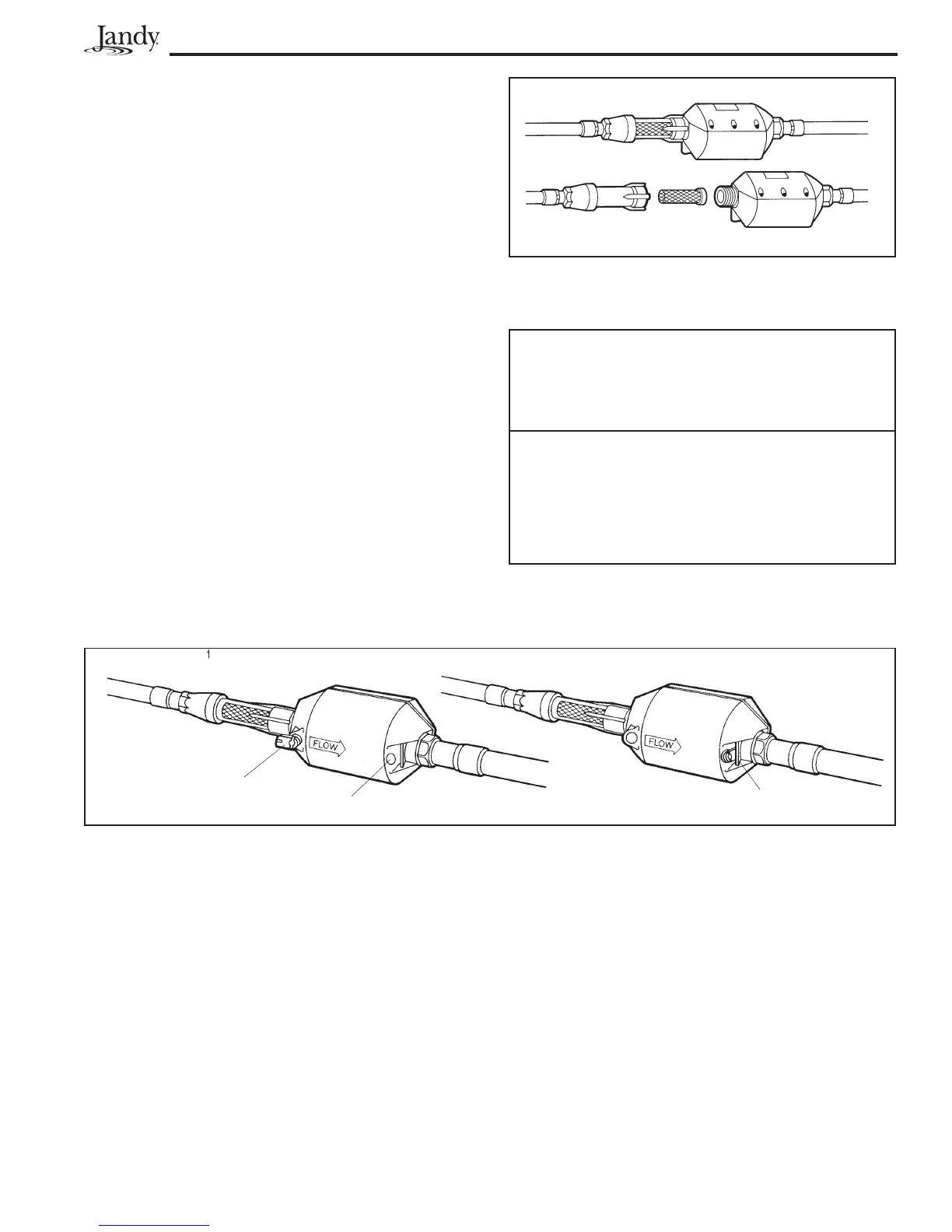
Figure 17. Cleaning Finger Screen
Figure 18. Changing Backup Jet Size
A
B
C
Page 9
3. Check the Finger Screen (at rear of Hydro-Timer)
If it is clogged, use the following steps to clear:
a. Grasp and hold the Hydro-Timer while you
unscrew the Finger Screen Case.
b. Remove the Finger Screen and rinse it off.
c. Place the Finger Screen back into its case
and tighten onto the Hydro-Timer.
4. At the pool equipment pad, turn the valve handle
until pressure gauge reads according to the chart
for your cleaner hose length (see Table 2).
5. If the Ray-Vac sticks in an obstacle (i.e. corners,
ladders, skimmers, etc.) it is possible to increase
the pull out by changing the backup jet size.
a. Remove Jet "A" from its holder and place it
in the discharge hole "B."
b. Use a flat head screwdriver to turn the tab
under the locking tab "C."
Note: Jet "A" is not available is some systems.
Table 2. Ray-Vac Pressure Settings
NOTE: Information in this table is a "guideline" only.



 To Next Page