INSTRUCTIONS FOR JAPCELL BATTERY CHARGER BC-4001
1. Intended Use
The product is intended to charge and discharge Ni-Cd or Ni-MH recharge-
able batteries. It provides four independent charging slots for AA/AAA re-
chargeable batteries. The charger can also optimize and test the maximum
capacity of the rechargeable batteries. Each charging slot has its own dis-
play to show various information, such as, charging current, battery vol-
tage, charged capacity, battery internal resistance and used charging time.
The charging current can be selected from 100mA to 1400mA with 200mA
per increment. If 4 batteries are needed to be charged, then the maximum
current for each slot is limited to 1000mA. If battery in slot 2 or 3 is not
present, then the maximum current for slot 1 and 4 can be selected up to
1400mA.
The charger can charge batteries of different type and size and with dif-
ferent capacity at the same time. It also integrates the minus delta voltage
(-ΔV) function, which monitors the voltage over the charging cycle. When
battery is fully charged, the charger will switch to trickle charging auto-
matically. Therefore the battery will be kept at its optimum capacity. The
charger also includes overheat detection to protect rechargeable batteries
and charger itself from overheating.
The charger can only be powered by power supply rated 12v/1.5A. Operate
and store it in dry indoor environment only.
This product fullls European and national requirements related to elec-
tromagnetic compatibility (EMC). CE conformity has been veried and the
relevant statements are available upon request.
Unauthorized conversion and/or modication of the device are inadmis-
sible because of safety and approval reasons (CE). Any usage other than
described above is not permitted and can damage the product and lead to
associated risks such as short-circuit, re, electric shock, etc. Please read
the operating instructions thoroughly and keep them for future reference.
The charger has its backlight turned on after each key press. The back light
will be switched off after 10 seconds without any key pressed.
2. Box Content
Battery Charger BC-4001 1pcs
Power Adapter 1pcs
Operation Instructions 1pcs
3. Safety Instructions
We do not assume liability for resulting damages to property or personal
injury if the product has been abused in any way or damaged by improper
use or failure to observe these operating instructions. The warranty will
then expire!
3.1. Product Safety
The product must not be exposed to substantial mechanical strain or
strong vibrations.
The product must be protected against electromagnetic les, static elec-
trical elds, extreme temperatures, direct sunlight and moisture.
The manufacturer’s instruction for the respective batteries must be ob-
served, before they are charged.
The product should not be connected immediately after it has been
brought from an area of cold temperature to an area of warm tempera-
ture. Condensed water might destroy the product. Wait until the product
adapts to the new ambient temperature before use.
Sufcient ventilation is essential when operating the charger. Never
cover the ventilating slots of the charger, especially when ambient tem-
perature is over 35˚C.
3.2. Battery Safety
Correct polarity must be observed while inserting the batteries.
Non-rechargeable batteries, rechargeable alkaline batteries (RAM), lead
acid batteries and lithium batteries must not be charged with this prod-
ucts. This could result in an explosion!
Batteries should be removed from the device if it is not used for a long
period of time to avoid damage through leaking. Leaking or damaged
batteries might cause acid burns when in contact with skin, therefore use
suitable protective gloves to handle corrupted batteries.
Batteries must be kept out of reach of children. Do not leave batteries
lying around, as there is risk, that children or pets swallow them. Bat-
teries must not be dismantled, short-circuited or thrown into re. Never
recharge non-rechargeable batteries. This could result in an explosion!
3.3. Miscellaneous
Repair works must only be carried out by a specialist or specialist workshop.
If you have queries about handling the device, which are not answered in
this operating instruction, please check with the distributor for further help.
4. Power Supply
The shipped power adapter is the power supply for this charger. In case
you need to use other power adapter, please be aware that the power sup-
ply has the correct polarity plug. Also please be noted that the power supply
need to have minimum 1.5A driving capability, otherwise the charger could
not work properly.
When the charger is powered up, all LCD segments will light up momen-
tarily. The “null” icon will be shown until any batteries are inserted.
5. Operation
Når et genopladeligt batteri sættes i opladeren, bliver batteriets spænding
(f.eks. 1.12V) vist i displayet i 3 sekunder, derefter vises “200mA Charge”
i displayet i yderligere 3 sekunder. Hvis MODE eller CURRENT ikke væl-
ges i løbet af de næste 6 sekunder, starter opladningen automatisk. Hvis
der trykkes på en knap, vil enheden vente endnu 10 sekunder før den
begynder at lade. Når opladeren er begyndt at lade kan ladestrømmen
ikke længere ændres. Den eneste måde at ændre ladestrøm er ved at
tage batterierne ud og sætte dem i igen - eller at genstarte opladeren. Tryk
derefter på “CURRENT” knappen for at vælge ladestrøm. Hvis du ønsker
at denere ladestrøm for hvert batteri, tryk på “CURRENT” knappen efter
isætning af batteriet. Hvis du ønsker at vælge den samme ladestrøm for 4
batterier på samme tid, er det bedst at indsætte alle re batterier og gen-
statre opladeren, for derefter at trykke på “CURRENT .
5.1. MODE Selection
Press and hold the “MODE” button for 2 seconds to change the operat-
ing mode for all charging slots.
Press the “MODE” button subsequently to toggle among the “Charge”,
”Discharge”, ”Test” , “Quick Test” and “Refresh” mode.
When particular slot working mode need to be changed, press SLOT
button to select the desired slot and then press MODE button to choose
wanted working mode.

 Need help?
 General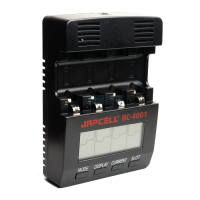

 To Next Page