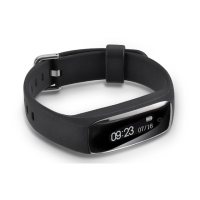
Main Page Features:
1-Select the Sport Interface to view data on your daily
activities such as Calorie expenditure, Distance
traveled, Steps taken and Activity duration. For details
on your sports data, you will need to click on the Goal
icon.
2-Select the Sleep Interface to view data on your sleep
duration and quality. Your activity band automatically
recognizes your sleep status and monitors your sleep
progress and analyzes the deep sleep, light sleep and
time awake.
3-Select the Heart Rate Interface to view data on your
average and resting heart rate and peak activities and
duration. Dynamic or Static Heart Rate Data will be
displayed depending on the selection you made during
set-up. You can change your selection in the Settings
menu, under Heart Rate Settings.
For all interfaces you can share your data with others
via text and social media. The Sharing link
is located on the top right of the Details Page. To
display your up-to-date data, pull down on the App
interface page to refresh/sync the data. When pressing
on the interface page, you will be able to switch between
data and view a detailed chart of your progress.
11


 To Next Page