4
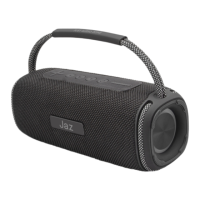
Description of the buttons and connectors:
1. Continuous pressure to increase the volume, one click for the next
song.
2. Play – Pause.
3. Change audio source (Wireless, TF card, USB key, AUX).
4. Change lights or stop them.
5. On/o button.
6. Continuous pressure to decrease the volume, one click for the
previous song.
7. Audio output via 3.5mm cable.
8. USB memory input
9. TF card memory slot.
10. Type-C charging socket
Instructions for use:
Turning on and pairing:
Press the ON/OFF button (5) until a confirmation sound is heard.
Search in the Bluetooth® settings of the telephone for “JAZ WITCHER
20”. The speaker will automatically turn o after 15 minutes if not
connected to any device.
Shutdown:
Press the ON/OFF button (5) until a confirmation sound is heard.
Play or pause audio:
Press the Play/Pause button (2) to play or pause a song.
Volume adjustment:
To increase the volume, press and hold + (1).
To decrease the volume press and hold - (6).
Next/previous song:
Press the + key (1) once to advance.
Press the - button (6) once to repeat.
Alternative playback modes:
USB key: insert a key with your favourite songs saved on it into the
USB slot (8).
Micro-SD memory: insert a card with your favourite songs saved on it
into the micro-SD slot (9).
Aux: connect an external player using a 3.5mm mini-jack cable (7).
Charging the speaker:
Insert the included cable into the Type-C socket (10) and connect it to
a suitable USB charger.
The LED will light up red and go o when charging is complete.
UK USER MANUAL


 To Next Page