Need help?
Do you have a question about the JB INDUSTRIES DV-40S and is the answer not in the manual?
Instructions for powering the wireless micron gauge on and off using the blue button.
How to charge the device by connecting a micro-USB cable to the bottom port.
Specifies the required Apple or Android device versions for wireless connectivity.
Instructions on downloading the free JB DV-40S application from app stores.
Steps to turn on the smart device and enable its Bluetooth feature.
How to power on the DV-40S unit to prepare it for pairing.
Touch the app's 'JB' icon, then select 'Scan' to find compatible devices.
Choose the DV-40S vacuum gauge from the list of detected devices.
Confirm connection via signal strength and note that the DV-40S is ready for use.
Steps to take if the DV-40S is not found in the smart device's detected list.
Guidance for when the DV-40S fails to connect after being selected.
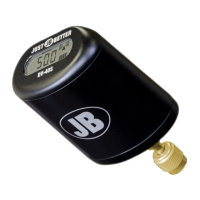
The JB DV-40S is a wireless micron gauge designed for measuring vacuum levels, primarily in HVAC/R systems. It offers wireless connectivity to smart devices, allowing users to monitor vacuum readings remotely and leverage additional features through a dedicated mobile application.
The primary function of the DV-40S is to accurately measure and display vacuum levels in microns. A micron is a unit of pressure, and measuring in microns is crucial for achieving deep vacuum in refrigeration and air conditioning systems, which is essential for proper system performance and longevity. The device is equipped with a sensor that detects the absolute pressure within a system and converts it into a micron reading.
The "wireless" aspect of the DV-40S refers to its ability to transmit these micron readings to a compatible smart device (smartphone or tablet) via Bluetooth. This eliminates the need for technicians to be physically next to the gauge to read the vacuum level, providing greater flexibility and convenience, especially when working in confined spaces or at a distance from the vacuum pump.
The accompanying mobile application, available for both Apple iOS and Android devices, enhances the functionality of the micron gauge. It allows users to:
The quick start guide outlines the essential steps for operating the DV-40S and connecting it to a smart device:
Powering On/Off: A single press of the blue power button on the bottom of the DV-40S turns the unit on or off. This simple interface ensures ease of use.
Charging: The device is rechargeable via a standard micro-USB cable, which is convenient as micro-USB is a widely available charging standard. The location of the port on the bottom helps maintain a clean aesthetic and protects the port during use.
Smart Device Connection (Pairing Process):
Troubleshooting Connection Issues: The guide provides clear instructions for what to do if the DV-40S does not appear in the list of detected devices or fails to connect after selection:
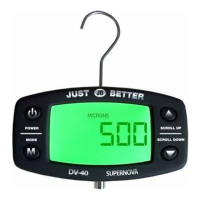
On-Device Display: While the primary benefit is wireless monitoring, the DV-40S itself features a digital display that shows "MICRONS" and a numerical reading (e.g., "500" in the cover image). It also includes a battery level indicator and the aforementioned wireless signal strength indicator, providing essential information directly on the unit.
The quick start guide does not explicitly detail maintenance features such as calibration, cleaning, or sensor replacement. However, based on the information provided:
For detailed maintenance instructions, the user is directed to the full manual available on the JB Industries website (www.jbind.com), indicating that comprehensive care guidelines exist beyond the quick start guide.
 General
| Brand | JB INDUSTRIES |
|---|---|
| Model | DV-40S |
| Category | Measuring Instruments |
| Language | English |

 To Next Page