EasyManua.ls Logo

JBL FLIP3 - Electrical Safety and RF Compliance

JBL FLIP3
30 pages
Print Icon
To Next Page IconTo Next Page
To Previous Page IconTo Previous Page
Loading...
1
3
4
6
2
5
6
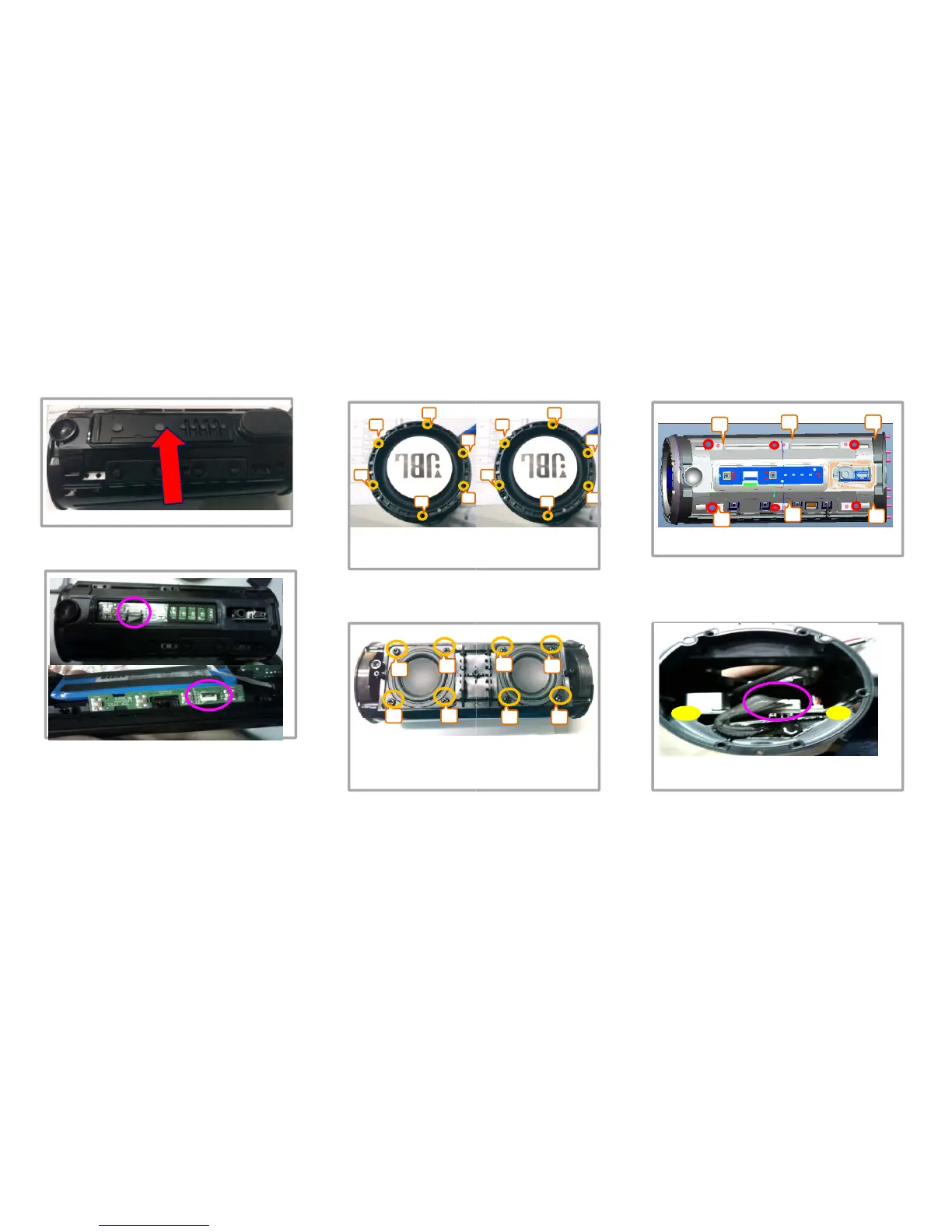
6.将灯板软胶垫撕扯取掉(底部备3M胶纸)
左辐射器
Takeofftherubberpart
7.用电批将左右辐射器
下(批头用
20
Take o
下(批头用
2
.
0
Take

o
twoendsasshowed
2
3
1
4
9
LED
灯板及按键板的
13PIN
6PIN
排线
1
4
9
.
LED
灯板及按键板的
13PIN
6PIN
排线
(FPC),拔拆方法为将贴片FPC插座扣位90°
翻起后再将排线取出,再将PCB板取下(底部
3M
胶)
Take off the 13pin cable and 6pin
10
用电批将左右喇叭共计
3M
胶)
Take
off
the
13pin
cable
and
6pin
cable,andtakeofftheLED/KEYboard
10
.
用电批将左右喇叭共计
用3.0),并将喇叭排插
线
off8pcsscrewsandt
a
bl
ca
bl
e
1
3
25
6
4
6
2
5
6
3
右辐射器
1
3
4
8.用电批将电池支架6颗螺丝取下如上图示位
置(批头用2.0),并将电池支架取下Take
off the screws as showed and take off
上图共计12颗螺丝取
off the screws at
off

the
screws
as
showed
,
and
take
off
thebatterycover
off
the
screws

at
7
6
5
8
5
8
8
颗螺丝取下(批头
11
先将腔体左侧电池
5P
8
颗螺丝取下(批头
线
从主板上取下Take
a
keoffthespeaker
11
.
先将腔体左侧电池
5P
再用翘刀将PCB板两边固定黄胶翘开清理干净
Takeoffthe5pincablefirstlyandclean
th l h d i ll
th
eg
l
ueass
h
owe
d
i
nye
ll
ow
7 - 3

Other manuals for JBL FLIP3

Related product manuals