
 Need help?
Do you have a question about the JBL Harman Tour Pro 2 and is the answer not in the manual?
Details tap, double tap, triple tap, and hold functions for media, calls, and assistants.
Instructions for enabling and configuring Google Assistant, Alexa, or Bixby/Siri.
Explains press and swipe actions on the charging case for various functions.
Details how to control ANC, Ambient Aware, and TalkThru modes via the case.
Select and configure Google Assistant, Alexa, or native voice assistants within the app.
Personalize sound profiles and adjust EQ settings for a custom listening experience.
Learn sample commands for hands-free operation with Google Assistant on Android devices.
Learn sample commands for hands-free operation with Alexa on Android devices.
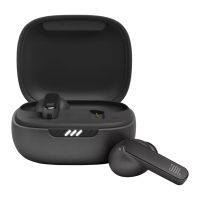
The JBL Tour Pro 2 are true wireless earbuds designed for a premium audio experience, offering a range of features for personalized listening, hands-free control, and seamless connectivity. These earbuds come with a smart charging case that enhances their functionality and user interaction.
The JBL Tour Pro 2 earbuds are primarily designed for audio playback, allowing users to listen to music, podcasts, and other audio content wirelessly. They incorporate advanced noise control technologies, including Active Noise Cancelling (ANC), Ambient Aware, and TalkThru, to adapt to various listening environments. ANC helps to block out external distractions, providing an immersive listening experience. Ambient Aware allows users to hear their surroundings while still enjoying their audio, which is useful for safety or situational awareness. TalkThru reduces music volume and amplifies speech, enabling quick conversations without removing the earbuds.
The earbuds support hands-free voice control, integrating with popular voice assistants like Google Assistant and Amazon Alexa. This allows users to manage their audio, make calls, check schedules, and control smart home devices using voice commands. The device also features a "Silent Now" mode, which activates ANC and disables Bluetooth and music playback, creating a quiet environment for relaxation or focus.
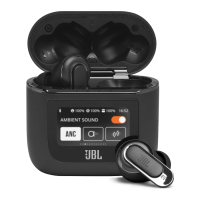
A key innovation of the JBL Tour Pro 2 is its smart charging case, which features an interactive display. This display provides quick access to various settings and controls, including ambient sound modes, volume adjustments, playback controls, and screen customization. The smart case acts as a central hub for managing the earbuds' features without needing to open the companion app on a smartphone.
Upon first use, the earbuds need to be charged by placing them in the charging case and connecting the case to a power source via a USB cable or a Qi-certified wireless charging pad. The earbuds will automatically enter pairing mode when taken out of the case.
To ensure optimal fit and audio performance, users are encouraged to try different sizes of ear tips (S/M/L) provided in the box. The JBL Headphones app includes a "Check My Best Fit" feature to guide users in finding the most secure and comfortable fit. Once in the ear, the earbuds should be slightly turned to find the optimal wearing position.
The JBL Tour Pro 2 supports Bluetooth connectivity for pairing with smartphones, tablets, and computers. For Android™ 6.0+ devices, it offers Google Fast Pair for quick and easy connection. For Windows 10 V1803+ devices, it supports Microsoft Swift Pair. The earbuds can also be manually paired with other Bluetooth-enabled devices through the device's Bluetooth settings.
The earbuds support "Dual Connect + Sync," allowing them to be used in either stereo mode (both earbuds) or mono mode (single earbud). This flexibility enables users to switch between modes seamlessly, for example, using one earbud for calls while the other charges.
The JBL Tour Pro 2 features multi-point connection, enabling it to be simultaneously connected to up to two devices. This allows for easy switching between a phone and a tablet or computer without needing to re-pair. To activate multi-point connection, users typically tap once and then hold for 5 seconds on the designated control area.
The earbuds offer intuitive touch controls for managing audio playback, calls, and noise control features.
The earbuds feature an auto play/pause function, which automatically pauses audio when an earbud is removed from the ear and resumes playback when it's put back in. This feature can be enabled or disabled through the JBL Headphones app.
This feature provides a quiet environment by activating ANC and disabling Bluetooth and music playback. To activate "Silent Now," users hold the control area on either earbud for 5 seconds. In this mode, the earbuds can provide up to 10 hours of quiet time on a full charge. Holding for 5 seconds again will turn "Silent Now" off, re-enabling ANC, Bluetooth, and music.
VoiceAware allows users to control the amount of their own voice they hear during calls. This feature can be adjusted via the JBL Headphones app, with settings ranging from low to high, providing a more natural conversation experience.
The earbuds are charged by placing them inside the smart charging case. The case itself can be charged via a USB-C cable or wirelessly using a Qi-certified wireless charging pad (not included). A quick 15-minute charge of the case can provide up to 4 hours of music playtime. A full charge typically takes 2 hours.
LED indicators on both the earbuds and the charging case provide visual feedback on their status:
If issues arise, a factory reset can resolve many problems. To perform a factory reset, users typically double-tap on the earbud control area and then hold for 5 seconds while the earbuds are outside the case. After the reset, the earbuds should be placed back into the charging case.
The JBL Headphones app is a crucial tool for maintaining and customizing the JBL Tour Pro 2. It allows users to:
The app provides extensive control and personalization options, making it an essential companion for maximizing the functionality and user experience of the JBL Tour Pro 2.
 General
| Driver Size | 10mm |
|---|---|
| Dynamic Drivers | Yes |
| Frequency Response | 20Hz - 20kHz |
| Bluetooth Version | 5.3 |
| Bluetooth Transmitter Frequency Range | 2.4GHz - 2.4835GHz |
| Bluetooth Transmitter Power | <10 dBm |
| Charging Time | 2 hours |
| Music Playtime with BT on | 10 hours |
| Music Playtime with ANC on | 8 hours |
| Talk Time | 6 hours |
| Water Resistance | IPX5 |
| Active Noise Cancellation | Yes |
| Smart Charging Case | Yes |
| Microphone | Yes |
| Ambient Sound Mode | Yes |
| Touch Controls | Yes |
| Voice Assistant | Yes |
| Foldable | No |
| Carrying Case | Yes |
| Impedance | 16 Ohm |
| Microphone Sensitivity | -38 dBV/Pa |
| Bluetooth Profiles | A2DP, AVRCP, HFP |
| Bluetooth Transmitter Modulation | GFSK, π/4 DQPSK, 8DPSK |
| Quick Charge | Yes |




 To Next Page