
 Need help?
Do you have a question about the JBL Reflect Contour and is the answer not in the manual?
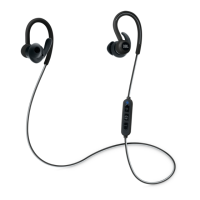
Instructions for mixing and matching ear tips and stabilizer parts for a custom fit.
Step-by-step guide for installing ear tips and stabilizer parts onto the earbuds.
Guidance on how to properly secure the outer earhook behind the ear for optimal fit.
Instructions on inserting the ear tip and turning for a secure and perfect fit.
Procedure for powering the device on and off, indicated by LED and timing.
Overview of the functions controlled by the device's buttons, including play/pause and track control.
Steps to initiate and establish a Bluetooth connection with a device, indicated by audio prompts.
Illustrates the process of charging the earbuds using a Micro USB cable.
Explanation of different LED light patterns indicating device status like connection, battery level, and charging.
 General
| Battery type | Built-in battery |
|---|---|
| Battery voltage | 3.7 V |
| Charging source | USB |
| Battery capacity | 120 mAh |
| Rechargeable battery | Yes |
| Continuous audio playback time | 8 h |
| Frequency band | 2.4 - 2.483 GHz |
| Bluetooth version | 4.0 |
| Bluetooth profiles | A2DP, AVRCP, HFP, HSP |
| Connectivity technology | Wireless |
| Quantity | 1 |
| Cables included | Micro-USB |
| Driver unit | 5.8 mm |
| Ear coupling | Intraaural |
| Headphone frequency | 10 - 22000 Hz |
| Buttons quantity | 3 |
| Headset type | Binaural |
| Product type | Headset |
| Product color | Green |
| Wearing style | Ear-hook |
| Recommended usage | Calls/Music |
| International Protection (IP) code | IPX5 |
| Microphone type | In-line |





 To Next Page