· 3 ·
REF. 53724
INSTRUCTION MANUAL
EN
Description
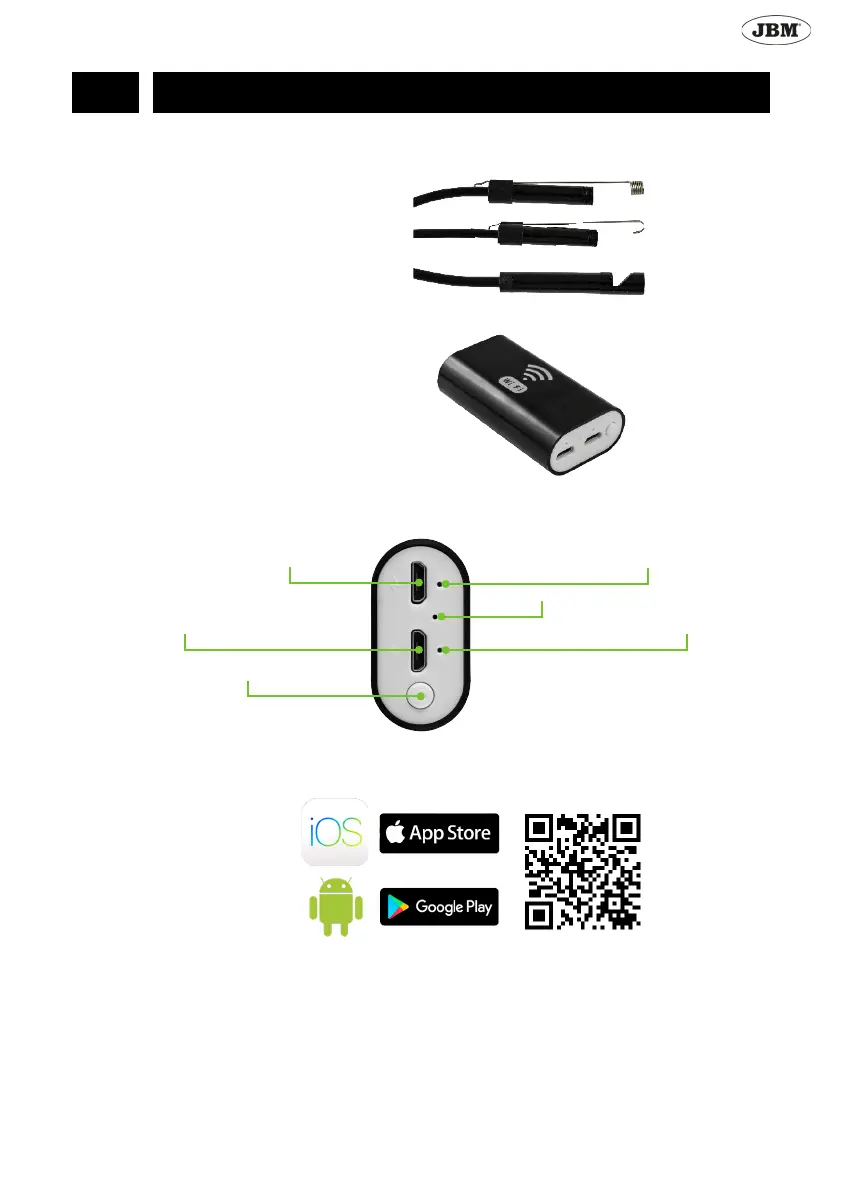
Endoscope with Wi-Fi enabled compatible with all kind of smartphones. Able to connect with tablets and compu-
ters. The equipment includes:
• Endoscope
• Wi-Fi connection port
• Hook tip
• Magnetic tip
• Mirror tip for side view
Features
• Resolution: HD640*480, 1280*720
• Vision angle: 70
• Diameter: 8mm
• 2 mega pixels
• Focal length: 4-6cm
• 6 adjustable White LEDs
• Water resistance IP67
• Lithium battery 800mAh
• Cable 1m
Description of parts of the Wi-Fi connection port
Installation and use in smartphone
1. Download and install the JBM app at the App Store for iOS devices, or use Google Play for devices using
Android operating system.
iOS
Android
2. Turn on the Wi-Fi port and plug in the camera at the correct input (nº 2 in accordance with the scheme).
3. Find Wi-Fi sign “Wi-Fi Check” in your device which doesn’t need a password
4. Initiate the app with the camera connected.
3. Charger
4. Battery indicator (RED)
5. Wi-Fi signal indicator (Green)
6. Reset
2. Camera connection input
1. On / O Switch


 To Next Page