tank.
5、Connect the pump with the 3-pin connection wire. Insert adaptor plug to the
controller and connect AC wire adaptor
Fig 1: assembly and operation
Fig. 1
Fig.2
III. Operation and Function
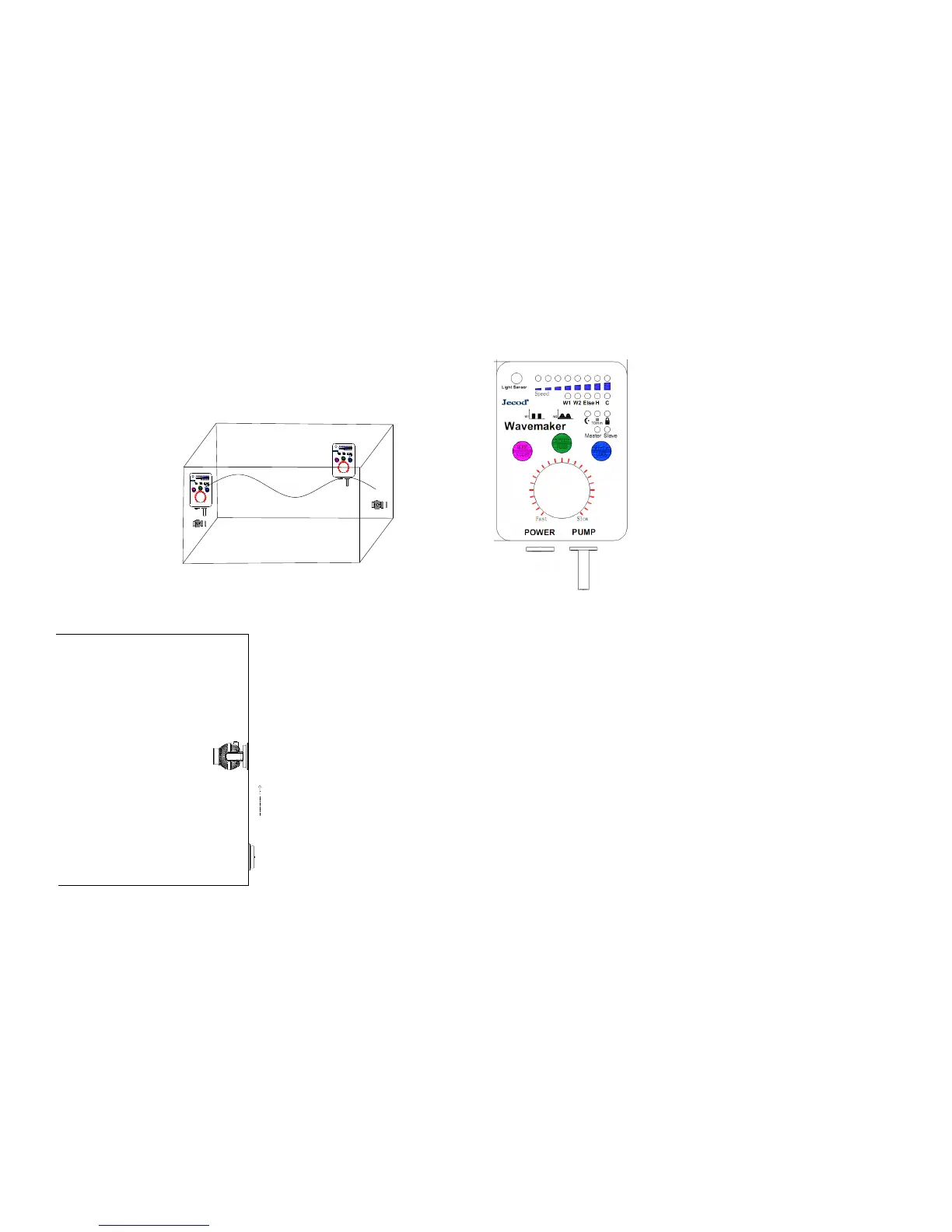
Control panel of wireless controller
1、Button and Knob
MODE/NIGHT: press the button to select different modes and enter to the
Night mode by long hold-down the button .
SPEED/FEED: press the button to adjust the flow rate and enter to the Feed
mode by long hold-down the button .
Wi-Le/ LOCK: Press the button to set Master control, Slave control or
operate individually and Lock the setting by long hold-down the button.
Knob: Rotate the knob to adjust different wave period and patterns in W1
mode; to adjust the flow speed in W2 and ELSE mode. To shift the time in
mode C.
2、 Function Description
Wireless controller is defined to allow operation without the wire among
wave makers.
MASTER Control:Press “Wi-Le” once and enter into Master control when
“Master” indicator lights. Master controller can operate all the functions for
the Slave Control: Press“ Wi-Le” until the “Salve” indicator lights and enter
into Slave mode , where all operation is invalid except adjusting flow rate by
rotate the knob.
Among two or more wave makers, set one as the Master and the others as
Slave. You can achieve the same function and operation for all the pumps by
adjusting the Master controller.


 To Next Page
 Loading...