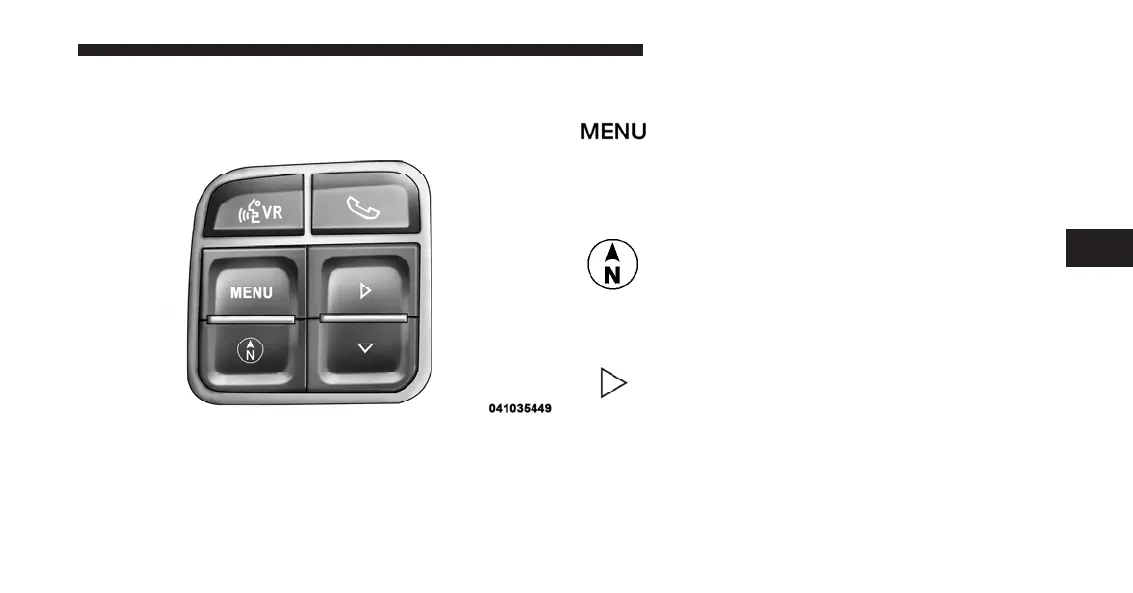
The system allows the driver to select information by
pressing the following buttons mounted on the steering
wheel:
MENU Button
Press and release the MENU button to scroll
through the main menus (Fuel Economy, Warn-
ings, Timer, Units, System, Personal Settings)
or to exit sub menus.
COMPASS Button
Press and release the COMPASS button to
display one of eight compass readings and the
outside temperature or to exit sub menus
SELECT Button
Press and release the SELECT button for access
to main menus, sub menus or to select a
personal setting in the setup menu.
EVIC Steering Wheel Buttons
4
UNDERSTANDING YOUR INSTRUMENT PANEL 213














 To Next Page