Icon Description
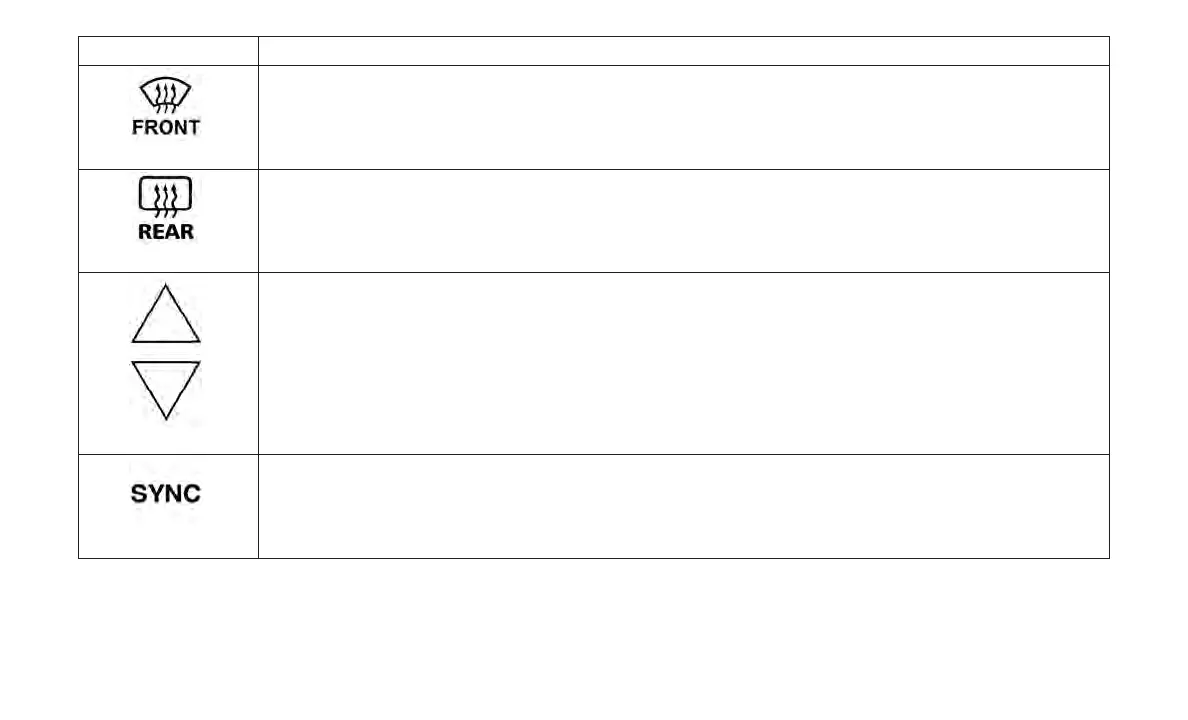
Front Defrost Button
Press and release the Front Defrost Button to change the current airflow setting to Defrost mode. Air comes from the
windshield and side window demist outlets when this feature is on. When the defrost button is selected, the blower level
may increase. Use Defrost mode with maximum temperature settings for best windshield and side window defrosting and
defogging. When toggling the front defrost mode button, the climate system will return to previous setting.
Rear Defrost Button
Push and release the Rear Defrost Control button to turn ON the rear window defroster and the heated outside mirrors (if
equipped). An indicator will illuminate when the rear window defroster is on. The rear window defroster automatically turns
off after ten minutes.
Driver and Passenger Temperature Up and Down Buttons
Provides the driver and passenger with independent temperature control. Push the red button on the faceplate or touch-
screen or press and slide the temperature bar towards the red arrow button on the touchscreen for warmer temperature
settings. Push the blue button on the faceplate or touchscreen or press and slide the temperature bar towards the blue
arrow button on the touchscreen for cooler temperature settings.
SYNC Button
Press the SYNC button on the touchscreen (if equipped) or on the instrument panel (if equipped) to toggle the Sync fea-
ture on/off. The SYNC indicator is illuminated when this feature is enabled. SYNC is used to synchronize the passenger
temperature setting with the driver temperature setting. Changing the passenger temperature setting while in SYNC will
automatically exit this feature.
49














 To Next Page