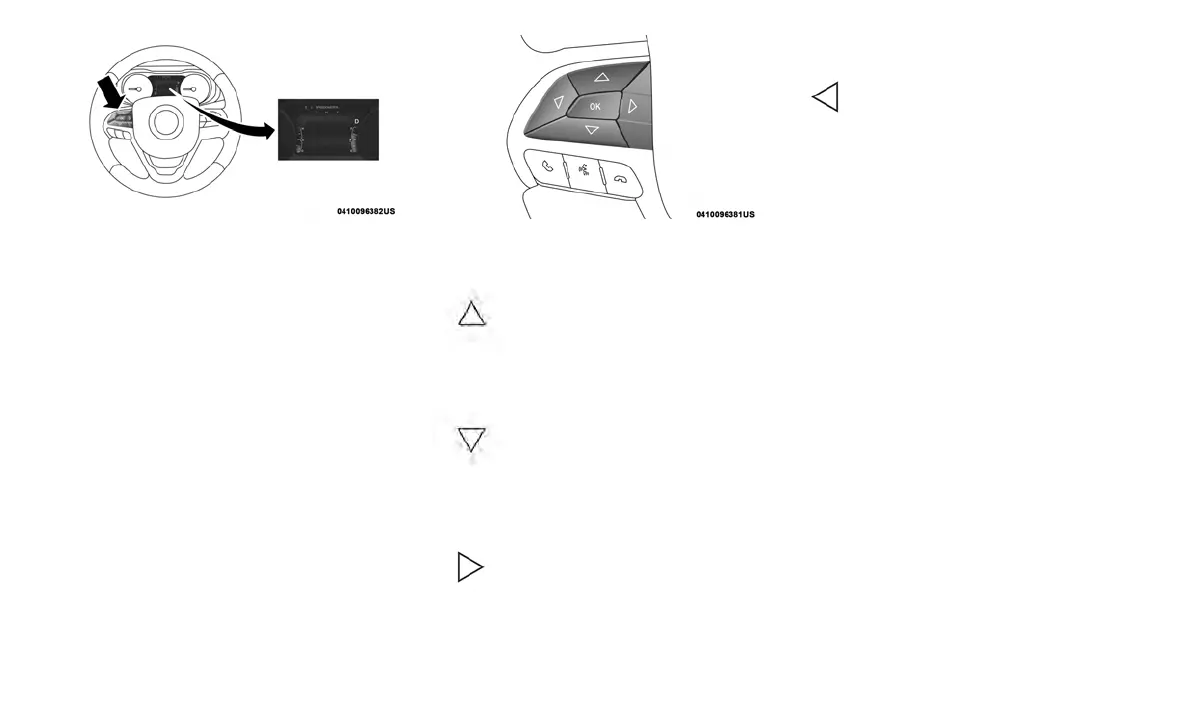
The instrument cluster display menu items con-
sist of the following as equipped:
• Speedometer
• Vehicle Info
• Driver Assist
• Fuel Economy
• Trip
• Messages
• Audio
• Screen Setup
• Vehicle Settings
The systems allow the driver to select informa-
tion by pushing the following buttons mounted
on the steering wheel:
• Up Arrow Button
Push and release the up arrow
button to scroll upward through the
main menu and submenus.
• Down Arrow Button
Push and release the down arrow
button to scroll downward through
the main menu and submenus.
• Right Arrow Button
Push and release the right arrow
button to access the information
screens or submenu screens of a
main menu item.
• Left Arrow Button
Push and release the left arrow
button to access the information
screens or submenu screens of a
main menu item.
• OK Button
Push the OK button to access/select the infor-
mation screens or submenu screens of a main
menu item. Push and hold the OK button for one
second to reset displayed/selected features that
can be reset.
Instrument Cluster Display Menu
Items
NOTE:
The instrument cluster display menu items dis-
play in the center of the instrument cluster.
Menu items may vary depending on your vehicle
features.
Speedometer
Push and release the up or down arrow button
until the Speedometer Menu item is displayed in
the instrument cluster display. Push and release
the OK button to change the speedometer scale
from MPH to km/h (or vice versa).
Vehicle Info (Customer Information
Features)
Push and release the up or down arrow button
until the Vehicle Info Menu item is displayed in
the instrument cluster display. Push and release
Premium Instrument Cluster Display Location
Instrument Cluster Display Control Buttons
73














 To Next Page