
EasyManua.ls Logo

Jensen Marine MSR3012 - User Manual

Jensen Marine MSR3012
18 pages
Print Icon
To Next Page IconTo Next Page
Loading...
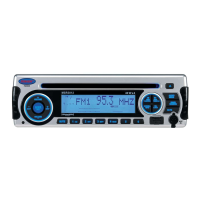
MSR3012
Installation and Operation Manual
MARINE AUDIO SYSTEM
Manual de la Instalación y Operación / Guide d'installation et d'opération

Questions and Answers

  • M
    Megan WilliamsAug 17, 2025
    Why is there no sound coming from my Jensen Marine Stereo System?
    • M
      maldonadojeanetteAug 17, 2025
      If your Jensen Marine Stereo System is not producing sound, first, ensure that the volume is adjusted to an audible level. If the issue persists, check the wiring connections to ensure they are properly connected.
  • M
    Molly FletcherAug 19, 2025
    How to fix a Jensen Marine Stereo System with no power?
    • K
      Kimberly FernandezAug 19, 2025
      If your Jensen Marine Stereo System has no power, first, make sure the vessel’s accessory switch is on. If the power supply is properly connected to the vessel’s accessory terminal, switch the ignition key to “ACC”. Also, check the fuse and replace it if it's blown.
  • X
    xblackwellAug 22, 2025
    What to do if my Jensen Marine MSR3012 Stereo System shows ERROR-04 on LCD?
    • J
      jmckinneyAug 22, 2025
      If your Jensen Marine Stereo System displays ERROR-04 on the LCD, it indicates an abnormal current to the USB device. Try changing the mode or unplugging and then reconnecting the USB device.
  • M
    mcummingsAug 26, 2025
    What does ERROR-05 on the Jensen Marine MSR3012 mean?
    • M
      Michael PerezAug 26, 2025
      If your Jensen Marine Stereo System displays ERROR-05 on the LCD, it means the iPod/iPhone is not verified. To resolve this, unplug and reconnect your iPod/iPhone.
  • T
    Thomas WebbAug 27, 2025
    Why does my Jensen Marine MSR3012 Stereo System sound skip?
    • L
      Larry HowardAug 27, 2025
      If your Jensen Marine Stereo System is skipping sound, it might be due to the installation angle being more than 30 degrees. Adjust the installation angle to less than 30 degrees. Additionally, the disc might be dirty or defective; clean the disc and try playing it again, or use a new disc.
  • J
    Jill RaymondAug 30, 2025
    What does ERROR-03 mean on my Jensen Marine MSR3012 Stereo System?
    • B
      Brittany OwensAug 30, 2025
      If your Jensen Marine Stereo System displays ERROR-03 on the LCD, it indicates that there are no songs on the device. To fix this, remove the device and add songs to it.
  • M
    Michael HillSep 2, 2025
    What does ERROR-02 on the Jensen Marine MSR3012 Stereo System mean?
    • T
      Thomas HorneSep 2, 2025
      If your Jensen Marine Stereo System displays ERROR-02 on the LCD, it means the disc is not supported. Remove the disc and insert a supported CDDA or CD-ROM disc.
  • A
    Angel JohnsonSep 5, 2025
    What does ERROR-01 mean on Jensen Marine Stereo System?
    • A
      Andrea BrennanSep 5, 2025
      If your Jensen Marine Stereo System displays ERROR-01 on the LCD, it indicates a database or decoder error. Try changing to another mode to resolve this issue.
  • S
    Sheri MeyerSep 7, 2025
    Why can't my Jensen Marine Stereo System tune to radio stations?
    • D
      Daniel PayneSep 7, 2025
      If you are unable to tune to a radio station or the auto-seek function isn't working on your Jensen Marine Stereo System, make sure the antenna cable is firmly inserted. If the signals are too weak, try selecting a station manually.
  • K
    Katelyn PatelSep 10, 2025
    What to do if the operation keys on my Jensen Marine Stereo System don't work?
    • C
      Candice GambleSep 12, 2025
      If the operation keys on your Jensen Marine Stereo System do not work, it could be due to the control panel not being properly installed. Reinstall the control panel. If the built-in microcomputer is not operating properly due to noise, press the RESET button.

Summary

Introduction

System Features

Lists the capabilities of the MSR3012 audio system.

Content and Hardware List

Details manual contents and included hardware kit items.

Safety Information

General Safety Precautions

Covers environmental risks like water, heat, power, and disc handling.

Disc Handling and Maintenance

Notes on CD-R/RW playback, compatibility, and cleaning.

Installation

Installation Preparation and Notes

Steps and considerations before installing the unit.

Mounting and Securing the Unit

Procedures for dashboard mounting and rear support.

Wiring

Electrical Connections

Power, antenna, and ground wire hookups.

Wiring Harness Pinout

Detailed description of the connector pin functions and colors.

Basic Operation

Core Controls and Source Selection

Power, volume, mute, and mode switching.

Audio and System Menu Navigation

Accessing and adjusting audio and system settings.

Basic Operation

Special Features and Display

Low battery, EQ, loudness, aux input, LCD, and scrolling functions.

Tuner Operation

Band Selection and Tuning

Switching between AM/FM bands and manual/auto tuning.

Preset Station Management

Storing, recalling, and auto-scanning radio presets.

CD Player Operation

Disc Handling and Basic Playback

Inserting, ejecting, and controlling CD playback.

Advanced CD Playback Features

Intro scan, repeat, and random play modes.

MP3;WMA Operation

File Requirements and Media Types

Acceptable formats, media, and ID3 tag support.

Playback Controls and Navigation

Controls for MP3/WMA files, including folder navigation.

MP3;WMA Operation

USB Device and Directory Search

Connecting USB devices and searching for files.

SiriusXM Radio Operation

Setup and Service Activation

Switching to SiriusXM, accessing ID, and activating service.

Channel Tuning and Presets

Selecting bands, categories, tuning, and storing favorites.

SiriusXM Radio Operation

Advanced SiriusXM Features

Direct access tuning, parental lock, display info, and signal strength.

SiriusXM Advisory Messages

Message Causes and Solutions

Table detailing SiriusXM advisory messages and their resolutions.

iPod Operation

iPod Compatibility and Connection

Supported iPod models and connecting to USB.

iPod Playback and Search Functions

Controlling playback and searching for music.

Care, Maintenance, and Troubleshooting

General Care and Noise Issues

Guidelines for cleaning and managing noise interference.

Common Operational Problems and Solutions

Table of troubleshooting symptoms, causes, and fixes.

Specifications

CD and Radio Specifications

Technical details for CD playback and FM/AM radio.

General and Power Specifications

Overall operating voltage, power, and dimensions.

Jensen Marine MSR3012 Specifications

CD Specifications IconCD Specifications
Signal to Noise Ratio> 75 dB
Channel SeparationMore than 50 dB
Frequency Response20 Hz - 20 kHz
FM Radio Specifications IconFM Radio Specifications
Frequency Coverage (USA)87.5 to 107.9 MHz
Frequency Coverage (Europe)87.5 to 108 MHz
Sensitivity (S/N=30dB)4µV
AM/MW Specifications IconAM/MW Specifications
Frequency Range (USA)530-1710 kHz
Frequency Range (Europe)522-1620 kHz
Sensitivity (S/N=20dB)36 dB
General Specifications IconGeneral Specifications
Operating VoltageDC 12 Volts
Speaker Impedance4-8 ohms per channel
Power Output40W x 4
Dimensions IconDimensions
Chassis Dimensions182(L) x 52.2(W) x 173(H)
Front Panel Dimensions188(L) x 58(W) x 21(H)
Current Drain15 Ampere (max.)