How do I setup my Eagle 1600?
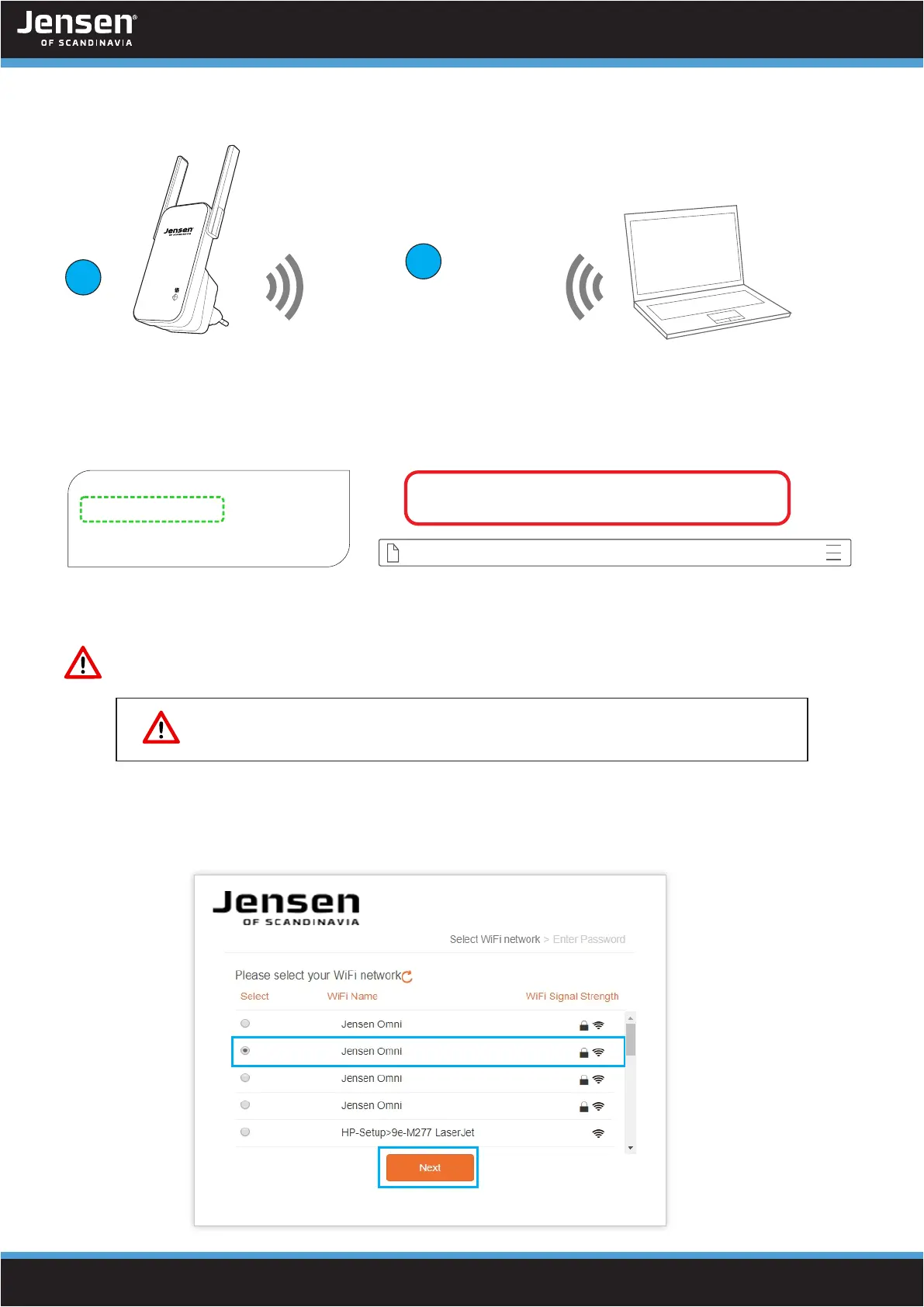
1. Connect the Eagle 1600 to the wall socket near your exsisting wireless router and wait
one minute.
2. After Eagle 1600 have started it will transmit a wireless signal Eagle_xxxxxx (eg..Eagle_0833CD).
Connect your computer, smartphone or tablet to this wireless network.
3. Open a new tab in your web browser and enter http://jensen.setup and click enter.
* If the above address doesn’t work you can try http://192.168.39.1
4. You should now see the setup wizard.
Select the wireless network you want to extend/repeat from the list and click Next.
1
2
http://jensen.setup and http://192.168.39.1 is both local addresses, and
will only work when you are connected the Eagle 1600 WiFi network.
3
WiFi Network Name (SSID):
Setup link for WEB browser:
jensen.setup
Eagle_0833CD
Eagle_0833CD
http://jensen.setup
The name is different on all Eagle 1600, so look at
your device to fint the correct name to look for.


 To Next Page