
 Need help?
Do you have a question about the Jensen STADIUM BT and is the answer not in the manual?
Connect the headset to a USB power source. The LED indicator shows charging status. Low battery triggers red flashing.
Turn the headset on or off by pressing the power button for approximately 3 seconds. Voice prompts confirm status.
Initiate pairing by holding the power button. Search for 'Jensen Stadium BT' on your device to connect.
Includes power on/off, call management (answer/end), and call rejection/redial.
Manage music playback (play/pause, next/previous track) and adjust volume levels.
Activate voice assistant and connect audio via 3.5mm AUX input.
Details on LED lights for pairing, connection, charging, and low battery.
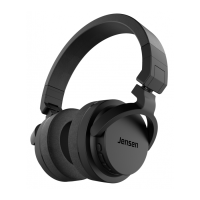
The Jensen Stadium BT headphones are a versatile audio device designed for wireless listening and communication, offering a range of features for convenient daily use.
At its core, the Jensen Stadium BT is a pair of Bluetooth headphones, enabling wireless audio playback from compatible devices such as smartphones, PCs, and laptops. The headphones are equipped with a multi-function power on/off button, which serves several purposes beyond simply turning the device on or off. This button is central to managing calls and initiating pairing. Dedicated buttons for volume control also double as track navigation controls, allowing users to easily adjust audio levels and skip between songs. A 3.5mm line-in (AUX) port provides an alternative for wired audio input, ensuring compatibility with devices that may not have Bluetooth capabilities or when battery power is low. For communication, a built-in microphone allows for hands-free calling and interaction with voice assistants. The device features a USB charging port for convenient power replenishment and an LED indicator to provide visual feedback on its status, such as charging, pairing, or low battery.
To begin using the Jensen Stadium BT headphones, the first step is typically charging. The headphones are charged via a USB interface, connecting to a PC or any standard USB power outlet. During the charging process, the LED indicator glows red, turning off once the battery is fully charged. A low battery is signaled by the LED flashing red twice every 5 seconds, accompanied by a beeping sound every 60 seconds, alerting the user to recharge.
Powering on the headphones is straightforward: press the power button for approximately 3 seconds until the LED starts flashing blue and red, and a voice prompt announces "Power on."
For wireless audio, the headphones need to be paired with a Bluetooth-enabled device. This involves pressing the power button for 2-3 seconds until the LED flashes blue/red and the voice prompt says "Pairing." At this point, the user can search for "Jensen Stadium BT" on their smartphone or other Bluetooth device and connect. A "Paired" voice prompt confirms a successful connection, and the headphones are then ready for use.
Once paired, the headphones offer a range of controls for audio playback and calls. The volume up button, when short-pressed, increases the volume. A long press (1 second) on this button skips to the next track. Conversely, the volume down button, when short-pressed, decreases the volume, and a long press (1 second) navigates to the previous track. For basic playback control, a short press of the multi-function power button will play or pause the audio.
Call management is also integrated. To answer or end a call, a short press of the multi-function power button is sufficient. If an incoming call needs to be rejected, pressing and holding the power button for 3 seconds will do so. For convenience, the headphones also support redialing the last outgoing call by quickly pressing the power button twice.
A notable feature is the voice assistant integration. By pressing both the volume up and volume down buttons simultaneously for 1 second, users can activate their smartphone's voice assistant, such as Google Assistant or Siri, allowing for voice commands and queries.
When not in use, the headphones can be powered off by pressing the power button for about 3 seconds, which will be confirmed by a "Power off" voice prompt.
The LED indicator provides crucial visual feedback on the headphones' status:
While the manual does not detail specific cleaning or repair instructions, it provides essential security and general maintenance guidelines to ensure the longevity and safe operation of the Jensen Stadium BT headphones.
Firstly, to prevent hearing damage, it is advised not to use the headphones at high volume for extended periods. Safety while driving is also emphasized, with a clear instruction not to use the headphones while operating a vehicle.
Environmental considerations are important for the device's durability. Users should keep the headphones away from fire sources, freezing temperatures, water, and chemicals, as these can cause damage. Direct sunlight for long periods should also be avoided.
The manual explicitly states that users should not disassemble the headphone, indicating that any internal issues should likely be addressed by professional service if needed.
For general care and battery health, it is recommended to power off the headphones before storing them in a bag or pocket to prevent accidental activation and battery drain. Furthermore, to maintain battery performance, the headphones should be charged at least once a month, even if not in regular use.
For any problems or questions regarding the product, users are directed to contact customer support via email, and a homepage link is provided for further information.
 General
| Bluetooth Version | 5.0 |
|---|---|
| Waterproof | No |
| Driver Size | 40mm |
| Frequency Response | 20Hz - 20kHz |
| Impedance | 32 Ohms |
| Foldable | Yes |
| Built-in Microphone | Yes |
| Wireless Range | 33 ft (10 m) |
| Charging Time | 2 hours |

 To Next Page