www.Jerguson.com ● JergusonApp@clark-reliance.com ● +1.440.572.1500
8
Section 4: Configuration
4.1 Operation Screen
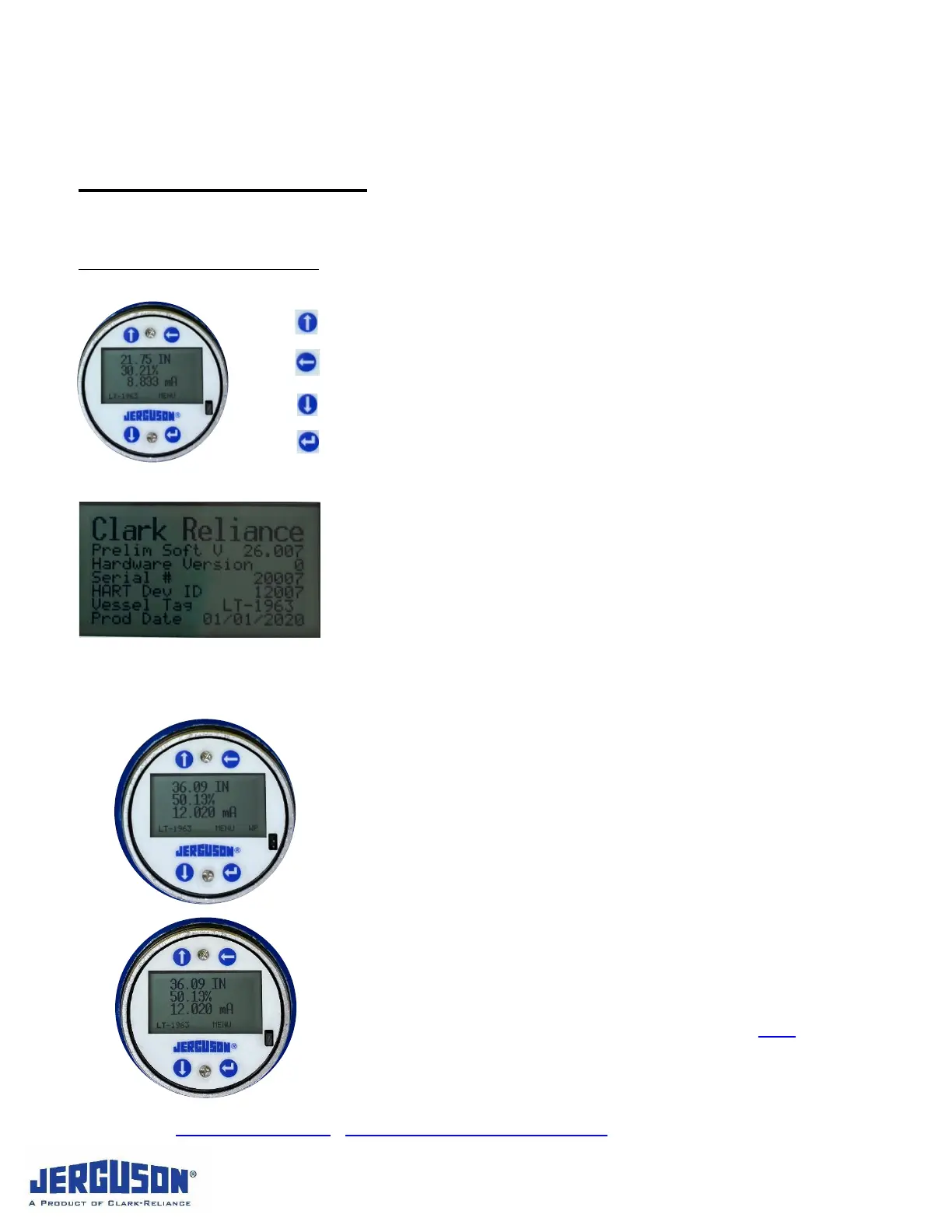
Push Button System Navigation
Up will advance the cursor up in the menu system.
Back will advance to the previous digit in a menu.
Down will advance the cursor down in the menu system.
Enter will select a menu option or advance to the next digit when
entering a value.
4.1.1 Boot-Up / Welcome Screen
Software Version: Ex.: V 29.000
Hardware Version: Ex.: 0
Serial # Ex.: 456789-01A
Hart Dev ID Ex.: 1001
Vessel Tag (if setup) Ex.: LT-1963
Production Date Ex.: 04/14/2021
4.1.2 Standard Operating Screen
Engineering Units
Inches, Millimeter, etc. (Selected in User Installation)
Percent Output
Defined as % of Level 4-20 mA
The % Output given will correspond with the mA output
current value between 4 and 20 mA
mA Output
Display of 4-20 mA analog output
Vessel Tag (if value is set – see User Installation)
WP
If Write Protect Jumper is removed, bottom right will
display “WP” notification. See section 4.1.4.


 To Next Page