Starting the Machine
Using as a Handheld Vacuum
Charging
EN
04
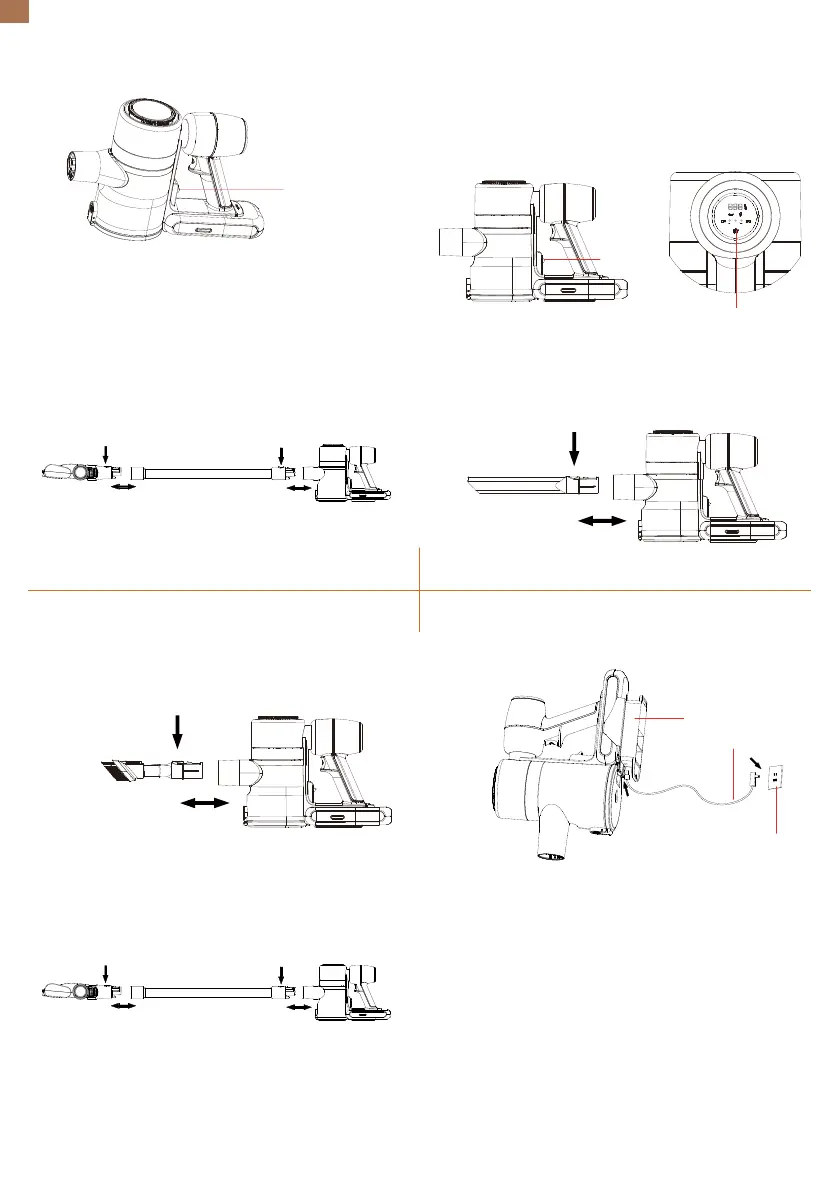
2.Assemble the extension tube and the floor brush.
Insert the extension tube into the vacuum head until
you hear a "click" and then insert the floor brush into
the extension tube until you hear a "click".
c)Push the dust cup assembly and the handle
module together until you hear a "click".
Press the power switch, and the vacuum cleaner
starts to work at medium speed by default.
1.Insert the long crevice tool into the vacuum head
until you hear a "click".
2.Insert the 2-in-1 dusting brush into the vacuum
head until you hear a "click".
1. Store the machine on the wall mount to charge.
3.Insert the extension tube into the vacuum head
and an accessory tool until you hear the click
sounds.
a) Tap the speed control button on the control panel
to change speed.
b) Press the power switch when the machine is
running at any speed, and it will stop working.
a) When the battery indicator on the control panel
and the light on the battery flicker, it indicates that
the battery is running out soon. Please get the
machine recharged.
b) When charging, the first light on the control panel
and the light on the battery flicker. And then the
second and the third light flickers by turn until the
battery is fully charged.
c) When fully charged, the lights will stay on for 1
minute and then go off, which means the charging is
complete.
Press
Push
Tap
Insert
Wall Mount
Charger
Socket
Insert
Insert Insert
Insert
Insert
NORMALECO TURBO


 To Next Page
 Loading...