Maintenance
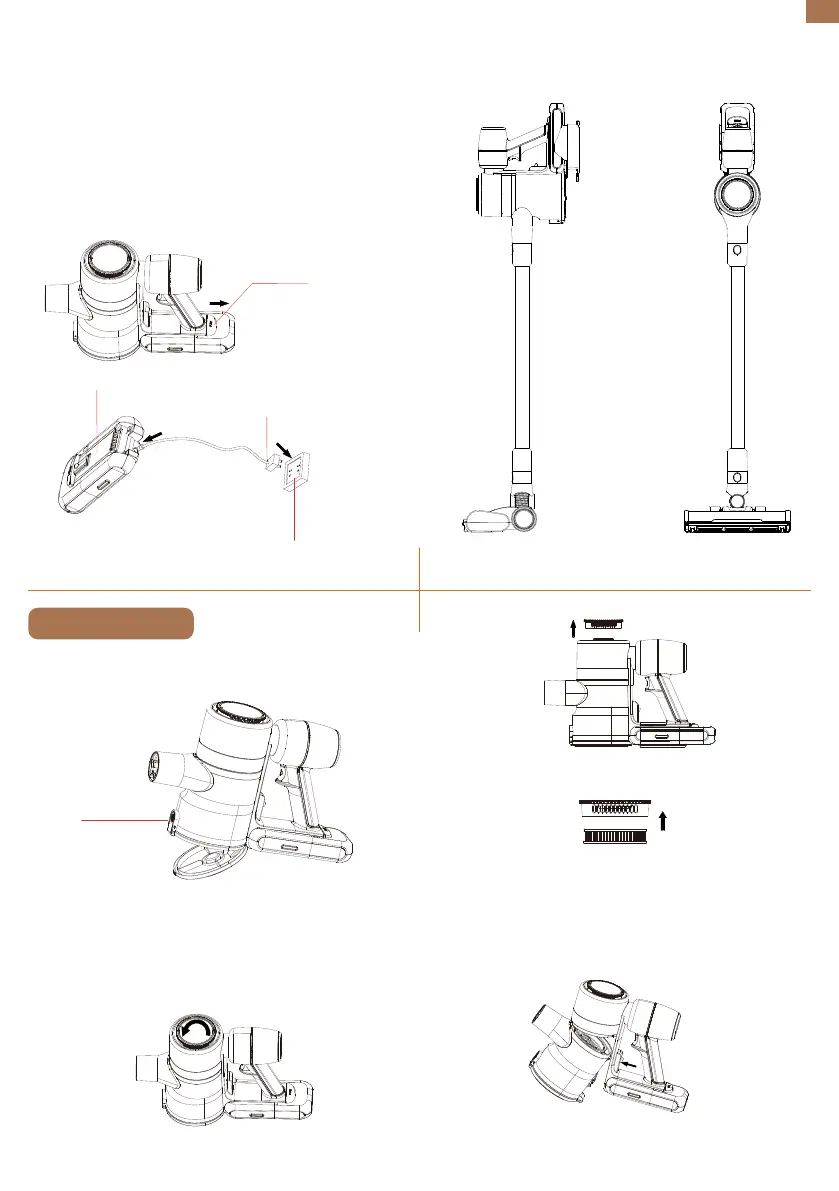
Emptying the Dust Cup
Cleaning the Filter
Using the Wall Mount
EN
05
Press down the release button to detach the battery.
Charge the battery directly using the charger.
Push the release button for the dust cup to empty
the contents.
Rotate the HEPA filter cover counterclockwise to take
out the HEPA filter.
b)Disassemble the dust cup and the handle module.
Press the release button to separate the dust cup
from the handle module.
After mounting the wall mount, place the machine
upright on it.
2. Charge the single battery.
a) When the battery indicator on the control panel
and the light on the battery flicker, it indicates that
the battery is running out soon. Please get the
battery recharged.
b) When charging, the light on the battery flickers.
c) When fully charged, the light will stay on for 1
minute and then go off, which means the charging is
complete.
Detachable Battery
Release Button
Charger
Socket
Push
Counterclockwise
HEPA Filter


 To Next Page