4 5
Using Method
Use of Product
First, Set the On/Off button to Off “ ” position, then plug in
the socket. Push the On/Off button to turn on the machine.
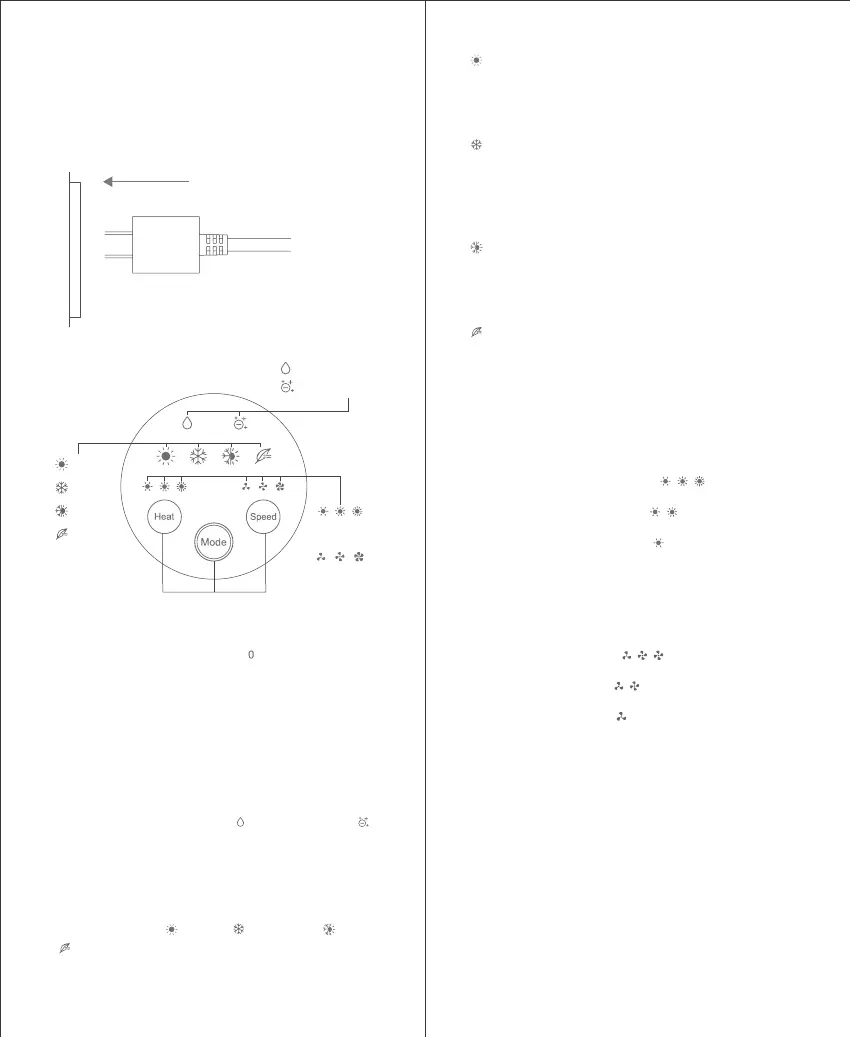
Press the LED display screen to choose suitable wind heat,
suitable wind speed and mode.(Figure 1,Figure 2)
Operate the LED display screen after turn on machine. The
function description of the LED display screen includes:
(Figure2)
1.Function icon:Nano water ion“ ” and negative ion“ ”.
When turn off the machine the icon disappears. When turn
on the machine the icon lights up and indicates that the
function is normal.
2.Mode button:Press the Mode button to switch among
four modes: Warm “ ”、Cool “ ”、Cool/Hot “ ”、Soft
“ ”.
1
Cool/hot circulation mode:Its original air and speed
setting stays the same as the first two modes. Air heat
and speed are adjustable. The air heat and speed
indicator ring displays red and blue light alternately.
Warm mode: In this mode, machine stays in the same
heat and air speed setting as when it is turned off. Both
air heat and air speed settings are adjustable in this
mode.
Cool mode:When change from warm mode to cool
mode, the air speed stays unchanged, air speed is
adjustable in this mode.If press Heat button to change
heat setting, the device will change automatically to
warm mode.
Soft mode:In this mode device works in low air heat and
speed mode .The Air heat & speed indicator ring shows
full white.
3.Heat button: Press Heat button to switch among high,
mid, low, 3 different air heat settings, the indicator changes
accordingly as below:
High air heat: Air heat indicator “ ” lights up.
Mid air heat:Air heat indicator “ ” lights up.
Low air heat:Air heat indicator “ ” lights up.
4.Speed button: Press Speed button to switch among high,
mid, low, 3 different air speed settings, the indicator
changes accordingly as below:
High air speed:indicator “ ” lights up.
Mid air speed:indicator “ ” lights up.
Low air speed:indicator “ ” lights up.
2
Warm
Cool
Cool/hot
circulation
Soft
5.Memory function: when device is turned on for the first time,
its original mode is high heat and high speed. When it is turned
on from second time, it stays in the same mode as previous
use.
Nano water ions
Negative ions
Heat setting
indicator
Speed setting
indicator
Function buttons



 To Next Page