Need help?
Do you have a question about the Jinbei EFIII-200 and is the answer not in the manual?
Read operating and safety instructions carefully before initial use. Keep manual with device.
Designed for photo and video lighting only. Not for domestic lighting.
Details common symbols used in the manual and on the device.
Lists all items included in the product packaging.
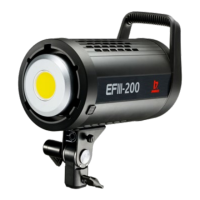
Details the device's buttons, switches, sockets, and mounting points.
Explains the various symbols and readouts on the device's LCD display.
Explains how to measure light output with and without reflectors.
Steps to switch the device on and off using the power switch.
How to use the function knob to set light brightness from 1% to 100%.
How to operate the fan and the note on brightness reset.
How to enter, set, pause, and resume light effects.
Enumerates the 10 available preset lighting effects.
How to activate WiFi and set groups/channels for remote control.
Available wireless modes: 2.4 GHz (b/p) and Bluetooth.
Procedure to reset the Bluetooth connection.
Where to download the "Jinbei" app for iOS and Android devices.
Steps to connect the light to a smartphone using Bluetooth.
How to manage connections when using a different smartphone.
Details on power, color temperature, CRI, illuminance, and lighting effects.
Covers remote control, Bluetooth version, channels, and groups.
Information on power input, fan noise, dimensions, weight, and materials.
Warnings about electric shock from faulty installations or misuse.
Instructions on connecting power, using the correct cord, and handling damage.
Precautions regarding cable handling, heat, and environmental conditions.
Warnings and guidelines for use around children and pets.
Reiteration that the product is for photographic use only.
Warning against use by drivers or in moving vehicles.
Caution against shining the light directly into eyes.
Requirements for adequate ventilation and temperature limits.
Instructions on how to dispose of packaging and the device properly.
Statement of compliance with EU directives and link to declaration text.
 General
| Model | EFIII-200 |
|---|---|
| Power Output | 200W |
| Color Temperature | 5600K |
| Beam Angle | 120° |
| Input Voltage | AC 100-240V |
| Frequency | 50/60Hz |

 To Next Page