Jinma Tractor Introductory User Guide July 2007 Page 9
C. Controls Adjacent to the Steering Wheel
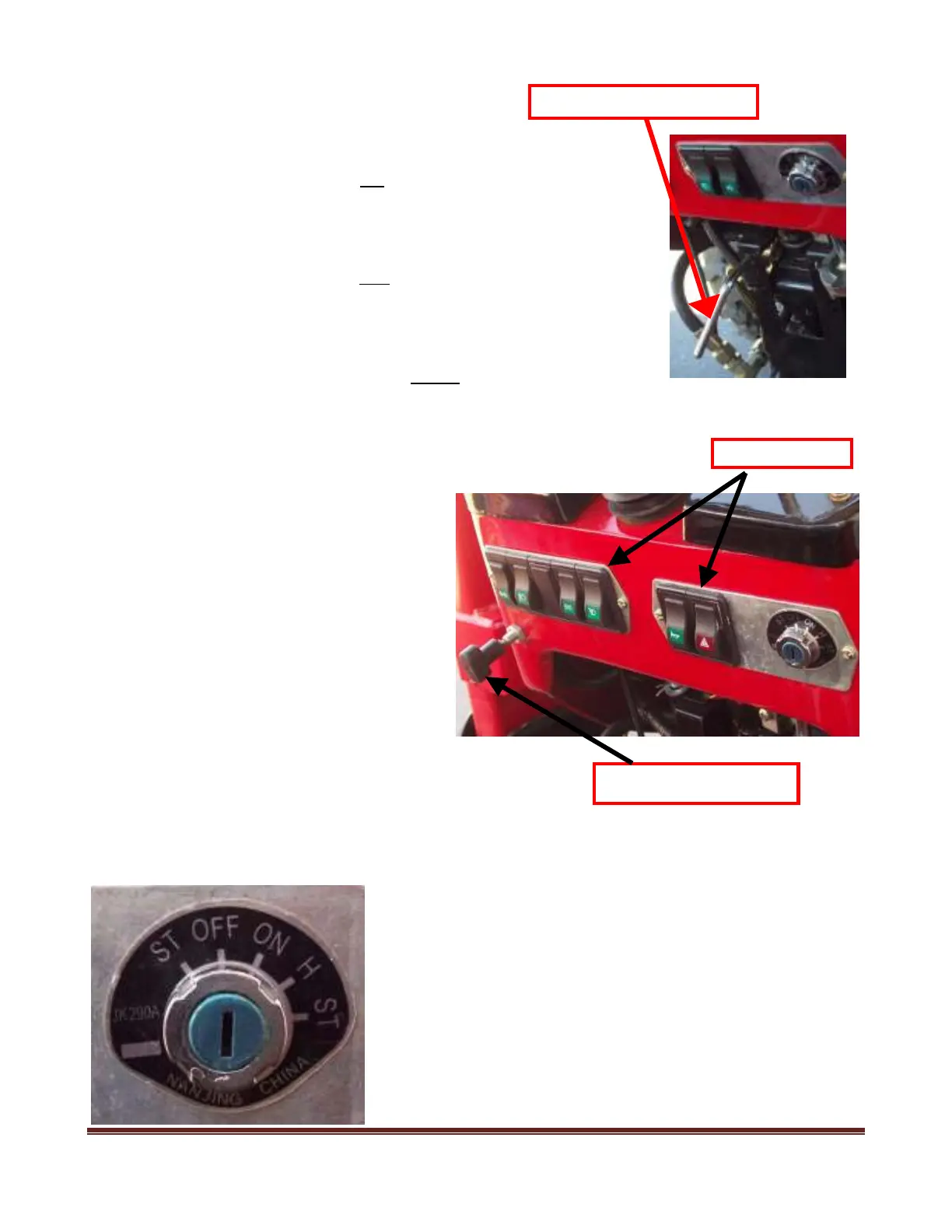
7) Decompression Lever (Decompressing lever in the Jinma manual):
(Note: This Decompression lever does not
exist on tractor models which have the
“Shuttle Shift” feature.) This lever is located below the switch panel. This lever
can be used to reduce (decompress) the pressure in the engine cylinders and make
starting easier in cold weather or if you have a weak battery. It can also be used to
turn the engine crankshaft and lubricate an engine which has not been started in a
while. The Decompression lever can only be turned clockwise. See the starting
section on how this lever is used.
8) Fuel “Cut-Off” Handle (Extinguishing lever in the Jinma manual):
Pulling this “Cut-Off” Handle (attached to a cable) stops the flow of diesel fuel to
the engine and stops the engine. This is the ONLY way to turn off the engine.
When starting the engine this Handle/cable needs to be fully pushed in to allow diesel fuel to go to the engine.
(Note: There are several different variations of the switches and switch panel. As
each switch has a “pictograph” of its function, you should be able to easily figure out
the function of each switch with a little trial and error.)
9) Work Light switch: This turns on/off the
rear work light.
10) Turn Signal switches: There are one or
two Turn Signal switches
11) Horn control: There are two ways to honk
the horn. The horn switch on the switch panel will
activate the horn. You can also push the center of
the Steering Wheel.
17) Headlight Switch: This Switch turns on
and off the headlights.
A) Dash Light Switch: This turns on/off the dash lights.
B) Hazard Light Switch: This activates the hazard lights (flashing both sides). Some older models use left
and right turn signals ‘On” to accomplish this.
18) Starting Switch: This switch has 5 Positions. The straight-up
position is “Off.” The key can be inserted and removed when the
switch is at “Off.” The left position is for Start, but is not normally
used. The first position to the right is the “ON” position and allows
current to the engine and accessories; when the tractor is operating the
key should be in the “ON” position. Switch positions to the clockwise
(right) of “ON” are momentary positions (e.g., the key returns to
“ON” when the key is released). The position to the right of “ON”
(Position “H”) is an interim position which is used to send electricity
to the Glow Plugs. The final position to the right is the ST (start)
position and used for starting the tractor. The switch returns to the
“ON” position automatically after the switch is turned right for
Fuel “Cut-Off” Handle



 To Next Page