
 Need help?
Do you have a question about the JJRC CADY WIDA R2 and is the answer not in the manual?
Details core robot functions including movement, gesture sensing, programming, and entertainment features.
Describes gesture control, patrol, obstacle avoidance, and automatic performance modes.
Covers model, dimensions, battery, charging, working time, and age recommendation.
Includes package size, weight, and lists included accessories like the robot, remote, and cable.
Explains how the robot can be programmed to execute user-created movement sequences.
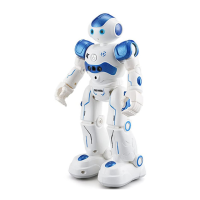
Identifies key components such as LED eye lights, gesture sensor, flexible arms, and sliding wheels.
Provides instructions on connecting the USB charging cable to charge the robot.
The JJR/C R2 CADY WIDA Intelligent Programming Gesture Control Robot is a versatile and interactive toy designed to provide entertainment and educational value through its various functions and programming capabilities. This robot offers a range of movements, interactive features, and intelligent programming options, making it suitable for users who enjoy remote-controlled devices and basic robotics.
The robot is equipped with multiple functions that allow for diverse interactions. It can perform basic locomotion, including sliding forward/backward and walking forward/backward. Additionally, it can turn left/turn right, providing directional control. A key feature is its gesture sensor, which enables the robot to react to simple hand gestures with basic movements and accompanying sound effects. This gesture control adds an intuitive and engaging layer to its operation.
Beyond basic movements, the robot is designed for entertainment with its dance and sing capabilities. It can perform pre-programmed routines that combine music and movement, offering a dynamic display. For more practical applications, it includes a patrol and obstacle avoidance function. In this mode, the robot actively scans its environment, and upon detecting an obstacle, it will issue a reminder message, then move backward and turn either left or right to navigate around the obstruction. This demonstrates a basic level of autonomous navigation.
The robot also features intelligent programming, allowing users to create custom movement sequences. This function encourages creativity and problem-solving as users can program the robot to carry out specific actions they design. An auto display mode is available, where the robot showcases its various functions automatically. It also incorporates mechanical language and adjustable volume settings, enhancing its interactive and customizable nature.
Operating the JJR/C R2 CADY WIDA robot is designed to be user-friendly, with several features that enhance the overall experience. The gesture control is a primary usage feature, allowing for direct and intuitive interaction. By simply moving a hand, users can command the robot to perform actions like moving forward, backward, or turning, accompanied by sound effects that provide immediate feedback. This makes controlling the robot accessible even for younger users.
The intelligent programming feature is a significant aspect of its usage. Users can enter a programming mode and sequence various movements, turns, and actions. Once programmed, the robot will execute these commands in the order they were set, providing a hands-on introduction to basic coding concepts. This feature promotes logical thinking and allows for personalized play scenarios.
The patrol and obstacle avoidance function offers a semi-autonomous mode of operation. When activated, the robot will move around independently, using its sensors to detect and avoid obstacles. This can be particularly engaging as users watch the robot navigate its environment, reacting to changes in its path. The robot's ability to deliver messages as reminders when encountering obstacles adds to its interactive personality.
For entertainment, the dance and sing functions are easily activated, allowing the robot to perform pre-set routines. This can be a fun way to showcase the robot's capabilities to others. The auto display function provides a quick demonstration of all the robot's features without requiring constant user input, making it convenient for initial setup or for simply observing its range of actions.
The robot is controlled via a remote controller, which provides a more traditional method of command input. This allows for precise control over its movements and functions, complementing the gesture control option. The remote includes buttons for various actions, ensuring that all features are easily accessible.
The design of the robot includes LED eye lights that illuminate, adding to its expressive appearance. It also features flexible arms and flexible fingers, which contribute to its overall articulation and visual appeal, even if these are primarily aesthetic rather than functional for complex grasping. The surround loudspeaker ensures that sound effects, music, and mechanical language are clearly audible, enhancing the immersive experience. The sliding wheels at the bottom enable smooth movement across various surfaces, contributing to its agility and obstacle avoidance capabilities.
While the manual does not explicitly detail extensive maintenance procedures, some aspects can be inferred from the provided information. The robot is powered by a rechargeable lithium battery, which is included. This means that regular charging is a primary maintenance activity. The robot comes with a USB charging cable, which connects to the robot at one end and a USB charging interface (such as a computer port or wall adapter) at the other. This ensures convenient and widely compatible charging.
The remote controller requires AA batteries, which are not included. Therefore, periodic replacement of these batteries will be necessary to maintain remote control functionality. Users should ensure they have a supply of AA batteries on hand.
Given that the robot is an electronic toy with moving parts, general care practices would apply. This includes keeping the robot clean and free from dust or debris that could interfere with its sensors or moving components. Avoiding harsh impacts or drops would also be crucial to prevent damage to its internal mechanisms or external casing. The flexible arms and flexible fingers, while robust for play, should be handled with care to prevent undue stress on their joints.
The gesture sensor and other external sensors should be kept clean to ensure optimal performance in detecting gestures and obstacles. Any obstruction on these sensors could impair the robot's ability to react correctly. The sliding wheels should also be checked periodically for any hair or debris that might accumulate and hinder smooth movement.
The manual itself serves as a maintenance resource, providing instructions on how to operate the robot and troubleshoot basic issues. Users should refer to the manual for guidance on proper usage and care to maximize the robot's lifespan and functionality. The product is designed for an age level of "above 3 years old," suggesting a certain level of durability for typical child's play, but responsible handling is always recommended.
 General
| Name | JJRC CADY WIDA R2 |
|---|---|
| Brand | JJRC |
| Category | Robotics |
| Type | Intelligent Robot |
| Charging Time | About 60 minutes |
| Playing Time | About 60 minutes |
| Functions | singing, dancing, programming |
| Control | Remote control, gesture sensing |
| Remote Control Distance | About 10 meters |
| Material | ABS |
| Recommended Age | 6 years and up |

 To Next Page