2
CellTap 4C Wireless Phone Audio Tap
Conguration
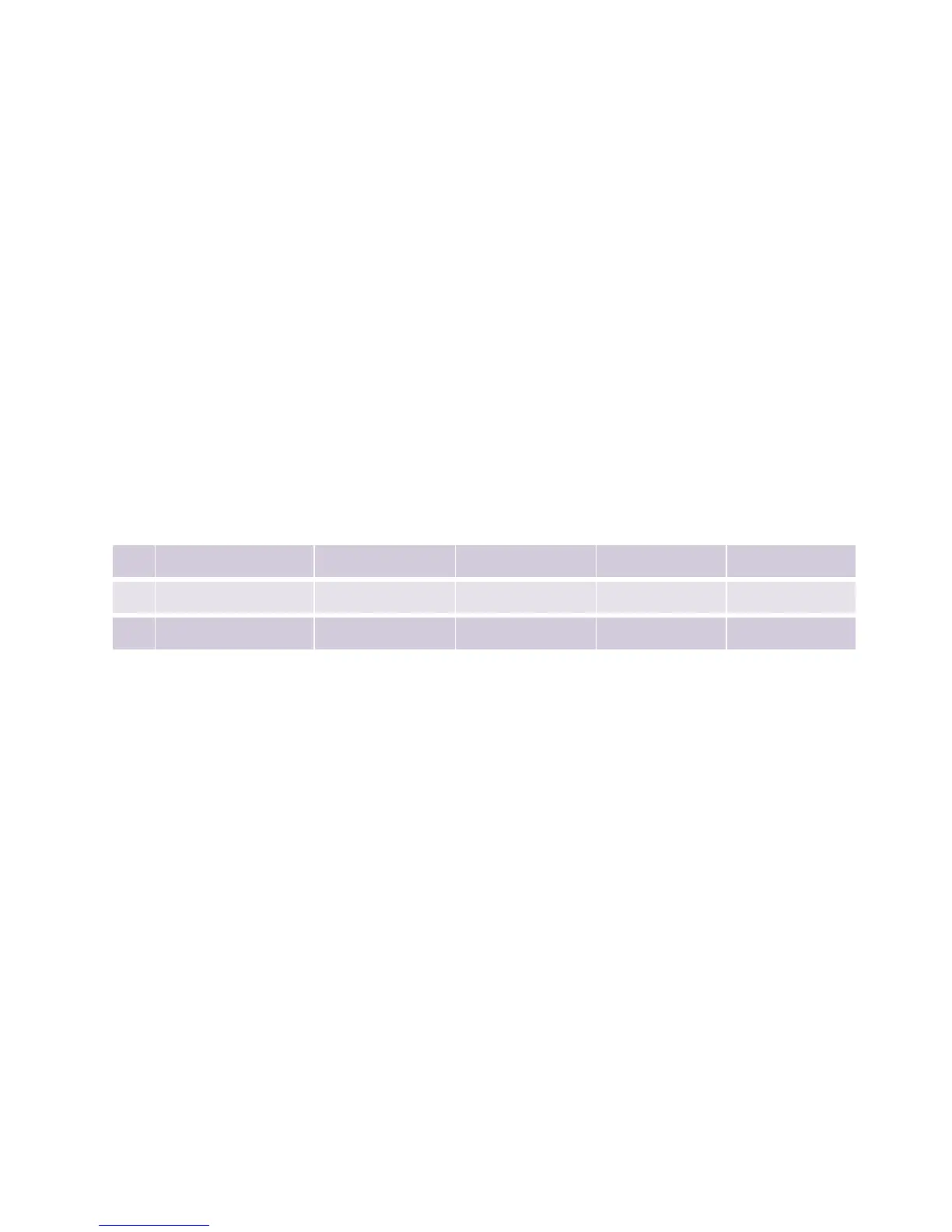
TRRS Congurations
If the headset is not working properly, try changing the TRRS conguration. To
switch the standard, disconnect all cables, open up your CellTap 4C by removing
the cover, ip the switch and close it back up. The internal switch supports the
following wiring standards:
Standard T R1 R2 S
A:
OMTP Left Output Right Output Mic Ground
B:
AHJ (Default) Left Output Right Output Ground Mic
C:
AHJ (Alternate) Left Output Right Output Ground Mic
OMTP: Open Mobile Terminal Platform, AHJ: American Headset Jack.
The A setting is wired for the Original Nokia standard. The B and C settings are
wired the same and are used on most phones. The C setting reduces noise on
many Smartphones. However, this position may potentially disable music/phone
controls on the iPhone and other phones. Use (default) Position B for the iPhone
or any phone or device that experiences trouble with music/phone controls under
position C.
Phones are continuously changing so trial and error may be the best method to
determine which position is best for your particular phone.



 To Next Page