EasyManua.ls Logo

JK Audio CellTap - User Manual

JK Audio CellTap
8 pages
Print Icon
To Next Page IconTo Next Page
Loading...
CellTap
Wireless TelephoneTap
JK Audio
User Guide
Question and Answer IconNeed help?

Do you have a question about the JK Audio CellTap and is the answer not in the manual?

Summary

Product Description

Device Operation

Group Listen Feature

Enables conference calling by connecting a speaker to the audio output jack for shared listening.

Phone Compatibility and Adapters

Details compatibility requirements for cell phones, including adapters for Nokia and Nextel service limitations.

Sidetone and Recording Limitations

Explains how phone design affects recording your own voice and how to test for sidetone.

Technical Specifications

Audio Output Details

Specifies connector type, output impedance, level, and isolation for the audio output.

Headset Jack Specifications

Details the connector type and conductor count for the device's headset jack.

Wireless Phone Jack Information

Provides details on the connector type and cable length for the wireless phone connection.

Frequently Asked Questions

CellTap Compatibility

Addresses compatibility requirements for cell phones and third-party earpieces.

Recording Handheld Phone Conversations

Explains why recording conversations directly on handheld phones is usually not possible.

Adapters for Phones Without Headset Jacks

Advises on using adapters for phones lacking a standard 2.5 mm headset jack.

Troubleshooting Recording Issues

Addresses issues where only incoming audio is recorded due to missing sidetone.

Product Warranty Information

Summary

Product Description

Device Operation

Group Listen Feature

Enables conference calling by connecting a speaker to the audio output jack for shared listening.

Phone Compatibility and Adapters

Details compatibility requirements for cell phones, including adapters for Nokia and Nextel service limitations.

Sidetone and Recording Limitations

Explains how phone design affects recording your own voice and how to test for sidetone.

Technical Specifications

Audio Output Details

Specifies connector type, output impedance, level, and isolation for the audio output.

Headset Jack Specifications

Details the connector type and conductor count for the device's headset jack.

Wireless Phone Jack Information

Provides details on the connector type and cable length for the wireless phone connection.

Frequently Asked Questions

CellTap Compatibility

Addresses compatibility requirements for cell phones and third-party earpieces.

Recording Handheld Phone Conversations

Explains why recording conversations directly on handheld phones is usually not possible.

Adapters for Phones Without Headset Jacks

Advises on using adapters for phones lacking a standard 2.5 mm headset jack.

Troubleshooting Recording Issues

Addresses issues where only incoming audio is recorded due to missing sidetone.

Product Warranty Information

Overview

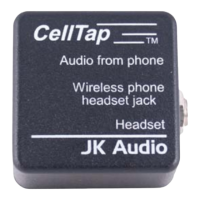
The CellTap Wireless Telephone Tap is a passive device designed to record or monitor conversations from a cell phone's headset jack. It requires no external AC power or batteries.

Function Description:

The primary function of the CellTap is to provide an audio output of both sides of a cell phone conversation. It acts as an intermediary between the cell phone's headset jack and an earpiece/headset, while simultaneously providing an audio output for recording or group listening. The device is designed to work with any cell or wireless phone that accepts a third-party earpiece or headset, although compatibility is not guaranteed due to the lack of industry standards for this connection.

Important Technical Specifications:

  • Audio Output:
    • Connector: 3.5mm Mono Jack
    • Output Impedance: 600 ohms
    • Level: 100 mV RMS
    • Isolation: 1500 VRMS
  • Headset Jack:
    • Connector: 2.5mm Micro Jack, 3 conductor
  • Wireless Phone Jack:
    • Connector: 1/4" - 3 conductor (a 36" cable is provided, converting 1/4" 3 conductor to 2.5 mm 3 conductor)
  • Power: Passive device, no AC or battery power needed.
  • Compatibility: Not Bluetooth compatible.

Usage Features:

  • Connection: The CellTap connects between the cell phone's 2.5 mm earpiece jack and your earpiece or headset. A tape recorder or powered speakers can then be connected to the 3.5 mm mini jack on the CellTap to capture or monitor the audio.
  • Recording Conversations: The audio output from the CellTap contains a mix of both sides of the conversation, allowing for recording.
  • Group Listen/Conferencing: By connecting a powered speaker to the audio output jack, the CellTap enables a "Group Listen" feature. Everyone in the room can hear the conversation, but only the person wearing the headset can speak to the distant party. This offers a conferencing capability without being a traditional speakerphone.
  • Phone Compatibility:
    • Any cellular phone with a 2.5mm 3 conductor headset jack will connect directly.
    • Most Nokia phones require a headset adapter to convert their proprietary headset jack to a standard 2.5mm 3 conductor headset jack. Nokia phones with a 2.5mm 4 conductor headset jack also require an adapter.
    • Wireless phones using Nextel service are not recommended due to excessive RF noise.
  • Sidetone Consideration: Many cell phones do not provide "sidetone," which is the user's own audio at the headset jack. If a phone lacks sidetone, recordings will only contain the caller's audio, not the user's. The CellTap cannot overcome this phone design limitation. Users can test for sidetone by connecting their headset directly to the phone, making a call, and listening for their own voice in the earpiece while speaking.
  • Adapter Availability: If a phone does not have a 2.5 mm earpiece/headset jack, many phone manufacturers sell adapters to allow connection of a 2.5 mm plug. These adapters can often be found where the phone was purchased, in electronics stores, or online.

Maintenance Features:

  • RF Noise Management: Wireless phones generate substantial radio frequency (RF) noise during calls. To prevent this noise from leaking into audio cables or equipment, it is important to keep the wireless phone one to two feet away from any audio cables or equipment. Additionally, the wireless adapter cord should be kept away from other audio cords.
  • Warranty: The CellTap is covered by a 2-year warranty against defective workmanship and materials. If repair is needed, users must contact JK Audio for authorization before shipping the device. Shipping to JK Audio is at the user's expense, while return shipping (UPS ground) is covered by JK Audio. The warranty does not cover defects caused by misuse, weather conditions, or other causes, except for defective workmanship or materials. No expressed or implied warranties extend beyond the stated warranty.

JK Audio CellTap Specifications

General IconGeneral
BrandJK Audio
ModelCellTap
CategoryCell Phone Accessories
LanguageEnglish

Related product manuals