JK Smart BMS JK-B1A8S20P/JK-B2A8S20P User Manual
(charger voltage is 5V higher than the battery voltage), i.e., after the battery assembly is
completed, the charger needs to be connected to make the BMS power on and work.
5.3 APP APP operation instructions
5.3.1 Connect to BMS and set password
a) Connect to BMS
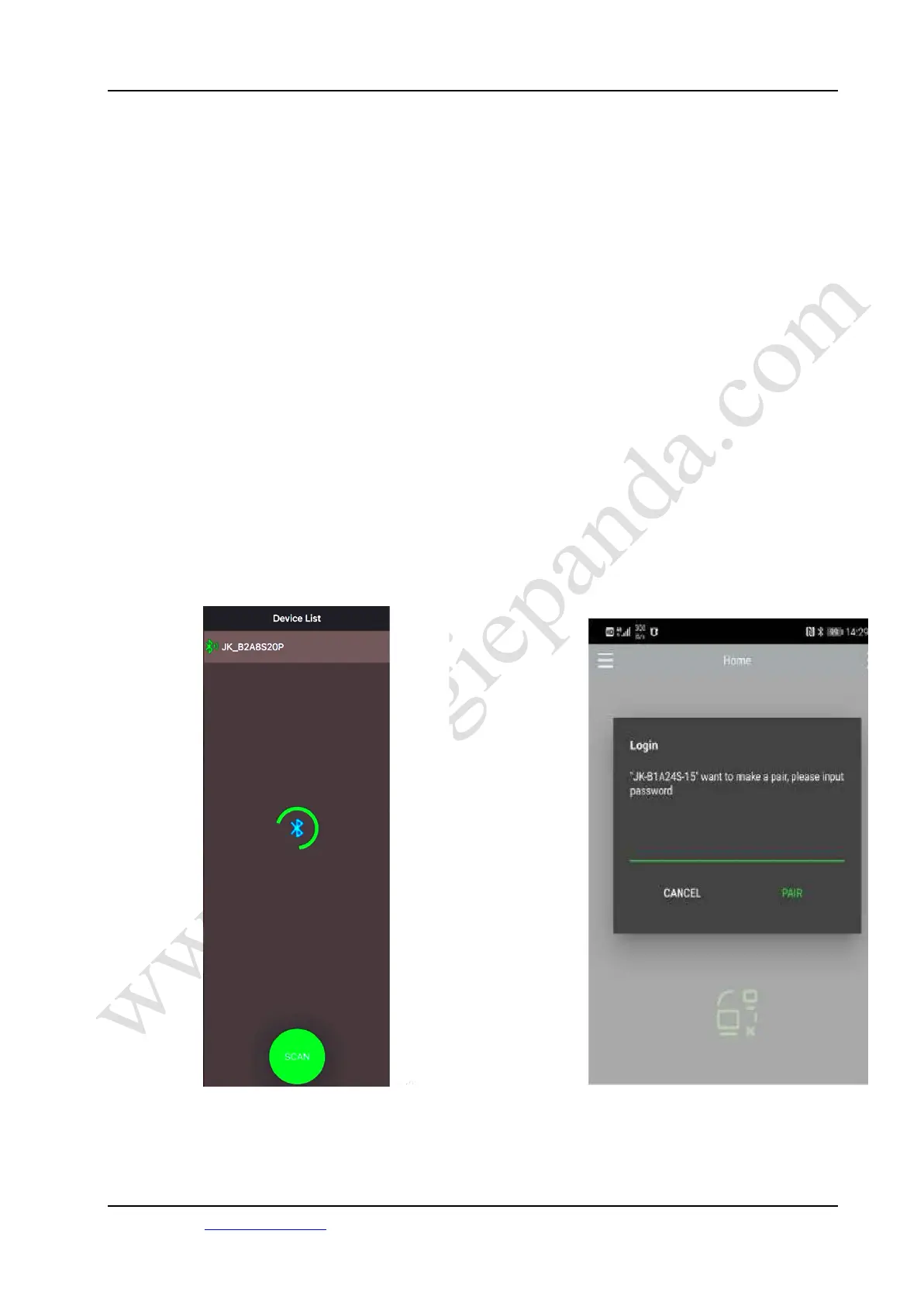
Firstly, turn on the Bluetooth on your phone, then open the app as shown in Figure
7. Click the icon on the top left corner to scan the device, wait until the scanning is
finished, then click the name of the device you need to connect, such as "JK-
B2A8S20P". When you connect for the first time, the APP will prompt you to
input the password, the default password of the device is "1234" (the password of
the setting parameter is "123456").
The APP will automatically record the password after the device is connected, so
you don't need to enter the password for the next connection, and the device will be
connected automatically after the APP is opened.
The password input interface is shown in Figure 8.
Figure 7 Scan Device Figure 8 Enter Password
11 /22
Energiepanda.com, providing you with quality accessories for DIY batteries.



 To Next Page