EasyManua.ls Logo

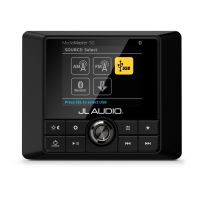
JL Audio MediaMaster 50 - User Manual

JL Audio MediaMaster 50
20 pages
Print Icon
To Next Page IconTo Next Page
Loading...
Thank you for purchasing a JL Audio MediaMaste
Source Unit for your sound system.
This product has been designed and manufactured to exacting
standards in order to deliver years of musical enjoyment. For maximum
performance, we highly recommend that you have your MM50 installed
by an authorized JL Audio dealer. Your authorized dealer has the
training, expertise and installation equipment to ensure optimum
performance from this product. Due to the complexity of modern
vehicle systems, we do not recommend self-installation unless you have
extensive experience in automotive and marine electrical systems.
Should you decide to install this product yourself, please take the time to
read this manual thoroughly to familiarize yourself with its installation
requirements and setup procedures.
If you have any questions regarding the instructions in this manual or
any aspect of the products operation, please contact your authorized
JL Audio dealer for assistance. If you need further assistance, please contact
the JL Audio Technical Support Department at technical@jlaudio.com
or call (954) 4431100 during business hours.
OWNER’S MANUAL

Questions and Answers

  • D
    Derek BryantJul 27, 2025
    What to do if there is no sound from my JL Audio MediaMaster 50?
    • D
      Donna DunlapJul 28, 2025
      If you're experiencing no or low sound from a specific zone or all zones on your JL Audio Receiver, first, verify that Mute is not activated by pressing or pressing and holding the knob from the Audio Zone Levels screen. Also, check the Audio Zone Levels screen or Audio Zone Setup menu settings to ensure the volume or zone level isn't turned down or disabled.
  • M
    Michael CantuAug 2, 2025
    How to fix a JL Audio MediaMaster 50 Receiver that doesn't turn on?
    • N
      Nicole StanleyAug 2, 2025
      If your JL Audio Receiver doesn't turn on, the issue might be a faulty fuse or poor connection integrity. Start by removing the fuse and checking it with a continuity meter, replacing it if necessary. Next, inspect the Ground and +12VDC connections for pinched wires and ensure all connections are tight.
  • R
    Richard CarterAug 8, 2025
    Why aren't the amps turning on in my JL Audio Receiver?
    • D
      Danny PearsonAug 8, 2025
      If the amps are not turning on in your JL Audio Receiver, the cause might be poor connection integrity. Check the 'Amp Turn-On' connections for pinched wires and make sure the connections are tight.
  • D
    Daniel SchmidtAug 14, 2025
    Why is the USB connection not working or charging on my JL Audio MediaMaster 50?
    • M
      Michael ParkAug 14, 2025
      If the USB connection is not working or charging on your JL Audio Receiver, the issue might stem from poor connection integrity. Inspect the USB cable for pinched wires and ensure all connections are secure.
  • M
    Mrs. Tammy Collins MDAug 20, 2025
    What to do if my JL Audio MediaMaster 50 has no tuner reception?
    • M
      Mark MccallAug 20, 2025
      If you're experiencing no or poor tuner reception with your JL Audio Receiver, the problem might be poor connection integrity. Check the antenna cable for pinched wires and ensure tight connections.

Summary

Safety Considerations

Mounting and Installation

Mounting Procedure

Step-by-step guide for mounting the unit into a fiberglass panel.

Installation Safety Precautions

Important warnings to follow before drilling or cutting for installation.

General Connections

Wiring Harness Connections

Explains connections for speakers, amplifiers, and media devices.

Power and Speaker Connections

Details connecting the unit to power, zones, and speakers.

General Control Functions

Bluetooth Audio

Pairing and Connecting Devices

Guide to wirelessly connecting a Bluetooth-compatible device.

Connecting USB Devices

Connecting an iPhone

iPhone Connection Procedure

Connecting an iPhone using a Lightning to USB cable.

System Settings Main Menu

Audio Zone Setup

Zone Configuration Options

Settings for Level Control, Max Volume Limit, Rename Zone, and Tone Control.

Subwoofer Zone Settings

Specific configurations available for the subwoofer zone.

Tone Control Mode

Tone, Balance & Crossover Settings

Configuring tone, balance, and HP crossover for audio zones.

Troubleshooting

Specifications

JL Audio MediaMaster 50 Specifications

General IconGeneral
BrandJL Audio
ModelMediaMaster 50
CategoryReceiver
LanguageEnglish

Videos

How to Connect Your iPhone to JL Audio MediaMaster 50 Easily