EasyManua.ls Logo

JLab Audio CRASHER SLIM - User Manual

JLab Audio CRASHER SLIM
2 pages
Print Icon
To Next Page IconTo Next Page
Loading...
CHARGING
Note: For optimum performance, charge
overnight with Micro USB cable prior to using.
1 Before charging, it is recommended you turn
off the Crasher Slim.
2 Connect the Crasher Slim to your computer or
wall outlet using the provided Micro USB cable
and/or 5V power adaptor.
3 The indicator light on the side of the Crasher Slim
will turn red indicating charging is in progress.
When it turns off, charging is complete.
AUX IN USB IN
OR
ACCESSORIES
S
A
T
I
S
F
A
C
T
I
O
N
G
U
A
R
A
N
T
E
E
30
DAY
C
U
S
T
O
M
E
R
S
U
P
P
O
R
T
U
.
S
.
B
A
S
E
D
We love that you are rocking JLab Audio!
We take pride in our products and fully stand behind them.
CRASHER SLIM
SPEAKER
MICRO USB
CABLE
L
I
M
I
T
E
D
T
W
O
Y
E
A
R
The Crasher Slim will automatically
be in Bluetooth pairing mode upon
start up.
Light will blink blue on the side of
the speaker to indictate it is ready
to connect to your device.
Bluetooth
Crasher Slim
Settings
FIRST TIME SETUP: BLUETOOTH PAIRING
1
3
Press and hold the Power Button
for 8+ seconds.
Select “Crasher Slim” in your device settings.
The light will stay solid blue once connected.
Notes:
Bluetooth is a wireless radio technology, which means it is sensitive to objects between the speaker and the connected device.
The speaker is designed to be used within 33 feet (10 meters) of a connected device, with no major objects in between (walls, etc.).
Once successfully connected, the speaker will memorize your device and automatically pair when turned on in the future.
Only one device may be connected at a time. To pair a different device, first unpair the current one through its Bluetooth settings.
If for any reason Bluetooth connection is lost, manually reconnect your Bluetooth device.
2
Turn on Bluetooth in
your device settings.
Bluetooth
Settings
Charging
YOUR SATISFACTION IS GUARANTEED
You may exchange or return merchandise within 30 days of the purchase date.
Learn more at jlabaudio.com/guarantee
YOUR WARRANTY
You may register your product at jlabaudio.com/register. All warranty claims are subject to JLab Audio
authorization and at our sole discretion. Retain your proof of purchase to ensure warranty coverage.
CONTACT US
Reach out to us at support@jlabaudio.com or visit jlabaudio.com/contact
Question and Answer IconNeed help?

Do you have a question about the JLab Audio CRASHER SLIM and is the answer not in the manual?

Summary

First Time Setup: Bluetooth Pairing

Bluetooth Pairing Steps

Step-by-step guide to pairing the speaker with a Bluetooth device.

Connection Notes

Information on Bluetooth range, device memory, and connection limits.

Accessories and Charging

Micro USB Cable

The included cable for charging the speaker.

Charging the Speaker

Instructions for charging the Crasher Slim, including indicator light status.

Speaker Ports and Controls

Button Functions Overview

Detailed functions for power, volume, track, and playback control buttons.

Alternative Audio Input

Using the AUX In Port

Connect devices via a 3.5mm AUX cable for audio playback.

Speaker Performance Optimization

Speaker Burn-in Process

Recommended procedure to optimize speaker performance through break-in.

Important Cautions

Safety and Handling Guidelines

Crucial warnings for safe usage, environment, and disposal.

Overview

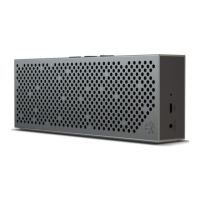
The JLab Audio Crasher Slim is a portable Bluetooth speaker designed for on-the-go audio. It offers a blend of wireless convenience, versatile connectivity, and robust support features, making it suitable for a variety of listening environments.

Function Description:

The Crasher Slim primarily functions as a wireless audio speaker, connecting to devices via Bluetooth for streaming music, podcasts, and other audio content. It also includes an AUX IN port, allowing for wired connections to devices that may not have Bluetooth capabilities. The speaker features integrated controls for power, Bluetooth pairing, play/pause, answering/hanging up calls, volume adjustment, and track navigation. A built-in microphone enables hands-free calling when connected to a smartphone. The device is designed for portability, indicated by its "Slim" designation, suggesting a compact and lightweight form factor.

Important Technical Specifications:

While specific technical specifications like frequency response, driver size, or battery capacity are not explicitly detailed in the provided manual, several operational aspects can be inferred:

  • Connectivity: Bluetooth wireless technology and a 3.5mm AUX IN port.
  • Wireless Range: The Bluetooth connection is sensitive to objects and is designed to be used within 33 feet (10 meters) of a connected device, ideally without major obstructions like walls.
  • Power: The device is powered by a rechargeable lithium battery, charged via a Micro USB cable. It requires a 5V power adaptor for wall charging.
  • Temperature: The maximum working temperature is 95°F/35°C.
  • Audio Priority: When both Bluetooth and AUX IN are connected, the Crasher Slim prioritizes AUX playback. It will revert to Bluetooth audio once the 3.5mm device is disconnected.

Usage Features:

  • First-Time Bluetooth Pairing:
    1. Press and hold the Power Button for 8+ seconds to turn on the speaker and initiate pairing mode.
    2. Turn on Bluetooth in your device settings.
    3. Select "Crasher Slim" from the list of available devices. The speaker's light will blink blue during pairing and turn solid blue once connected.
    • The Crasher Slim automatically enters Bluetooth pairing mode upon startup.
  • Automatic Reconnection: Once successfully connected, the speaker memorizes the device and automatically pairs with it in the future when turned on.
  • Single Device Connection: Only one device can be connected via Bluetooth at a time. To pair a different device, the current one must be unpaired through its Bluetooth settings.
  • Manual Reconnection: If the Bluetooth connection is lost, users can manually reconnect via their device's Bluetooth settings.
  • Controls:
    • Power ON/OFF: Press and hold for 2+ seconds.
    • Bluetooth Pairing: (See First Time Setup)
    • Play/Pause/Answer/Hang Up: Single click.
    • Volume -: Single click.
    • Track Back: Press and hold for 2+ seconds.
    • Volume +: Single click.
    • Track Forward: Press and hold for 2+ seconds.
  • AUX IN Function:
    • Connect a 3.5mm AUX cable (not included) from the audio output terminal of your device (e.g., mobile phone, computer, MP3 player) to the AUX IN port on the Crasher Slim.
    • The speaker will automatically switch to AUX playback if a wired connection is detected while Bluetooth is also active.
  • Charging:
    1. It is recommended to turn off the Crasher Slim before charging.
    2. Connect the provided Micro USB cable to the Crasher Slim and a computer or a 5V wall power adaptor.
    3. The indicator light on the side of the Crasher Slim will turn red during charging and turn off when charging is complete.
    • For optimum performance, it is recommended to charge the device overnight prior to first use.
  • Warm-Up (Burn-in):
    • JLab Audio recommends 40 hours of "burn-in" time for speakers to reach optimal performance. This process helps loosen the diaphragm of a new speaker and stress the speaker driver.
    • Users can burn-in their audio equipment using the JLab Audio app (available on App Store and Google Play) or by visiting jlabaudio.com/burnin.

Maintenance Features:

  • Warranty: JLab Audio offers a limited two-year warranty. Users can register their product at jlabaudio.com/register. All warranty claims require JLab Audio authorization and proof of purchase.
  • Satisfaction Guarantee: Merchandise can be exchanged or returned within 30 days of the purchase date. More information is available at jlabaudio.com/guarantee.
  • Customer Support: JLab Audio provides U.S.-based customer support. Users can contact them at support@jlabaudio.com or visit jlabaudio.com/contact.
  • General Cautions:
    • Listen at a suitable volume to prevent hearing and speaker system damage.
    • Store in a well-ventilated area.
    • Do not expose the speaker or accessories to rain, water drops, or moisture to reduce the risk of fire or electric shock.
    • Keep the unit away from open flames (e.g., fire, candles).
    • Avoid extreme heat, cold, and humidity.
    • Use only manufacturer-specified attachments/accessories.
    • Do not drop objects into the unit's openings.
    • Do not place heavy objects on the unit.
    • Ensure proper ventilation; do not cover or block slots and openings with cloth or other materials.
    • Battery Disposal: Lithium batteries are recyclable and should not be disposed of in normal household waste. Contact local government for disposal and recycling practices.

The Crasher Slim emphasizes user-friendly operation with its straightforward pairing process, intuitive controls, and versatile connectivity options. The inclusion of a burn-in recommendation highlights JLab Audio's focus on optimizing audio performance over time, while comprehensive warranty and support services underscore their commitment to customer satisfaction.

JLab Audio CRASHER SLIM Specifications

General IconGeneral
BrandJLab Audio
ModelCRASHER SLIM
CategorySpeakers
LanguageEnglish

Related product manuals