To Adrninistrator of F-2000
-1.t2
F 2000
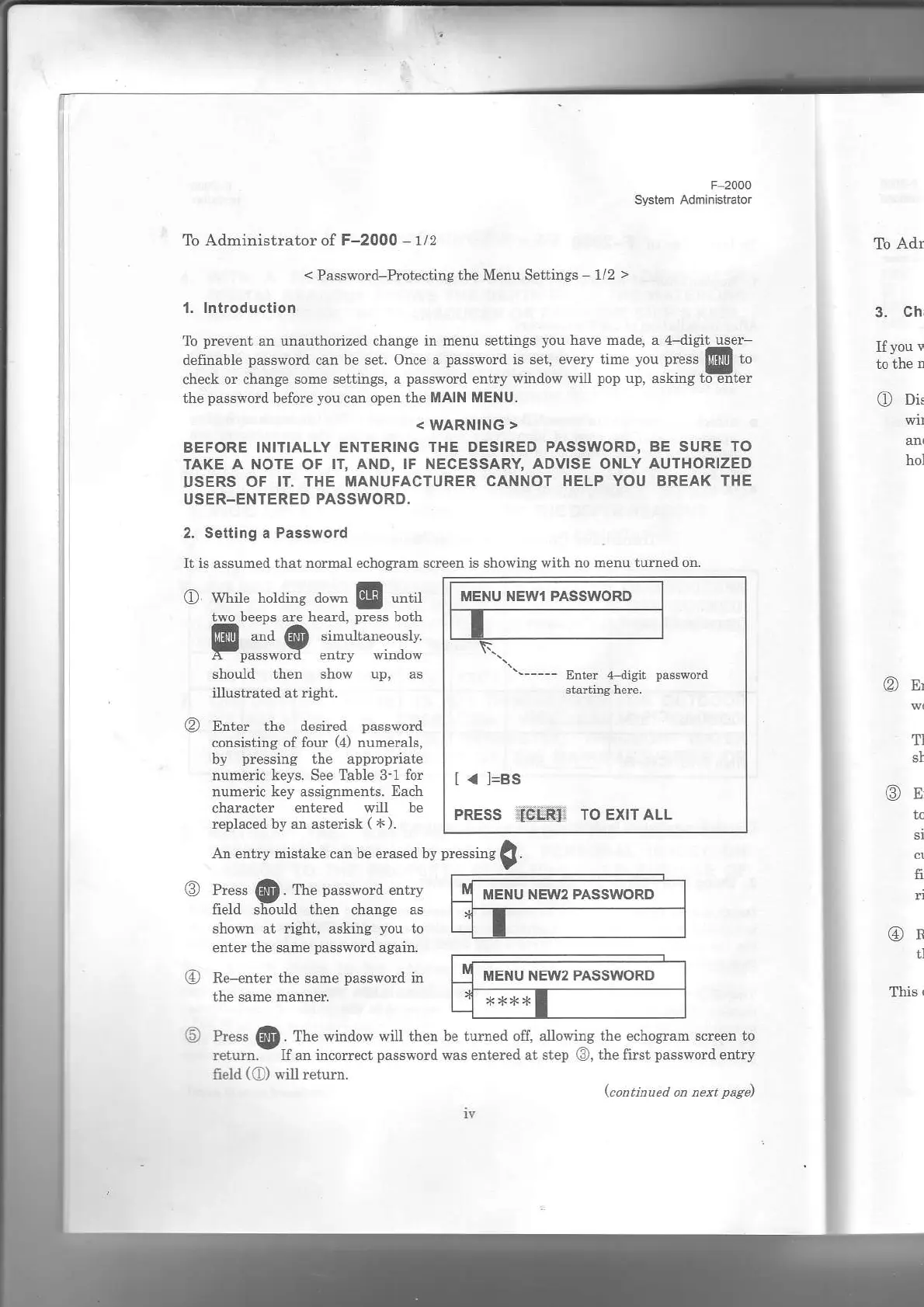
MENU NEWI PASSWORD
Erter l.ligli
paslword
l< l=ss
PRESS
i]ICi'F!]:
TO EXIT ALL
To Adn
<
Password-Prot€cting the Menu Settings
1/2
>
1. lntroduction
-.
p.F\pn
sl unau l-ori/'o, hans- in mpnu se|irss
vou ha'p nido..
d-d
r'it uspr
dp|'|1,b|'p'.'{ord.anbF.F'orc""p"..""-"":'
clech or.L".ep
sora.ar ing". J
p"sbsord
Fnrr) w:nd
wwi
pop
up. sskirg'o-41p,
the
password
before
you
can open
the MAIN MENU.
<
WARNING
>
BEFORE INITIALLY
ENTERING THE DESIRED PASSWORD. BE SURE
TO
TAKE
A NOTE
OF
IT, AND, IF NECESSARY, ADVISE ONLY
AUTHORIZED
USERS OF IT. THE MANUFACTURER
CANNOT HELP YOU BREAK
THE
USER-ENTERED PASSWORD.
2. Setting a Password
Ii is
assumed
ihat normal echosran sdeen is showing with
no menu iurned on.
3.
Chr
If
you
r
O
Di.
hol
O
wt'il" I'otai.g a"*
@
""t
two beeDs
are
hedd.
Dress
both
@
.*
@ ",'"i'"*.""r,
A
passworo
eNry
qnoow
should then show up. as
illustrated
at
right.
I
Enter the destued
password
consisting of four
(a)
numerals,
ly
pressing
the appropdate
nume{ic
keys.
See
Table 3-1 for
numedc key
assignhents.
Each
character entered
will be
replaced by d estedsk
(
*).
@s'
T}
@r,
fi,
d
@R
il
This
t
qJ
Frr"y
mic-'kp. sr 1".**a ly
p-""i"s
!.
@
cress
@
rhe
pa"s"ud
otry
Lnen
cnange
as
shown at right, asking
you
to
enter
the same
password
again.
G)
Re-enter
the
same
password
in
the sahe
hanner
P-.'@ lhF
"indo" "rU
ih"-
he,u"-"d ott dllo{ire
rhp
"choear
s.r
"n
LJ
r",ur . -I. I i..orp
r
pab"so.d
*dsFnterpd
r,
"rep
.,fa_
r.
pdss$o.o
pn'r)
field
(O)
s.il return.
lca,titued
at teat
page)
iv
MENU NEW2 PASSWORD
MENU NEW2
PASSWORD


 To Next Page
 Loading...