
EasyManua.ls Logo

jobmate 199-8594-6 - User Manual

jobmate 199-8594-6
25 pages
Print Icon
To Next Page IconTo Next Page
Loading...
Use and Care Guide
1-866-JOBMATE
(1-866-562-6283)
Contact us for assistance, we’re here to help.
Version no. 02
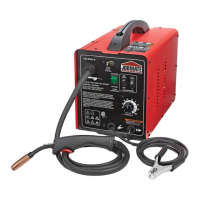
MIG/FLUX-CORE WIRE WELDER KIT
199-8594-6
1
2
WIRE FEED
ENTRAINEMENT
199-8594-6
SOUDEUSE A D VIDAGE
DE FIL- LECTRODE SOUS GAZ
MIG/FLUX-CORE WIRE FEED WELDER
INERTE OU A AME EN FLU
X
1
2
3
4
5
6
7
8
WARNIN
G/
AV
ERTIS
SEMENT
. Thi
s
we
l
der i
s
f
o
r
us
e
on
a
2
0 A
br
a
n
c
h
c
i
r
c
ui
t.
DO
N
OT RE
M
O
V
E
THI
S
LABEL
/
N’
E
N
L
E
VE
Z
PA
S C
ET
T
E
É
TI
Q
U
E
TT
E
.
2
29
6
83
. I
f c
o
nn
e
cted
t
o a ci
rcui
tp
rotec
te
d by
fus
es
, use
a t
i
me-d
el
a
y
e
d
fus
e
m
ar
ked
D
”.
. Ce
t
te
s
oudeu
se
r
e
qui
e
r
t
un ci
r
cui
t
d
e 20
A
.
. S
e
l
a
s
o
u
d
euse es
t
b
r
a
nc
e á
u
n c
i
r
cui
t pr
o
tégé
par f
u
si
b
l
e
s
, uti
l
is
e
z
un
f
usi
bl
e
tem
p
ori
mar
qu
é
<
<
D
>
>
.
Congratulations on the purchase of your new MIG/Flux-Core Wire Welder. In
order to ensure you have the best possible experience please read through the
following instructions. If you require any help please contact the customer
service department at:

Questions and Answers

  • B
    bfreemanAug 5, 2025
    What to do if my jobmate 199-8594-6 Welding System welder does not work?
    • L
      Lindsey ClineAug 5, 2025
      If your Jobmate Welding System welder isn't welding, several factors could be at play. First, ensure the power input is correct. Next, check the grounding to the workpiece to make sure there's adequate current at the output. Examine the output connection for any signs of poor connection. Also, make sure that the surfaces are clean. Finally, verify that you are using the correct welding wire.
  • B
    Breanna JordanAug 12, 2025
    Why does my jobmate 199-8594-6 Welding System not work when turned on?
    • R
      Randy AllenAug 12, 2025
      If your Jobmate Welding System isn't working when you turn it on, the issue could stem from a few things. Start by checking the circuit or fuse of the power supply to ensure there is power input. If that's not the problem, the power cord or plug might be broken and need replacement. The main switch itself could also be faulty, requiring replacement. In some cases, the transformer could be broken, which would also necessitate a replacement.
  • A
    Amy MckeeAug 20, 2025
    What to do if my Jobmate Welding System keeps blowing fuses?
    • C
      Craig GentryAug 20, 2025
      If the Jobmate Welding System repeatedly blows a fuse or trips the circuit breaker, verify that the fuse in the power supply is 20A.
  • C
    Cynthia QuinnAug 28, 2025
    How to fix inconsistent arc or wire feed on jobmate 199-8594-6?
    • M
      Megan KingAug 28, 2025
      To address inconsistent arc or wire feed on your Jobmate Welding System: * First, tighten the drive tension adjustor on the wire feeder, as there might not be enough drive roller pressure. * Next, adjust the wing nut on the spool holder, as the spool hub tension may be too tight or too loose. * Also, replace the contact tip, because it could be worn or the wrong size. * Finally, consider replacing the wire if it's rusty or corroded.

Summary

Quick Start Guide

Installing the Wire

Learn to install the welding wire correctly.

Setting Wire Tension

Adjust drive tension for smooth wire feeding.

Operation Basics

Basic steps for initiating welding and feed speed.

SAFETY ADVICE

Safety Alert Definitions

Explains DANGER, WARNING, CAUTION symbols and their meanings.

Key Safety Warnings

Lists critical safety precautions for electric shock, fumes, fire, burns, and explosion.

Environmental and Personal Safety

Covers protection from rain, arc rays, and personal safety during welding.

General Welding Safety Rules

Provides crucial rules for operators, including PPE and equipment checks.

IMPORTANT INFORMATION

Product Overview and Components

Describes the welder and its key components like switches, knobs, and cables.

Gas Connection and Selection

Instructions for connecting gas and selecting appropriate shielding gas.

Polarity Settings

Explains polarity configuration for flux-core and MIG welding.

Wire Drive Compartment

Details the components within the wire drive mechanism.

SCOPE OF DELIVERY

Unpacking Instructions

Warnings and procedures for safely unpacking the welder.

Included Parts List

Lists all items included in the welder kit.

KEY PARTS DIAGRAM

Component Identification

Identifies major components of the welder with a visual diagram.

ASSEMBLY INSTRUCTIONS

Installing the Handle

Step-by-step guide to attach the welder's handle.

Checking and Selecting Drive Roller

Procedures for inspecting and choosing the correct drive roller.

Pre-adjustments for Wire Feeding

Critical pre-operation checks and adjustments for the wire drive.

Setting Wire Spool Tension

How to adjust the spool tension for optimal wire feeding.

Setting the Wire Feed Speed

Process for adjusting the wire speed for proper operation.

Assembling the Welding Shield

Steps to assemble the protective hand-held welding shield.

OPERATING INSTRUCTIONS

Initial Setup and Controls

Covers tuning wire speed, overload button, and torch handling.

Welding Angles and Fine-Tuning

Explains welding angles and fine-tuning the arc for optimal performance.

Welding Techniques and Positions

Details stringer/weave beads, travel speed, and the flat welding position.

Advanced Positions and Passes

Covers horizontal, vertical, overhead positions and multi-pass welding.

Spot Welding Procedures

Details different spot welding methods and their operational steps.

Maintenance

Maintenance Schedule and Procedures

Outlines routine checks, cleaning, and storage recommendations.

TECHNICAL SPECIFICATIONS

Welder Specifications and Settings

Lists detailed technical data, settings, and dimensions of the welder.

Main Circuit Chart

Electrical Circuit Diagram

Provides a schematic diagram of the welder's main electrical circuits.

TROUBLESHOOTING

Common Problems and Solutions

Offers solutions for frequent issues like no power or arc problems.

WARRANTY

Warranty Terms and Limitations

Details the product's warranty terms, conditions, and limitations.

EXPLODED VIEW

Welder Component Diagram

Visual breakdown of the welder's components for identification.

PARTS LIST

Component Part Numbers

A comprehensive list of all replaceable parts with their corresponding numbers.

jobmate 199-8594-6 Specifications

General IconGeneral
Brandjobmate
Model199-8594-6
CategoryWelding System
LanguageEnglish