28
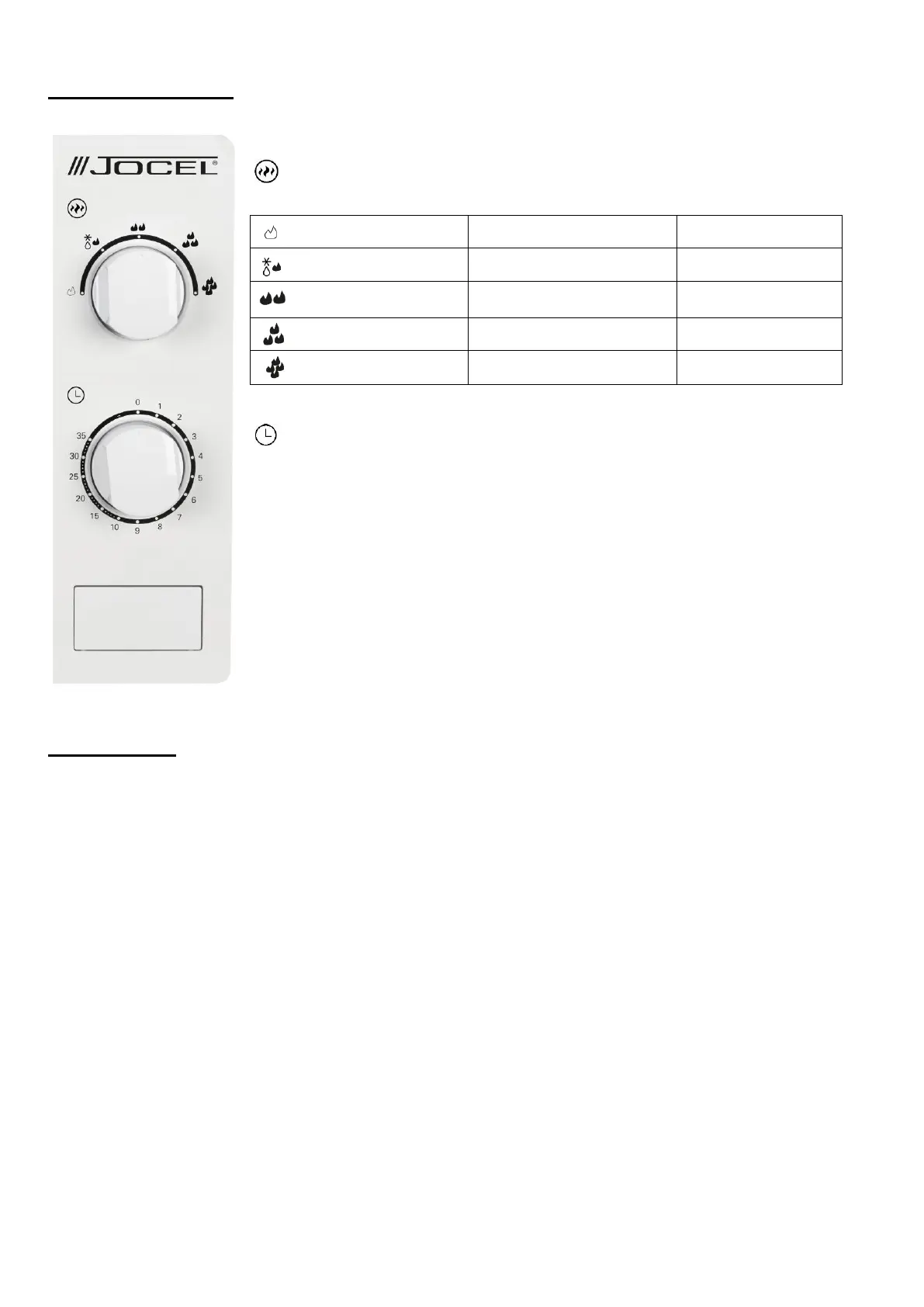
CONTROL PANEL
Function / Power knob
Timer
− The max cooking time length that can be set is 35 minutes.
− Each setting is 1 minute.
− A bell ring will be heard when the timer times out and returns to “0”
position.
OPERATION
1) Connect the cord.
-Before connecting the cord, make sure the timer is set to “0” position.
-Do not block the ventilation.
2) Place the food on the glass turntable and close the door.
- Food must be contained in a utensil.
3) Select the desired power level.
4) Set the timer If desired time is less than 10 minutes, turn the timer knob to over 10 minutes position and
then turn back to the desired time setting.
5) Once the desired time is set, the cooking begins. If pausing in between is needed, just open the door at
any time, and close it to resume operation.
6) When it times out and cooking ends, the microwave produces a bell ring, the inside lamp will also be
automatically turned off.
- If food is removed before time out, make sure to set back the timer to “0” position, this avoids the
microwave from operating in empty load.
- It is recommended to wear gloves when removing the cooked food from microwave.


 To Next Page