EasyManua.ls Logo

Joel Inspiration Cube - User Manual

Joel Inspiration Cube
2 pages
Print Icon
To Next Page IconTo Next Page
Loading...
Quick Start Guide:
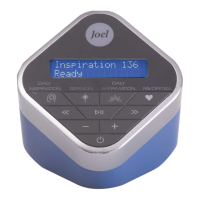
• Press the POWER button to turn on device.
• Set the DATE/TIME (Year / Month / Day / Hour /
Min / AM or PM) on your device before rst use.
1) Press and hold INSPIRATION button for
3 seconds to enter the Time Setting mode.
2) Use the REWIND (<<) and FORWARD (>>)
buttons to advance forward or backward.
Press the PLAY button to save your entry
and advance to the next setting.
• Press DAILY INSPIRATION, SERMON or DAILY
AFFIRMATION button to begin listening.
We recommend fully charging your audio device before using for the rst time and
keep charged for optimal listening experience.
Please note, your device should run 4 hours at full volume level before it needs
to be recharged.
NOTE: If your device ever loses a charge, you will need to set-up date and time to
correctly synchronize DAILY INSPIRATIONS and AFFIRMATIONS as they are
programmed to an automatic cycle. This is why it is recommended to set the
DATE/TIME before you begin listening to your device.
For complete operating instructions, please refer to the instruction manual
Question and Answer IconNeed help?

Do you have a question about the Joel Inspiration Cube and is the answer not in the manual?

Summary

Quick Start Guide

Charging and Initial Use

Recommendations for fully charging the device and its initial run time before recharging.

Setting Date and Time

Instructions for setting the device's date and time before first use.

Powering On the Device

How to turn on the audio device using the POWER button.

Starting Playback

How to begin listening to daily inspirations, sermons, or affirmations.

Quick Reference Guide for Buttons & Features

Power Button Functionality

How to turn the unit on and off by pressing and holding the POWER button.

Playback Control Buttons

Using PLAY/PAUSE, RWD/SKIP, and FWD/SKIP for audio playback and navigation.

Volume Adjustment

How to adjust the volume up or down using the respective buttons.

Content Selection Buttons

Functions of DAILY INSPIRATION, SERMON, and DAILY AFFIRMATION buttons.

Favorites Feature

Entering Favorites mode, tagging, and untagging messages as favorites.

Joel Inspiration Cube Specifications

General IconGeneral
BrandJoel
ModelInspiration Cube
CategoryMedia Player
LanguageEnglish