5
4
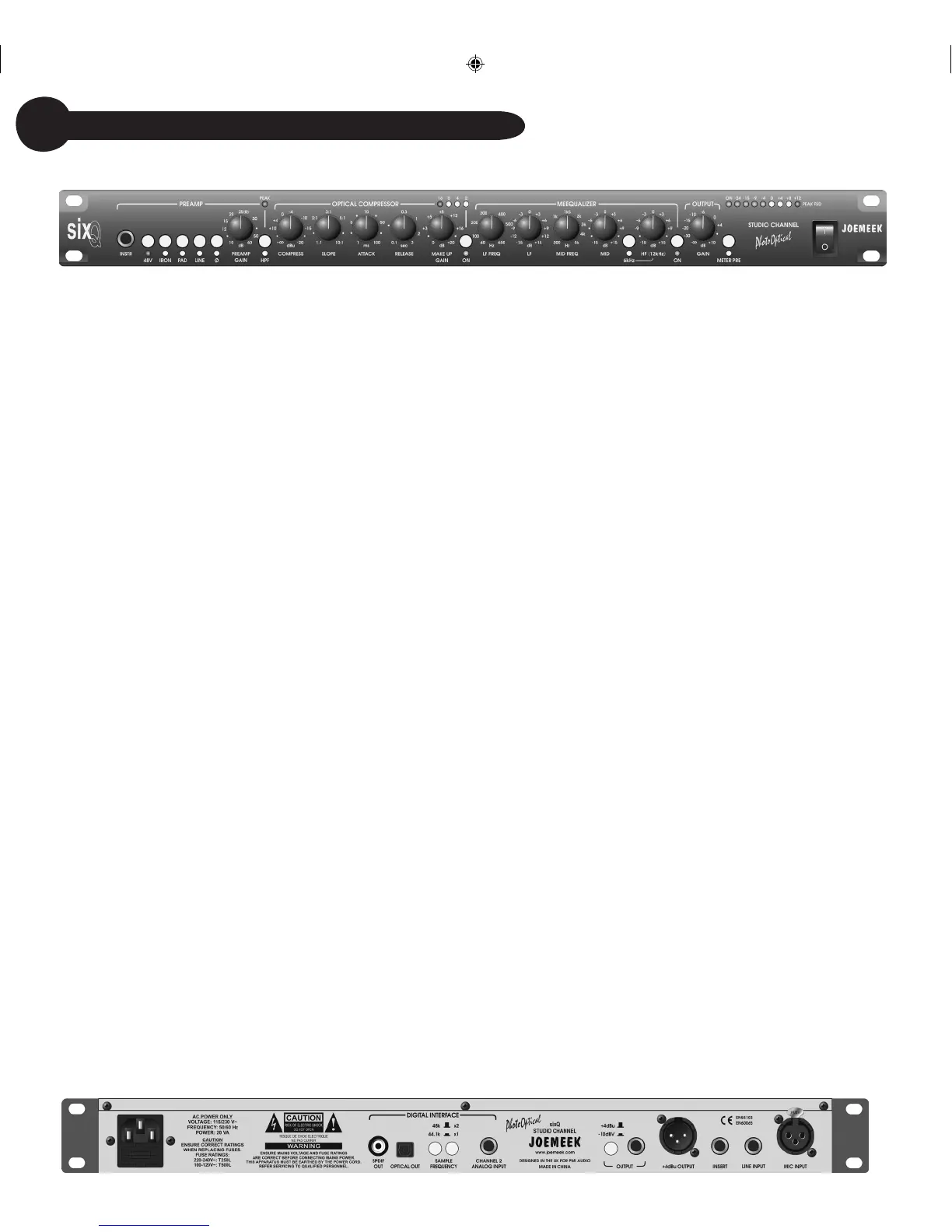
48V PHANTOM POWER switch - feeds 48V power to the microphone
XLR connector. Most condenser microphones require phantom power
to operate.
IRON switch - selects transformer coupling of the Mic (XLR) input. The
LED lights when active.
PAD switch - selects 20dB attenuation of the Mic (XLR) input. The LED
lights when active.
LINE switch - selects the Line and INSTRument (1/4” jack) inputs
instead of the Mic (XLR) input. The LED lights when active.
Ø switch - reverses the phase of all inputs.
INSTRument input – high impedance input. Plugging in here overrides
anything plugged into the Line input.
PREAMP GAIN - sets the amount of audio amplification. Too little gain
and the sound will be too quiet; too much and the signal could become
distorted.
PEAK LED - lights 6dB below clipping.
HPF - “high-pass filter”. Mainly for use with microphones, this helps
remove stage rumble, handling noise and “pops”. The LED lights when
active.
COMPRESS - sets the level of signal (or “Threshold”) above which the
signal starts to be compressed.
SLOPE - sets the compression ratio applied to signals above threshold.
ATTACK - sets how quickly the compressor responds to peaks above
threshold.
RELEASE - sets the time taken for the signal to return to its normal size
after compression. In general, the longer the time, the less obvious the
compression.
MAKE UP GAIN - restores the level of the signal after compression.
COMPRESSION METER - 4-Led bargraph indicates the amount of
gain reduction in dB, which is taking place at any given moment.
Compressor ON switch - turns the compressor on. The LED lights
when active.
LF - controls the volume of Low Frequencies or “Bass” in the audio
spectrum. 15dB of boost or cut is available at the selected frequency.
LF FREQ - sets the frequency at which the LF control operates,
anywhere from 40Hz to 650Hz.
MID - controls the Middle frequencies in the audio spectrum. 15dB of
boost or cut is available at the selected frequency.
MID FREQ - sets the frequency at which the MID control operates,
anywhere from 300Hz to 5kHz.
HF - controls the volume of the High Frequencies or “Treble” in the
audio spectrum. 15dB of boost or cut is available at the selected
frequency.
6kHz switch - sets the frequency at which the HF control operates,
in for 6kHz, out for 12KHz. The LED lights when in.
EQ ON switch - turns the Meequalizer on. The LED lights when active.
OUTPUT GAIN - the volume control or “Fader” for the output of the sixQ.
VU METER - 8-Led bargraph shows the output signal level in dB at
any given moment.
+4dBu/-10dBv switch - selects the operating level of the 1/4” jack
output, either to the professional +4dBu level, or to the -10dBv
semi-pro level.
sixQ Controls at a Glance


 To Next Page