9
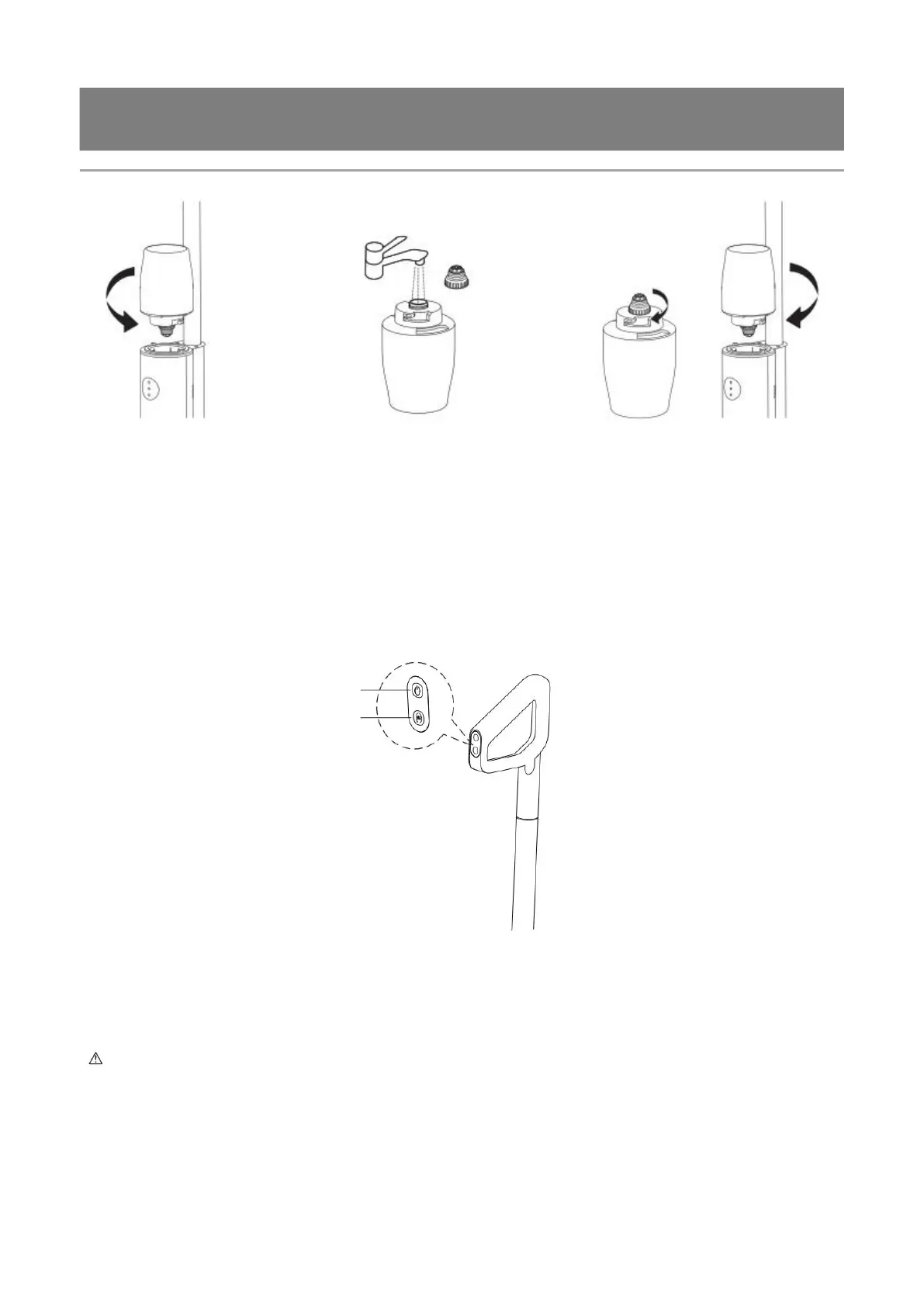
2) Fill water in the clean water tank
Remove the clean water
tank
Open the silicone stopper and fill with
water
Install clean water tank on the body
2. Start to work
1) Startup: Press the Power button after the product is fully charged to start the machine, and press this button
again to shut down the machine;
2) Mode switching: The AUTO (auto) mode is activated by default after startup. Press the Mode key to switch to
the MAX (powerful) mode. The two modes alternate in turn;
3) Self-cleaning: When the machine is charging, press the self-cleaning button once to activate the self-cleaning
function, and press this button again to deactivate the self-cleaning function; the machine enters the air drying
mode after self-cleaning;
ON/OFF key
Mode key/self-cleaning key
3. Cleaning after use
1) Self-cleaning of body pipes and roller brush
a. After use, please the machine into the charging base timely for charging, and press the self-cleaning button to
clean the machine automatically.
b. The machine enters the air drying mode after self-cleaning, and then enter the charging state at the next stage;
Tips: Ensure enough water is kept in the clean water tank before self-cleaning.



 To Next Page