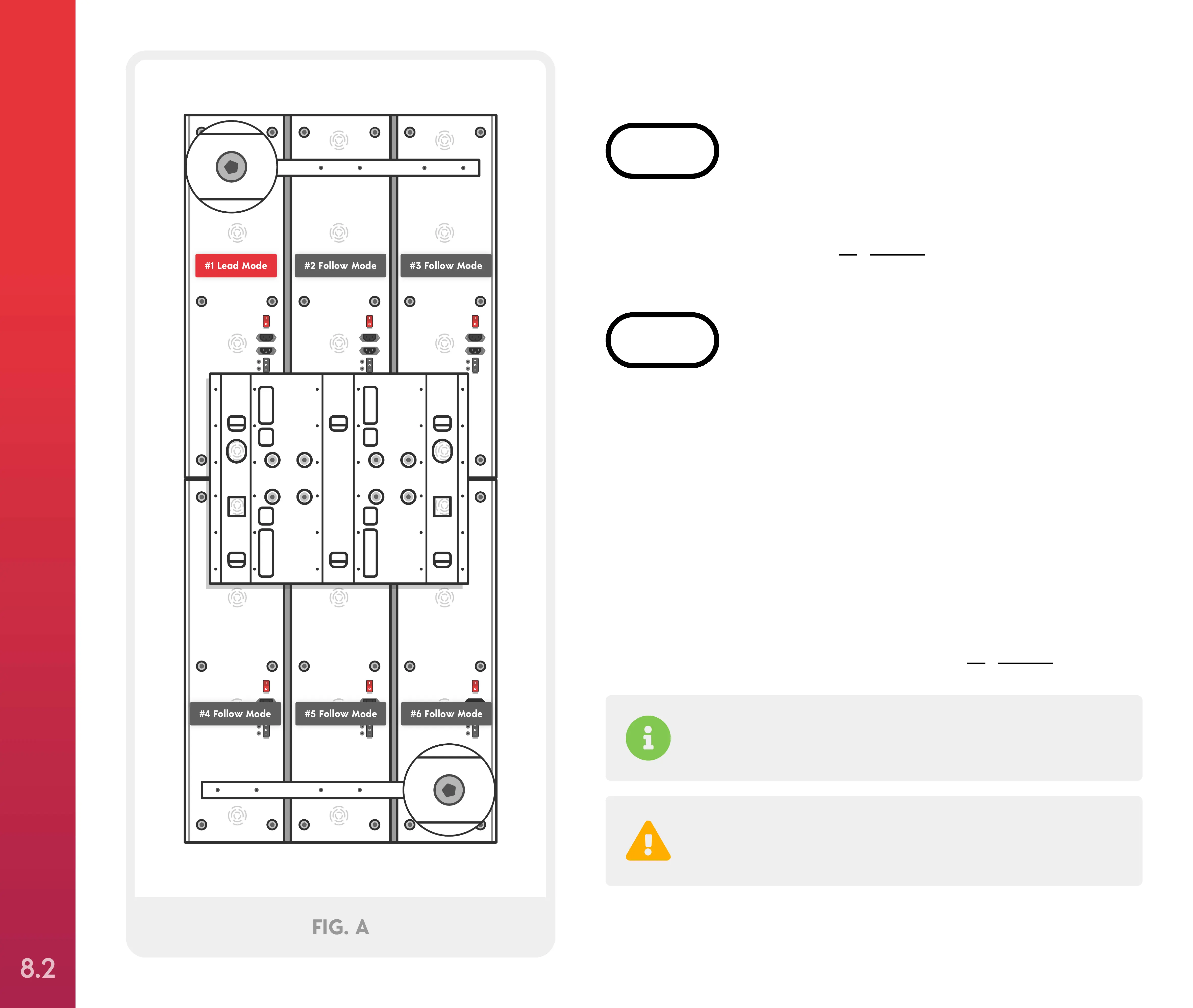
Place each Solo face down on a scratch-free surface
and align, as shown in Figure A.
STEP 1
Locate the Elite Bracket Kit, and place the Elite
bracket on top of the Solos aligning the bracket
holes with the corresponding holes on each device.
Attach the bracket using (36) M4x6mm Allen screws
and hand tighten using the included Allen wrench.
Next, place the connection bars across the top and
bottom of each Solo. Attach the bars using (12)
M4x6mm Allen screws and hand tighten using the
included Allen wrench, as shown in Figure A.
STEP 2
Your Joovv system comes with extra screws.
Do not use a drill to install the screws as this can
strip the threads.
#1 Lead Mode #2 Follow Mode #3 Follow Mode
#5 Follow Mode #6 Follow Mode#4 Follow Mode
FIG. A
Optional Mounting Systems
(2 people required)
SETTING UP YOUR JOOVV ELITE
8.2



 To Next Page