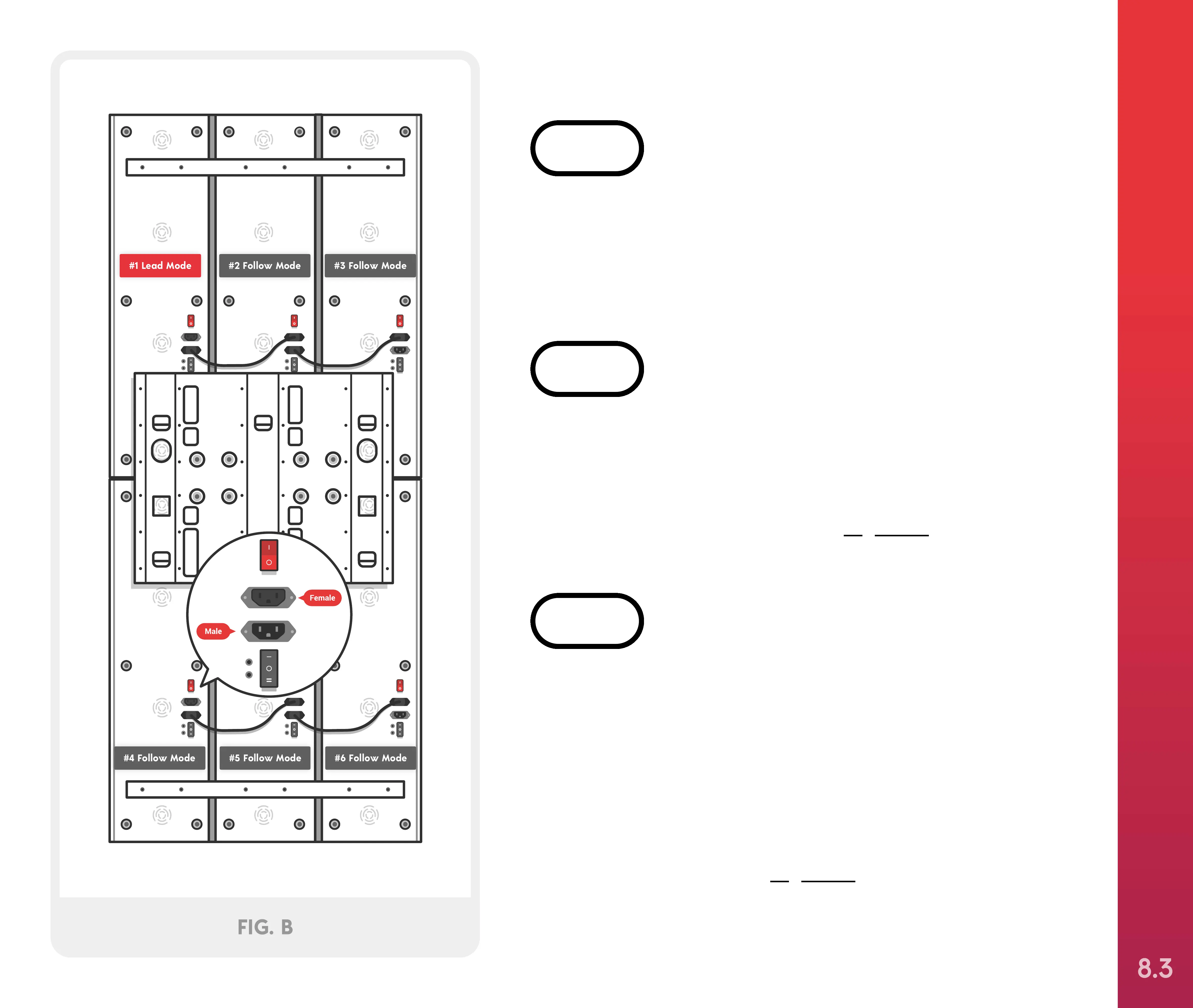
Locate the power patch cords in the Elite Bracket kit.
Connect each cord by inserting the female ends into
Solos #1, #2, #4, and #5 and male ends into Solos
2#, #3, #5 and #6, as shown in Figure B.
STEP 4
For instructions on how to use your Joovv Elite with
an optional mounting system, refer to the guide
included with that system. Then proceed to step 4.
STEP 3
Plug the two power cables into devices #3 and #6.
Next, plug patch cables into the male sockets
devices #1 and #4 and the female sockets on devices
#2 and #5. Finally, connect the last two devices by
connecting patch cables into the male sockets of
devices #2 and #5 and the female sockets on devices
#3 and #6, as shown in Figure B.
STEP 5
#1 Lead Mode #2 Follow Mode #3 Follow Mode
#5 Follow Mode #6 Follow Mode#4 Follow Mode
FIG. B
Optional Mounting Systems
(2 people required)
SETTING UP YOUR JOOVV ELITE
8.3



 To Next Page