ASSEMBLY INSTRUCTIONS JK270
It is very important to have 2 people to add the side
panels to prevent the composter from spinning.
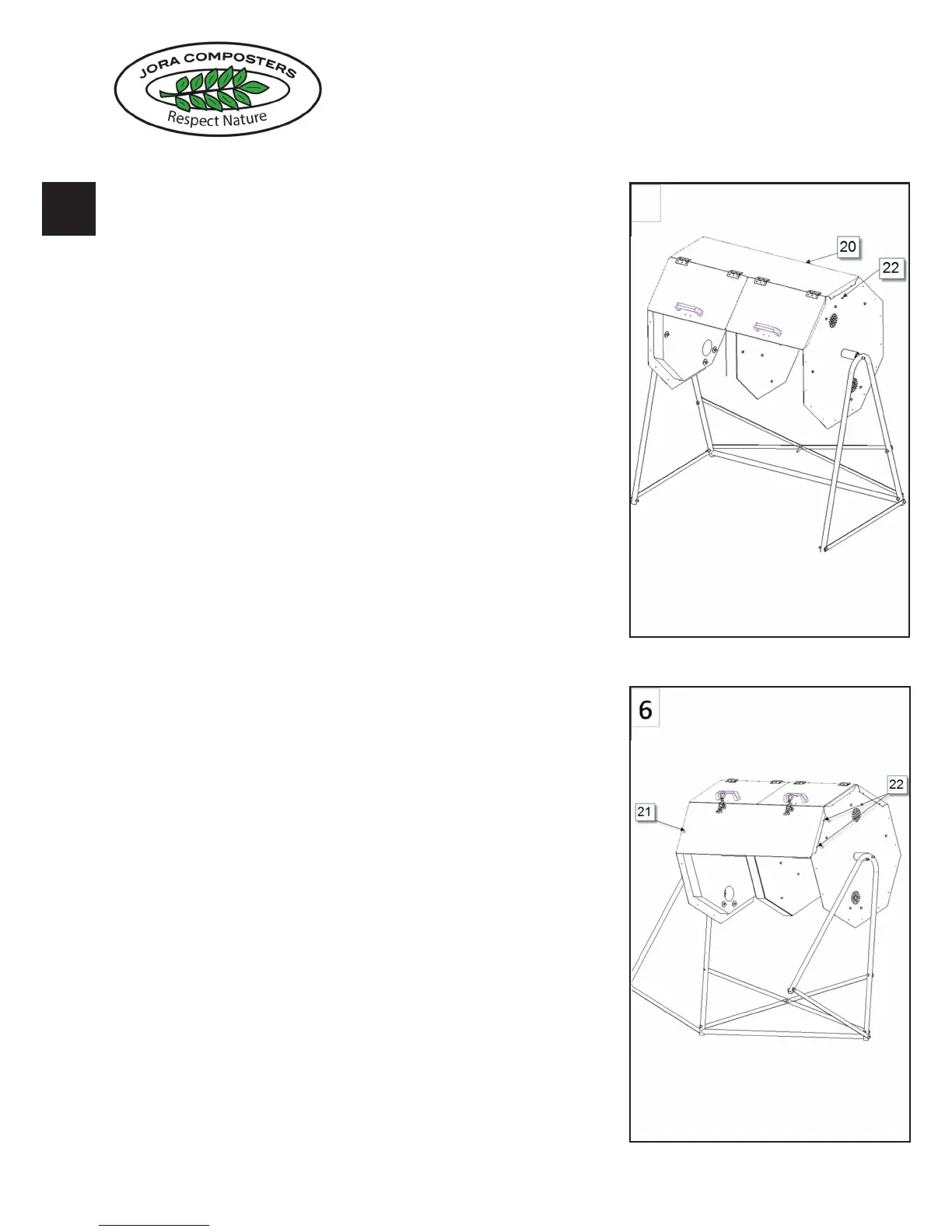
Line up the octagonal panels.
Place the side section with doors #20 on top with doors
pointing towards the front.
Line up the predrilled holes and insert the 4 screws #22
to attach panel and doors.
Add the second panel with locks #21 the same way
lining up the screw holes.
Adjust to locks screwing the latch in or out so it closes
comfortably and locks the 2 doors.
Note: Laying the tumbler back on the blanket for the
above after attaching the rst couple of panels may
make it easier to apply pressure to line up the holes
5-6
5
8
Assembly
I
nstruction
JK
2
70
www.joracomposters.com
j
o
r
a
c
o
m
p
o
s
t
e
r
s
R
e
s
p
e
c
t
N
a
t
u
r
e
5
8
Assembly
I
nstruction
JK
2
70
www.joracomposters.com
j
o
r
a
c
o
m
p
o
s
t
e
r
s
R
e
s
p
e
c
t
N
a
t
u
r
e



 To Next Page