EasyManua.ls Logo

Journey HA01 - User Manual

Journey HA01
12 pages
Print Icon
To Next Page IconTo Next Page
Loading...
Passport
Guitar Headphone Amp
Model: HA01
User Manual
V1.1
Question and Answer IconNeed help?

Do you have a question about the Journey HA01 and is the answer not in the manual?

Summary

Introduction to the HA01 Guitar Headphone Amp

Power Supply and Battery Life

Details the DC5v, 300mA battery, charging, and 5-hour continuous use.

Safety and Maintenance Precautions

Lists precautions to maintain the unit and extend its lifetime, avoiding heat, magnets, dust, humidity, and impact.

HA01 Signal Chain Overview

Illustrates the signal flow from input through modules like CAB, Reverb, Delay, MOD, AMP, and Tuner.

Audio and Data Input;Output Ports

HA01 Interface and Indicator Lights

Explains the center mode indicator lights (EDIT, Tuner, Bluetooth/Bypass, Battery life).

Bluetooth Connectivity and Pairing

Guides on how to connect and control the HA01 unit via Bluetooth from a device.

Panel Controls and Indicator Guide

Indicator Lights for Effects and Parameters

Explains how indicator lights show preset selection, volume, parameters, and tuning status.

Control Button Functions

Details the operational functions of the On-Off, Store, Bypass, and Tuner buttons.

Ports and Battery Status

Describes the micro-USB ports for data/charging and the battery status indicator.

HA01 Operating Modes: Preset vs. EDIT

Preset Mode Operation

Explains the default mode, preset selection using lights, and module status indication.

EDIT Mode Access and Functionality

Details how to enter and use EDIT mode for customizing parameters and effects.

Default Factory Preset Settings

Presents the chart of 10 default factory presets with their AMP, GAIN, TONE, and effect settings.

Detailed Module and Effect Explanations

AMP Selection and Voices

Lists the 10 pre-amp voices available, including Clean, Overdrive, and Distortion types.

GAIN, TONE, and Modulation Adjustments

Guides on adjusting Gain, Tone settings, and the Chorus/Phaser modulation effects.

Delay Parameters: Time, Feedback, and Mix

Explains how to control the delay effect's time, feedback (Fb), and mix level.

REVERB and IR Cab Mode Settings

Details how to adjust Reverb wetness and select from 10 IR Cab simulations.

Volume Adjustment and Tuner Function

Guides on adjusting master volume and activating the precision tuner.

Bypass Function and Recording Jack

Explains the bypass mode for dry signal and using the micro-USB to 3.5mm jack for recording.

Technical Specifications and Troubleshooting

HA01 Technical Specifications

Lists input/output types, sampling rate, power supply, size, and weight.

Troubleshooting Device Issues

Provides solutions for device unresponsiveness and Bluetooth connection problems.

Overview

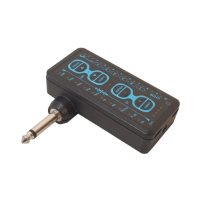
The Journey Instruments Passport HA01 is a "Swiss Army Knife" multi-effect guitar headphone amplifier designed for a full tonal modeling and effects experience in a compact, portable package. It offers a wide range of features for guitarists to practice, record, and jam along with their favorite music.

Function Description:

The HA01 serves as a versatile guitar headphone amp with multi-effects, including chorus, phaser, delay, and hall reverb. It features 10 classic preset effects and allows for customization of various effect parameters. The device also includes 10 classical IR cabinet simulations, a clean bypass for direct dry signal recording or monitoring, and a precision tuner. A key feature is its Bluetooth connectivity, enabling users to stream audio from a phone, tablet, or computer to jam along with backing tracks. For recording, it offers a digital output directly to a DAW via USB or a headphone jack input for iOS devices (requiring an Apple camera connection kit). It also supports internal recording to Android and compatible devices via a micro-USB to 3.5mm recording jack.

Important Technical Specifications:

  • Input: Standard 1/4" interface mono/TS
  • Output: Standard 1/8" interface mono/TS
  • Sampling Rate: 48K/24bit
  • Power Supply: DC 5V, 300mA power adapter. The internal battery provides up to 5 hours of continuous use and fully recharges in 2 hours with 5V, 2.0A charging. It also supports active charging while recording with digital out to a DAW.
  • Size: 85(D) x 81(W) x 29(H)mm
  • Weight: 121g
  • Accessories: Includes packing box, manual, charging cable, and internal recording cable.

Usage Features:

Operating Modes:

The HA01 has two primary operating modes: Preset Mode and EDIT Mode.

  • Preset Mode: This is the default mode upon turning on the device, offering 10 pre-programmed presets with popular effects and cabinet settings. Users can switch between presets using the "on/off" (◄) and "store" (‣) buttons. The master volume can be adjusted using the "Bypass/-" and "Tuner/+" buttons.
  • EDIT Mode: Accessed by briefly pressing the "on/off" (◄) and "store" (‣) buttons simultaneously. The "EDIT" light illuminates blue to indicate this mode. In EDIT mode, users can customize parameters for various modules like AMP, GAIN, TONE, MOD (Chorus/Phaser), DELAY (Time, Feedback, Mix), REVERB, and IR CAB. The "on/off" (◄) and "store" (‣) buttons are used to cycle through modules, while "Bypass/-" and "Tuner/+" buttons adjust parameters within each module. Edited presets can be saved by an extended press on the "Store" button.

Module and Effects Details:

  • AMP Selection: Offers 10 classic pre-amps (e.g., Gas Station Clean, Day Tripper OD, Mr Smith Dist). Users can cycle through these options in EDIT mode using "Bypass/-" and "Tuner/+" buttons.
  • GAIN Adjustment: Controls the gain level from 1 (minimum) to 10 (maximum).
  • TONE Adjustment: Adjusts the tone level from 1 (darkest) to 10 (brightest).
  • MOD Modulation Module (CHORUS and PHASER): A combined effect. Chorus is on the left side (1-5), and Phaser is on the right side (6-10). The center position (all lights off) means neither is active.
  • DELAY: Parameters include:
    • TIME: Controls delay length (1-10, shortest to longest).
    • Fb (Feedback control): Adjusts feedback intensity (1-10, weakest to strongest).
    • MIX: Sets the mix volume of the delay effect.
  • REVERB: Adjusts the wetness of the reverb effect (1-10, minimum to maximum).
  • IR Cab Mode: Provides 10 preset IR Cab simulations (e.g., Line 6 Vetta, Marshall 1960AV V30, Peavey 5150 + Mesa). Users can select their preferred cab in EDIT mode. Third-party IR CAB simulations can be loaded via the CubeSuite software (feature to be available in upcoming months).
  • VOLUME Adjustment: Controls the master volume level (1-10, minimum to maximum) in both Preset and EDIT modes.

Tuner Function:

Activated by an extended press on the "Tuner/+" button. The center light illuminates red. Lights above guitar notes (EADGBE) indicate the detected string. Bottom lights move left for flatter pitch and right for sharper pitch, centering when in tune. Exiting the tuner returns to Preset Mode.

BYPASS Function (Direct Dry Signal):

Activated by an extended press on the "Bypass/-" button. The Bypass indicator light turns blue, and other module lights turn off. The output signal is a dry signal. To exit, press "on/off" (◄) and "store" (‣) buttons.

Bluetooth Connectivity and Control:

To turn Bluetooth on/off, press both "Bypass/-" and "Tuner/+" buttons simultaneously. The Bluetooth indicator light flashes slowly when not paired and illuminates blue when connected. To connect for the first time: turn off Bluetooth on the device, turn on HA01 (Bluetooth indicator should flash), then turn on Bluetooth on the device, locate "HA01," and select for connection. Adjust line-in volume on the connected Bluetooth device.

Recording:

  • Digital Out: Record directly to a DAW via USB.
  • Headphone Jack Input: For iOS devices (requires Apple camera connection kit).
  • Micro-USB to 3.5mm Recording Jack: For internal recording to Android and compatible devices supporting 3.5mm input.

Maintenance Features:

  • General Care: Avoid connecting the unit to other powered-on equipment for long periods when not actively in use (apart from charging).
  • Environmental Considerations: To extend lifetime, avoid high temperatures, heavy magnetic fields, dust and dirt, high humidity or water, prolonged exposure to direct sunlight, and heavy vibration or strong impact.

Troubleshooting:

  • Device Unresponsive: If the device freezes, press and hold the "On/Off" button for 10 seconds, then release.
  • Bluetooth Connection Issues (Mac): For first-time connection to a newer Mac OS: 1. Turn off Bluetooth on the Mac. 2. Turn on the HA01. 3. Turn on Bluetooth on the Mac. 4. Click the connect button when prompted by Mac software.

Journey HA01 Specifications

General IconGeneral
BrandJourney
ModelHA01
CategoryMusical Instrument Amplifier
LanguageEnglish