
 Need help?
Do you have a question about the Joy-it Tasta-Mini and is the answer not in the manual?
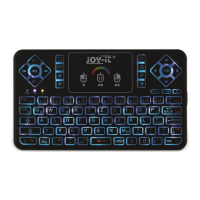
The device presented in this manual is the "Tasta-Mini," a mini wireless keyboard designed for various applications, offering a compact and versatile input solution. It is equipped with a touchpad and backlight, enhancing its functionality and user experience.
The Tasta-Mini serves as a mini wireless keyboard, providing a full QWERTY keyboard layout along with a multi-touch touchpad. Its primary function is to offer a convenient and portable input method for devices that require a keyboard and mouse, such as smart TVs, media centers, mini PCs, or other compatible systems. The wireless connectivity ensures flexibility and freedom from tangled cables.
The keyboard features a standard set of alphanumeric keys, function keys (F1-F12), and special keys for navigation and control. Dedicated buttons for media control (Play/Pause, Backward, Forward, Volume Up, Volume Down) are also integrated, making it suitable for multimedia applications. A search button is included for quick access to search functions on connected devices.
The integrated touchpad supports multi-touch gestures, allowing for intuitive navigation and control. It can be used for cursor movement, left and right mouse clicks, and scrolling, effectively replacing a traditional mouse. The device also includes a power button for easy on/off control and a home button for quick access to the home screen of the connected device. A browser button is also available for direct access to web browsing.
Battery and Power Management: The Tasta-Mini is powered by a 3.7V lithium battery (BL-5B). It features a physical switch on the right side to turn the device on and off, helping to conserve battery life when not in use. The device includes a red LED indicator for active charging, allowing users to easily monitor its power status.
Connection: To establish a connection, users need to press and hold the "Fn" and "RF" keys simultaneously until a blue LED flashes. This indicates that the device is in pairing mode. Once the connection is successfully set up, the blue LED will light up permanently, confirming a stable connection. The blue LED also serves as an indicator for Bluetooth connection status or a low battery warning.
Standby Mode: To optimize power consumption, the Tasta-Mini automatically enters standby mode after three minutes of inactivity. The device can be reactivated by pressing any key, ensuring a quick return to operation without needing to power cycle the unit.
LED Indicators: The keyboard is equipped with several LED indicators to provide visual feedback on its status:
Adjusting Cursor Speed: The Tasta-Mini offers three different cursor speeds to suit user preferences. To adjust the speed, users simply press the "Fn" key along with the space bar. The orange LED will briefly light up to confirm the change in cursor speed.
Touchpad Functions: The multi-touch touchpad supports several intuitive gestures:
Backlight: The Tasta-Mini features a backlight, which can be activated by pressing the "Fn" and "Win" keys. The backlight offers 7 different colors, allowing for personalization and improved visibility in low-light conditions. To enter the color mode for backlight adjustment, users press the "Fn" and "Ö" (RGB) keys while the backlight is on. Colors can then be selected by swiping from left to right on the touchpad. To exit the color mode, users press the "Fn" and "Ö" (RGB) keys again.
Function Keys: The device includes a range of dedicated function keys and combinations for various controls:
Information and Take-back Obligations: The manual provides important information regarding the disposal and return of the device, adhering to environmental regulations.
Symbol on Electrical and Electronic Equipment: The crossed-out dustbin symbol indicates that the Tasta-Mini, as electrical and electronic equipment, should not be disposed of with household waste. Users are instructed to return old appliances to a designated collection point.
Battery Separation: Before disposing of the device, any batteries and accumulators that are not enclosed within the waste equipment must be separated from it. This ensures proper recycling and prevents environmental contamination.
Possibility of Return at Company Location: The manual specifies that returns can be made at the Simac GmbH company location during opening hours.
Possibility of Return in Your Area: For convenience, the company offers to send a parcel stamp, allowing users to return the device free of charge via mail. Contact information (e-mail and telephone) is provided for this service.
Information on Packaging: If users do not have suitable packaging material or prefer not to use their own, they can contact the company, and suitable packaging will be provided.
Support: The company offers support after purchase. Users can contact them via mail, phone, or their ticketsystem on the website for any questions or problems encountered with the device. Contact details for support (website, email, and phone number with operating hours) are clearly listed.
 General
| Type | Mini Keyboard |
|---|---|
| Number of Keys | 78 |
| Backlight | No |
| Cable Length | 1.5 m |
| Connectivity | Wired |
| Compatibility | Windows, Linux, MacOS |

 To Next Page