AC
adapter
(9V
600 mA)
(re-e
Dcc$birui!a&
DC 9V OUT DC 9V IN
BYPASS
ffi
To
your
effect
pedals
or amps etc.
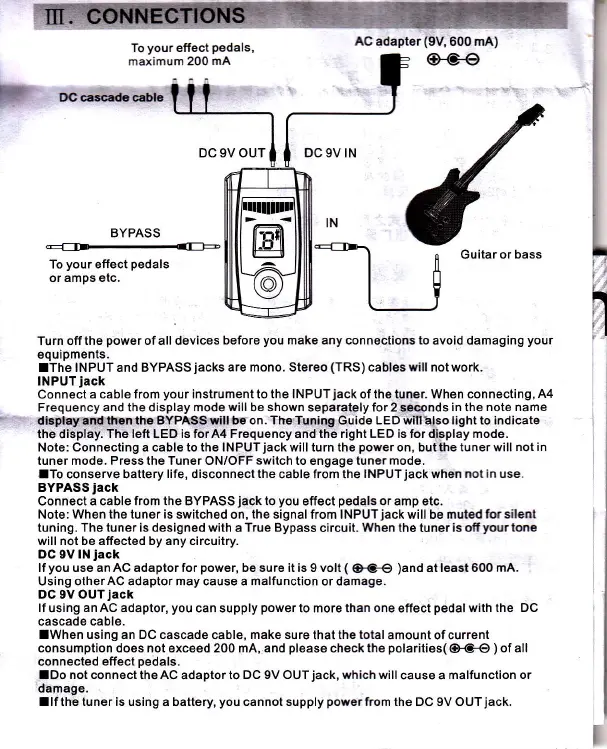
Turn off the
power
of all devices
before
you
make any conngctions to avoid
damaging
your
equipments.
lThe INPUT and BYPASS
jacks
are mono. Stereo
(TRS)
cableswill not work.
INPUT
jack
Connect a
cable from
your
instrument to the lNPUTjack of the tuner. When connecting,
A4
Frequency and the display mode
will
be shown separately
for
2 seconds
in the note name
disphyandthEnthe
BYP/tSSrill be on. The Tuning Guide LED wma.lso light to indicate
the display.
The left LED is for A4 Frequency and the right LED is for display mode.
Note: Connecting a cable to the lNPUTjack will turn the
power
on, but the tuner will
not in
tuner mode. Press the Tuner ON/OFF switch to engage tuner mode.
lTo conserue battery
life,
disconnect
the
cable from ths
|NPUTjack
whon
not in use.
BYPASS
iack
Connect a cable from the BYPASS
jack
io
you
effect
pedals
or amp etc.
Note: When
the tuner
is
switched on,
the
signal from INPUT
jack
will be muted
forsilent
tuning. The tuner is designed with
a
True Bypass
circuit.
When
the tuner
is ofi!rcur tme
will not be affected by any circuitry.
DC 9V lN
iack
lf
you
use an AC adaptor for
power,
be sure it is 9 volt
(
(}r9€
)and
at least600 mA.
Using otherAC adaptor may cause a malfunction or damage.
DC 9V OUTjack
lf
using
an AC adaptor,
you
can supply
power
to more than one effect
pedal
with
the DC
cascade
cable.
lwhen using
an
DC cascade
cablg,
make sure
that
the total
amount of current
consumption does not
exceed
200 mA, and
please
check
the
polarities(
(}GO
)
of all
connected
effect
pedals.
lDo
not connect theAC
adaptor
to DC 9V OUTjack, which will
cause a
malfunction or
damage.
llfthe tuner is using a battery,
you
cannot supply
powerfrom
the DC 9V OUTjack.
{
o Guitar or
bass



 To Next Page
 Loading...