EasyManua.ls Logo

Joyo JT-305 - Operation and Features; Battery Installation; Tuner Operation Mode; Bypass Functionality

Joyo JT-305
4 pages
Print Icon
To Next Page IconTo Next Page
To Previous Page IconTo Previous Page
Loading...
'
U
a
I'"';"oar
runer(r"J"f;:'?"ur,
IV
.
BATrEnVtrNsrnlLATlON
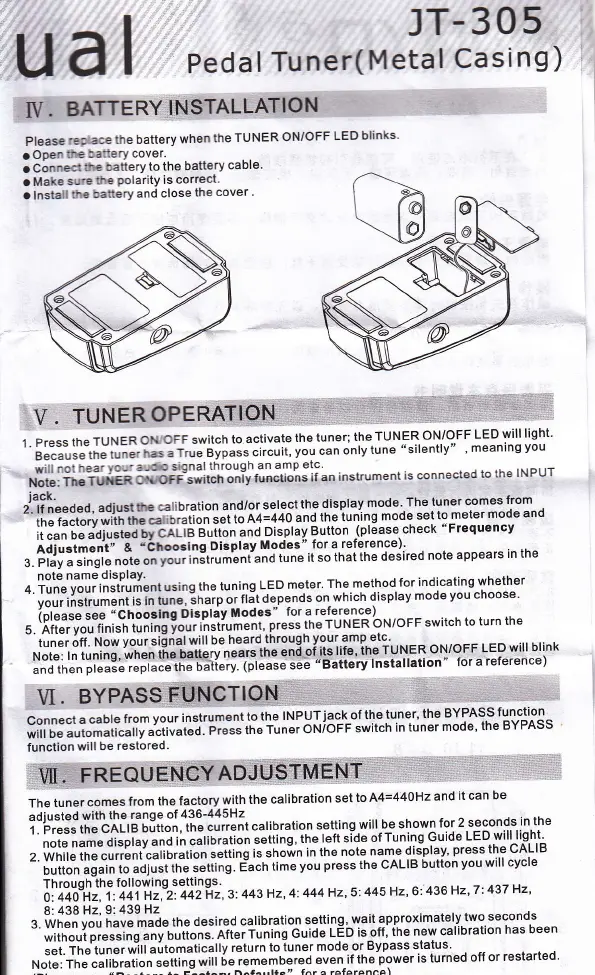
Please
rep ac€
the battery
when
the
TUNER
ON/OFF
LED
blinks
a ODen
fie
SanerY
cover.
. Connecl
the battery
to the
battery
cable
a Make
sd.e
the
polarity
is
correct.
a lnstall
the
batiery
and close
the
cover
'
VI.
BY
Connect
a
cable
from
your
instrument
to
the
lNPUT.iack
of
the tuner'
the
BYPASS
func-!ion^
;''ti;;;;;;;ii";rrv
atiivatea.
pili"
ir," r,n"t
oNloFF
switch
in tuner
mode'
the
BYPASS
function
will
be restored.
iW;,fREouEh[W
iack.
zlileeaeo,
aoiust
the
€libration
and/or
select
the
display
mode'.The
tuner
comes
from
the
factory
with th.
""i,urution
"JiiJn+=++O
"nO
tn"iuning
mode
set to
meter
mode
and
ii J.n ie
a'OiusteO
Uy
CALTB
Buiton
and
Disptay
Button
lplease.check
"Frequency
Adiustmeni"
&
'Ch@sing
Display
Modes".
for a.reterence)'
3. Play
a
singte
note
on
yor, ,nsr,,mlnt'and
tune
it so
that
the desired
note
appears
in the
note
name
disPlaY.
4. Tune vour
instrument
using
the tuning
LED
meter'
The.method
for
indicating
whether
'
"Iil'"ri"t'l'r!'"ii"
i"
ir^",
it'.rp
",
flit
depends
on
which
displav
mode
vou
choose'
(please
see
"Chooslng
Displav
Modes"
for a
reference)
5 After vou
finish
tuning
vour
rnsiiu;Lni,
press
the
TUNER
oN/oFF
switch
to
turn
the
-
irn"i
6r.
rlo*
vour
si[nal
will be
heard
through
your amp
etg'.
.. .
Note:
ln tuning,
when
tne
oattely-ne-ai"1n"
"ni
of
it"
rit"' ine
tuuen
oHloFF
LED
will
blink
;;;"t;;;;i;;:;
;;pi""e
tn" u"li"ii-ipr"'""
i""
"
Battery
lnsialration
"
for a
reference)
:V.
TUNEROPER,W
1.
Press
the
TUNER
oN
oFF switch
to
activate
the
tuner;
the
TUNFR
ON/OFF
LED
will
light'
'
b""""i,l"
tt
"
ir"er
nas
a
rrue e!fa!"
"it"'it,
yo'
"un
only
tune "silently"'
meaning
you
will
not
nea'to--
a-3€
srgnal
through
an
amp
etc'
Nlii,
ii.iiir,ien
oporr"swirctr
oniy
functions
if an
instrument
is
connected
to
the
INPUT
The
tuner
comes
from
the factory
with
the
calibration
set
to A4=440H2
and
it can
be
adiusted
with
the
range
of
436-445H2
1
-
Press
the
CALI
B outton,
tne
cuient
calibration
setting
will.b-e
shown
for
2 seconds
in the
'
'
noi"
n"r"
ai"pray
and
in calibration
ieiting'
the
lett side
of
Tuning
G,uid-e-!F^qy]ll.]is,hl
z.
rivtrif"
it
"
"u"Lnicalibration
setting
is shown
in the
note
name
display'
press tne
UALrD
-
;;ii;"';;"i;i;
;ojust
rtre settinl.
E'ach
time
vou
press
the oALIB
button
vou
will
cvcle
Through
the
following
settings.
o,i+iil.
iii+i
az,'2:442-Hz,3:443Hz,4:444Hz,s:
445
Hz' 6:436
Hz'l:437
Hz'
8:438
Hz,9:439
Hz
s [yh"n ,oi
h"u"
made
the
desired
calibration
setting,
wait
approximately
two.seconds
"
;lilili;;i;:;;;
"",
u,iL"i.
aiGiiuning
cuioe
rEo is
off;
the
new calibration
has
been
""i.
ihliu*,
*'irr
"utomatlcally
return
to
tuner
mode
or
Bypass
status'
N"t!i
iiii""iio*lion
settins
witt
6eii11,*,:'::.";:lrirlhe Power
is turned
off or
restarted'