81
Index
HANDBOOK / KIT DPS
KIT DPS 140/300 ASSEMBLY INSTRUCTIONS — PAGE 2/3
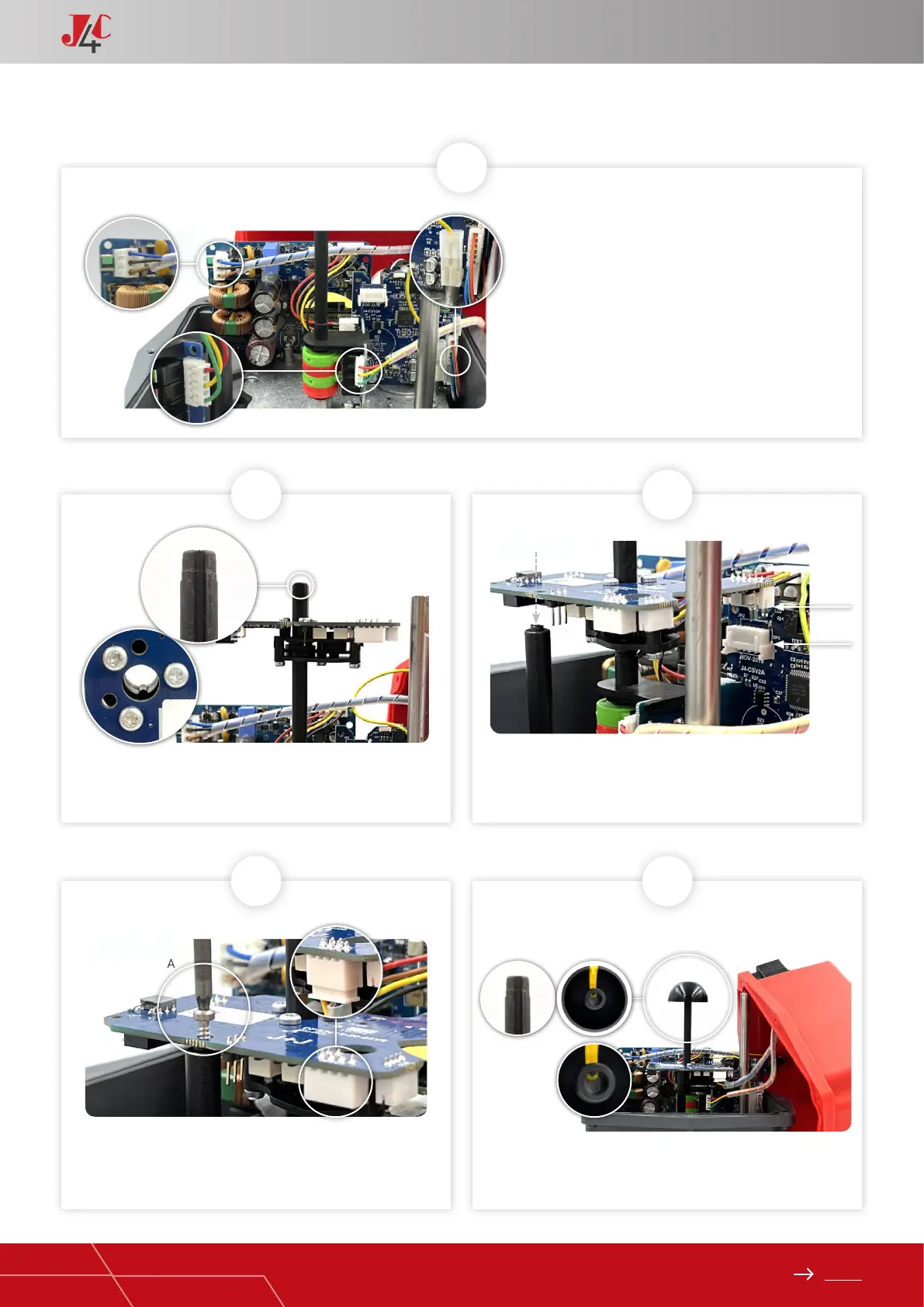
7
Take the DPS cover (Element A) and connect its
cables, following (Fig. A,B and C).
A
C
B
8
10 11
Mount the DPS positioner PCB (Element C), matching the cleft of
the shaft with the key inside the DPS gear.
Fix the DPS positioner PCB (Element C) to the plastic column
(Element B) with the plastic xing screw (Element E) (Fig. A).
Connect the remaining cable (Element A) to the connector base
on the DPS PCB (Element C) (Fig. B).
Carefully insert the position indicator, matching its inner key with
the cleft of the shaft.
9
Press the DPS positioner PCB (Element C) along the shaft
until the PCB connector (JP3) is plugged in the actuator PCB
connector (JP2).
JP3
JP2
A
B


 To Next Page