EasyManua.ls Logo

Juice MAX - User Manual

Juice MAX
2 pages
Print Icon
To Next Page IconTo Next Page
Loading...
How to charge the Juice®MAX power bank
Ensure to fully charge the Juice®MAX power bank before rst use,
the LED will display 4 solid lights. Do this by charging and draining
the power bank 3 to 4 times, this will ensure the Juice®MAX is fully
optimised. To charge the Juice®MAX simply connect the supplied
Micro USB cable into the power bank and the other end into your
computer or to a mains plug (plug not supplied). The LED will ash
when charging, when all 4 LEDs are lit, the bank is fully charged.
Note: It is normal for the Juice®MAX and your device to get
warm during charging. They may get even warmer if you use
your device to play videos or for gaming while charging.
Note:
Click the OFF/ON button once to turn the Max on, Double Click to turn it o
To check the energy levels, refer to the 4 power light LEDs:
1 ashing light= 0-25% 1 light= 25-50% 2 lights= 50-75%,
3 lights= 75-100% 4 lights= 100% full
Charge Time : 7-8 hrs (DC5V, 2A input)
Charging your gadgets
Micro USB and USB C Input ports
• USB A Charging port - Output (3A) x2
• USB C Charging port - Output (3A)
Contents
Overview
Juice®MAX power bank, Micro USB to USB cable (for charging) &
User Manual
MAX
powerbank
20,000mAh
Juice® has built the
Juice®MAX power bank with
you in mind. Speed is important
when charging and when on the
go, the Juice®MAX will charge your
device at a speedy 3A and will allow
around 7 full charges of an average mobile.
This handy charger will also charge THREE devices
at the same time, ready for when you need it most.
OFF/ON
USB 18W Output
Power Light
USB 18W Output
Micro USB Input: DC 5V/2A
Type-C Input/Output
Always check the voltage your device can except before
charging with any Juice product, this will ensure full
compatibility
1. Connect your device via the cable to the USB A or USB C port.
You are able to charge from all output ports at the same time but
the speed of charge will decrease for optimum safety. For other
devices and Apple devices you will need to use your original cable
that was supplied with your, this will ensure compatibility. 2. Press
the power button to turn the Juice®MAX on, now you can charge.
Your device will show you when it is being charged via a sound or
on the screen. The number of lit LEDs will decrease to show that
power is being transferred from the power bank to your device.
3. When your device is fully charged or you want to stop charging,
disconnect the cable. 4. In order to charge your device(s), you will
need a cable compatible with your device. These come included as
standard when purchasing most devices. Plug the device’s
standard USB A end in to the Juice®MAX, then plug the other end
of the cable into the device you wish to charge. 5. Once charged,
simply unplug your device and store your Juice®MAX power bank
until you are ready to use it again, ensure to charge the power bank
fully every 3 months to ensure it is kept in optimum condition.
NOTE: Mobile and gadget device manufacturers have dierent
requirements to charge their products, they may also use dierent
cables to charge their devices. These manufacturers may vary the
specications of how to charge a device and they may also
introduce other charging methods on their new products,
therefore we can not guarantee that the Juice®MAX power bank
will be able to charge all devices. Juice® always suggests that you
use the original charging cable included with your device to charge.
Checking the remaining charge
11% of the material on this product is made
from recycled post consumer waste plastic.
Made from 100% recycled plastics

Question and Answer IconNeed help?

Do you have a question about the Juice MAX and is the answer not in the manual?

Summary

Product Overview and Ports

Initial Power Bank Charging

Checking Remaining Charge

LED Indicators for Charge Level

Displays charge level using flashing and solid LED lights, indicating percentage ranges from 0-25% to 100%.

Charging External Gadgets

Legal Liability and Disclaimers

Important Safety Notes

Overview

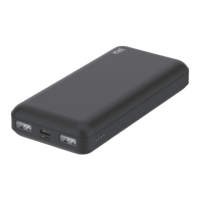
The Juice®MAX is a 20,000mAh power bank designed for charging electronic devices. It aims to provide fast and efficient charging, capable of delivering a speedy 3A output and offering approximately 7 full charges for an average mobile phone. A key feature is its ability to charge three devices simultaneously.

Technical Specifications:

  • Capacity: 20,000 mAh / 74Wh (Lithium polymer battery cell)
  • Dimensions: 140 x 68 x 26.5 mm
  • Net Weight: 342g
  • Input Ports:
    • Micro USB: DC5V/2A
    • USB-C: DC5V/3A, 9V/2A
  • Output Ports:
    • USB A (x2): DC5V/3A, 9V/2.22A, 12V/1.5A (18W)
    • USB C: DC5V/3A, 9V/2.22A, 12V/1.5A (20W)
  • Max Output at any time: 20W
  • Charge Time (for power bank): 7-8 hours (DC5V, 2A input)

Usage Features:

Charging the Juice®MAX Power Bank:

Before first use, the power bank should be fully charged. This involves connecting the supplied Micro USB cable to the power bank and the other end to a computer or a mains plug (not supplied). The LED lights will flash during charging, and all four LEDs will be solid when fully charged. To optimize the battery's performance, it's recommended to charge and drain the power bank 3 to 4 times initially.

Checking Remaining Charge:

The power bank features four power light LEDs to indicate its energy levels:

  • 1 flashing light: 0-25%
  • 1 solid light: 25-50%
  • 2 solid lights: 50-75%
  • 3 solid lights: 75-100%
  • 4 solid lights: 100% full

Charging Gadgets:

  1. Connect your device: Use a compatible cable to connect your device to either the USB A or USB C output port on the Juice®MAX. While it can charge from all output ports simultaneously, the charging speed may decrease for optimal safety. For Apple devices or other specific gadgets, using their original charging cable is recommended to ensure compatibility.
  2. Activate charging: Press the power button once to turn on the Juice®MAX. Your device will indicate that it's charging, either via a sound or on its screen. The number of lit LEDs on the power bank will decrease as power is transferred to your device.
  3. Stop charging: Disconnect the cable when your device is fully charged or when you wish to stop charging.
  4. Cable compatibility: The Juice®MAX requires a cable compatible with your device. Most devices come with a standard USB A cable. Connect the USB A end to the Juice®MAX and the other end to your device.
  5. Storage: Once charged, unplug your device and store the Juice®MAX until needed.

Maintenance Features:

General Care:

  • Regular Charging: To maintain optimum condition, ensure the power bank is fully charged every 3 months.
  • Temperature: Use the product within a temperature range of 0° to 40°C. Avoid exposing it to excessively high temperatures, intense sunshine, or hot environments.
  • Moisture: Keep the product dry at all times. Do not expose it to moisture or immerse it in liquid. Do not use it in bathrooms.
  • Physical Impact: Avoid dropping or any other impact or friction to the product.
  • Cleaning: Do not touch the Juice®MAX with wet hands.
  • Disconnection: Disconnect the cable from the Juice®MAX once your device is charged.

Safety Notes (Important Warnings):

  • Read Warnings: Always read all information and warnings before using the Juice®MAX. Improper use can lead to product damage, overheating, toxic fumes, fire, or explosion.
  • Charging Method: Only charge the Juice®MAX using a USB charger or computer. Do not use other unauthorized methods.
  • Modification: Do not modify or disassemble the battery or the Juice®MAX in any way.
  • Flammable Materials: Do not place the Juice®MAX on flammable materials like bedding or carpets during charging.
  • Input/Output: Do not connect input and output in reverse.
  • Overcharging: Do not charge the Juice®MAX beyond its suggested rating.
  • Troubleshooting: If any issue arises, disconnect the cable from the computer port and contact your dealer.
  • Eye Contact: If liquid from the product gets into your eyes, do not rub them. Wash immediately with clean water and consult a physician.
  • Unusual Behavior: If you notice unusual heat, discolouration, or product distortion during charging or storage, stop using it immediately and contact the dealer. These issues could indicate leakage, heat, smoke, or ignition.
  • Children: The Juice®MAX is not a toy and is not intended for use by persons (including children) with reduced physical, sensory, or mental capabilities unless supervised or instructed by a responsible person. Children should be supervised to ensure they do not play with the device.
  • Waste Disposal: Electrical products should not be disposed of with household waste. All electronic products with the WEEE logo must be collected and sent to approved operators for safe disposal or recycling. Check with local authorities or retailers for designated collection facilities.

Environmental Commitment:

The Juice®MAX is made from 100% recycled plastics, with 11% of the material derived from recycled post-consumer waste plastic.

Warranty:

The product comes with a 1-year warranty. The warranty will be void if the batch code is removed from the product.

Juice MAX Specifications

General IconGeneral
BrandJuice
ModelMAX
CategoryAccessories
LanguageEnglish

Related product manuals