24 25
JBP-RCS-MANUAL |
©
2021 JUICED BIKESJBP-RCS-MANUAL |
©
2021 JUICED BIKES
capability of the motor.
• Be sure to keep your eyes on the road and hands on the
handlebars at all mes. The Cruise Control funcon should
not be used to distract yourself from riding.
RESETTING THE TRIP COUNTER
The LCD display has a trip counter funcon to keep track of the
distance of your ride over me. The Amp-hours (Ah) and Wa-
hour (Wh) drawn from the baery pack are also linked to the
trip counter data. You can reset the trip data to zero at any me.
TO RESET THE TRIP, AH, AND WH COUNTER TO ZERO
Push and hold both the power buon and “assist down” buon
for 3 seconds, then release both buons. The trip and Ah
counter will reset to zero.
ACTIVATING THE ADVANCED DISPLAY SCREEN
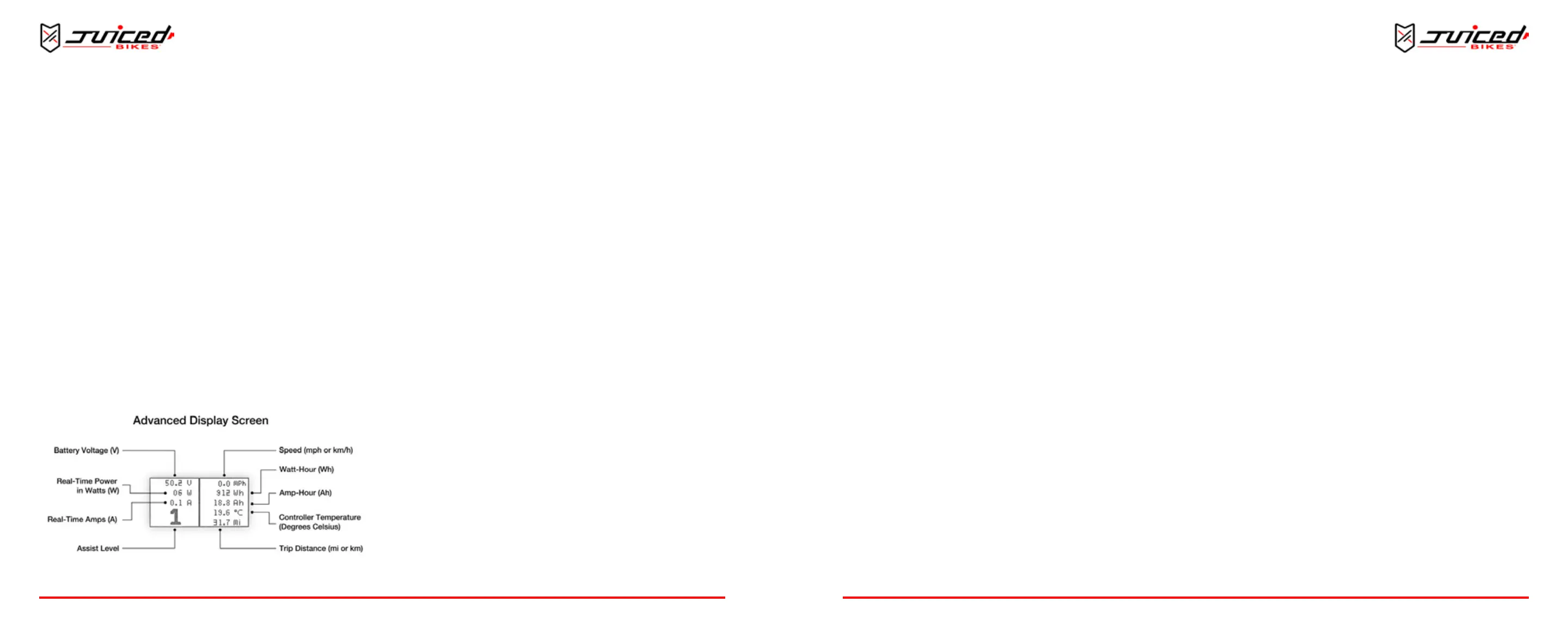
Fig. 24 - Data on the Advanced Display Screen
In some instances it is useful to see addional ride stascs.
The display can be switched into the advanced display mode.
This funcon will allow you to see expanded real-me data on
one screen.
THIS DATA INCLUDES
Voltage, Power, Amps, Assist Level, Speed, Wa-hours, Amp-
hours, Controller Temperature and Trip Distance
TO TOGGLE BETWEEN THE MAIN SCREEN AND THE ADVANCED DISPLAY
SCREEN
Push the power buon and the “assist up” buon at the
same me for 1 second. The display screen will change to the
advanced mode.
NOTE: The default display is the standard screen. This is the rst
display that will appear when you turn on the e-bike.
UNDERSTANDING THE ADVANCED DISPLAY
MODE
VOLTAGE
The voltage displayed is the voltage of the pack. When the
baery is charged, the voltage will be higher (around 54V).
When the baery pack is depleted, the voltage will be lower
(around 43V). Voltage uctuates when the baery is under load.
NOTE: The voltage display is only accurate to about +/- 0.3 Volts
and should not be used for any scienc measurements.
AMPS
The amperage is the current ow through the wires. In this
OPERATION
case we measure the current ow through the controller. The
average will not be non-zero, as the system needs some small
amount of current to operate. When the motor is under load,
the Amp value will increase. The maximum value should be 20-
22A on the nine-transistor controller.
NOTE: The Amperage display is only accurate to about +/- 1 A and
should not be used for any scienc measurements.
POWER
Power is the Voltage x Amperage and appears in Was. This
is the power output at any moment of your e-bike. The more
power used to propel the e-bike, the higher this value will be.
NOTE: Do not use the power display for any scienc
measurements.
AMP-HOURS
The amp-hour gure measures the amount of current owing
out of the baery for a given hour. Reset the amp-hour and
wa-hour value by reseng the trip counter.
WATT-HOURS
The wa-hour is the measurement of how many was are
sustained for a given hour. The wa-hour is the energy
consumed by the system. You can get a good indicaon of how
much energy remains inside the baery by subtracng the total
wa-hours consumed by the total “Wh” available in the baery.
NOTE: Because there is a small error rate in the Amp and Voltage
measurements, the Wa-hour value will also have some degree of
error. Use the measurement for informaonal purposes and not for
scienc measurements.
ASSIST LEVEL
The assist level indicator shows the assist level you are in at
any given moment. It appears in both the advanced and the
standard display modes.
SPEED
The speed indicator measures the speed of the bike. This value
is measured from the motor’s internal speed sensor. If you have
changed to a new re with a larger or smaller diameter than the
included re, you may need to manually adjust the wheel
speed seng.
CONTROLLER TEMPERATURE
The controller temperature is measured by a temperature
sensor mounted inside of the controller near the transistors.
The temperature displays on the screen in Celsius. When the
e-bike is under load, the controller’s temperature will increase.
The bike’s performance will begin to decrease when the
temperature exceeds 80 degrees Celsius.
TRIP DISTANCE
The trip distance counts up from zero. The distance is calculated
by each rotaon of the rear wheel. To reset the trip distance,
refer to “Reseng the Trip Counter” on page 26.
ADJUSTING PARAMETERS IN THE SETUP MENU
Adjust some of the parameters to control the behavior of your
e-bike.
TO ENTER THE SETTINGS MENU
Hold the “assist up” and “assist down” buons for about 3
OPERATION


 To Next Page