
 Need help?
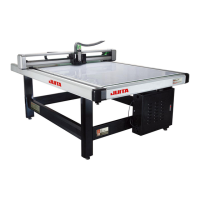
Do you have a question about the JUITA JT-1512B and is the answer not in the manual?
Covers safe installation, grounding, and power connection for the cutting machine.
Details further safety guidelines for operation, electrical connections, and maintenance.
Specifies operating temperature, humidity, and environmental requirements for the machine.
Provides further operational guidelines and cautions for using the cutting machine.
Details the technical specifications of the garment template cutting machine.
Outlines the necessary software compatibility and hardware for the machine.
Lists the various materials and tools that can be used with the cutting machine.
Lists all components and accessories provided with the cutting machine package.
Guides the assembly of the machine's stand and table structure.
Details the procedure for installing paper rolls onto the machine's chart drum.
Explains how to properly install the spindle motor for operation.
Describes setting up parameters within the MarkCad software for cutting.
Covers the steps for connecting the machine to power and a computer.
Guides the installation process for the machine's control software.
Details the procedure for installing necessary device drivers via the wizard.
Outlines the correct sequence for switching on the cutting machine.
Provides general information about the machine's software interface.
Explains the functions available in the software's menu bar and toolbar.
Guides users through importing files and performing basic software operations.
Covers advanced operations like contour extraction, tool selection, and half cutting.
Explains how to select and manage different parameter plans for cutting.
Guides on selecting and loading specific process plans for operation.
Configures basic software parameters like directory, file extension, and options.
Defines the working area or boundaries for printing and cutting operations.
Adjusts settings for drawing accuracy, tool offsets, and symmetry correction.
Corrects vertical alignment and configures machine-computer communication.
Details settings for drawing speed, press, cut lines, and tools.
Further details on stoppage settings, cutting delay, and pressure.
Explains how to use MarkCad software and select processing tools.
Configures parameters within MarkCad for material properties and file handling.
Adjusts the cutting proportion to correct errors between actual and measured data.
Defines the operational area for cutting based on material placement.
Specifies the X and Y start/end points for the working range.
Addresses issues with machine power, holder movement, and erratic cutting.
Troubleshoots problems with the pen or cutter not functioning correctly during operation.
Explains how to protect and use the cutting mat with different materials.
 General
| Model | JT-1512B |
|---|---|
| Category | Cutter |
| Voltage | 24V |
| Frequency | 50 Hz |
| Motor Type | DC Brushless Motor |

 To Next Page